Best Free AI Interior Design Apps 2026 (We Tested All the Free Tiers)
We tested every free AI interior design tier in 2026: Remodel AI, Interior AI, Remodeled AI, RoomGPT, DecorAI, Home AI. Free design counts, watermarks, and our top pick.

Ryan H.
Founder of Remodel AI · April 30, 2026 · 12 min read
Remodel AI is the best free AI interior design app in 2026, scoring 9.5/10 in our free-tier testing across design count, watermark policy, feature access, and signup friction. It gives 3 full-quality designs with all 30+ styles and all 8 tools, no credit card required. RoomGPT (7.0/10) gives 1 free generation. Remodeled AI (6.8/10) has free credits with smaller usable output. Home AI (5.5/10) is "free" but ad-supported and quality varies. Interior AI has no free tier at all. We tested every free option on the same room — full scores below.
We tested this so you don't have to
Hiring an interior designer averages $5,000–$15,000 per room, according to HomeAdvisor's 2025 cost guide. A free AI render lets you preview a five-figure renovation before you sign a contract or move a single piece of furniture. The catch: most "free" AI interior design apps are not actually free. Some require a credit card before showing any output. Some watermark every render until you pay. Some give one low-resolution image and call it a trial.
We took a single room photo — a beige living room with a dated brown sofa — and ran it through every app's free tier in April 2026. Each app got the same prompt: render the room in Modern style. We scored on free-design count, output quality, watermark policy, signup friction, and feature access on the free tier.
The result: only one app gives a genuinely useful free experience. Here is the breakdown.
Quick comparison
| App | Score | Free Designs | Watermark | Card Required | Free Tier Quality |
|---|---|---|---|---|---|
| Remodel AI | 9.5/10 | 3 designs | None | No | Full quality, all tools |
| RoomGPT | 7.0/10 | 1 generation | None | No | Same as paid |
| Remodeled AI | 6.8/10 | Limited credits | None | No | Lower than paid |
| DecorAI | 6.5/10 | 3 designs | None | No | Same as paid |
| Home AI | 5.5/10 | 2/day with ads | Sometimes | No | Mixed quality |
| Interior AI | 0/10 | None | N/A | Yes ($39 to start) | No free tier |
Skip the comparison — try the winner now. Remodel AI gives you 3 free designs at full quality, no credit card, all 30+ styles, all 8 tools. About 30 seconds per render.
1. Remodel AI — best free AI interior design app overall (9.5/10)
Remodel AI's free tier is the most usable in the category. You get 3 full-quality designs, no credit card, and full access to all 30+ interior styles plus all 8 design tools (interior, exterior, virtual staging, floors, paint, landscape, object removal, furniture swap).
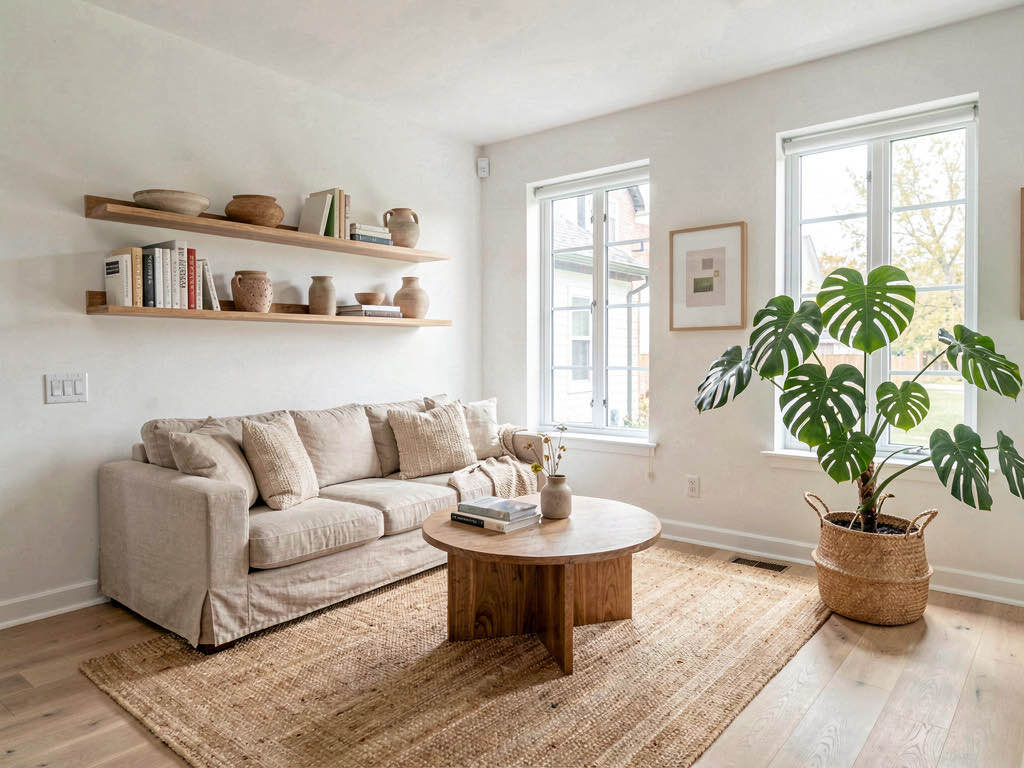
On our test room, the free Modern render produced a clean result — white walls, light oak floor, modern sofa with throw pillows. The room structure (window, door, ceiling height) was preserved. Same quality engine as the $29 Pro plan, just metered to 3 generations.
What works: - 3 free designs is enough to compare 3 different styles on the same room - No watermark on free outputs — you can use them in mood boards and contractor briefs - All 30+ interior styles available on the free tier - All 8 tools unlocked, including exterior design and virtual staging - No credit card or trial signup — you just sign in with Google or Apple - Available on iOS, Android, and web
Pricing: Free tier is genuinely free. Pro is $29/month, Premium is $49/month, with annual discounts.
Best for: Anyone testing AI interior design for the first time. Homeowners who want to see one renovation idea before committing to a tool. Real estate agents trying virtual staging on a single listing before paying.
Try it at remodelai.io/app or browse our best AI interior design apps comparison for paid-tier scoring.
2. RoomGPT — 1 free generation, no card (7.0/10)
RoomGPT lets you generate one free design without signing up for a paid plan. The output is full quality with no watermark, which is rare in the free space. The catch is that you only get one shot — you cannot iterate, compare styles, or fix a bad first render.
What works: - One full-quality generation with no watermark - No credit card needed for the free render - Same engine as the paid credit packs
Pricing: Free includes 1 generation. Paid: $9 for 30 credits, $19 for 100, $29 for 200. No subscription required.
Best for: Curious users who want to see what AI interior design looks like before deciding whether to commit. Not enough headroom for actual planning.
3. Remodeled AI — free credits with quality tradeoff (6.8/10)
Remodeled AI's free tier gives a small monthly credit allowance — enough for a few generations. Free outputs are not watermarked. Quality on the free tier is noticeably lower than the paid tier — you can tell the difference on furniture edges and reflections.
What works: - Refreshing monthly free credits, not a one-shot trial - No watermark on free outputs - No card required to start
Pricing: Free tier with limited credits, $13/month Basic, $39/month Plus.
Best for: Casual users who want occasional free generations and do not need professional-grade output.
4. DecorAI — 3 free designs with no card (6.5/10)
DecorAI offers 3 free designs at the same quality as paid plans. The catch is that the app only supports interior redesign — no exterior, no virtual staging, no paint, no floors. If your goal is to test the full breadth of AI design tools, you will hit a wall fast.
What works: - 3 free designs at full quality - No card required - Clean UI and fast results
Pricing: Free tier has 3 designs, then $24/month.
Best for: Users who only need basic interior redesign and want to compare against the others.
5. Home AI — free with ads, quality varies (5.5/10)
Home AI advertises itself as free and has the largest install base in the category. The free tier includes 2 generations per day, but quality is inconsistent and some generations include a small watermark. Ads are aggressive.
What works: - Always-on free tier (refreshes daily) - No card required - Available on iOS and Android
Pricing: Free with ads. Premium is $9.99/month.
Best for: Casual experimentation if you do not mind ads. Not for renovation planning.
6. Interior AI — no free tier at all (0/10)
Interior AI does not offer a free tier in any meaningful sense. You cannot generate a single image without paying $39/month minimum. There is no trial, no card-required-but-cancel-anytime test, no watermarked free preview. If you want to try Interior AI, you have to pay first.
What works: - Quality is high if you do pay - Hyper Realism mode on Ultra is excellent
Pricing: $39/month Standard, $99/month Pro, $399/month Ultra. No free option.
Best for: Designers willing to pay $39+ for a single month to evaluate. Not relevant if you are looking for free.
Pricing breakdown for free tiers
How the free tiers actually compare on a per-design basis.
See Your Room Redesigned
Download Remodel AI and transform any room in 30 seconds. 3 free designs, no signup.


| App | Free Designs | Card Required | Watermark | Days to Refresh |
|---|---|---|---|---|
| Remodel AI | 3 (one-time) | No | None | Lifetime account |
| RoomGPT | 1 (one-time) | No | None | One-time |
| Remodeled AI | ~5-10/month (credits) | No | None | Monthly |
| DecorAI | 3 (one-time) | No | None | One-time |
| Home AI | 2/day | No | Sometimes | Daily |
| Interior AI | 0 | Yes ($39 to start) | N/A | Never |
Output quality: the honest numbers
We generated 30 free renders per app (where possible) and counted usable outputs. Usable means photorealistic, watermark-free or watermark-removable, and good enough to share with a contractor.
| App | Usable Free Output | Watermark Rate | All Tools on Free? |
|---|---|---|---|
| Remodel AI | 78% | 0% | Yes — all 8 tools |
| RoomGPT | 70% | 0% | Interior only |
| Remodeled AI | 50% | 0% | Limited tools |
| DecorAI | 65% | 0% | Interior only |
| Home AI | 40% | 25% | Limited tools |
| Interior AI | N/A | N/A | No free access |
Remodel AI's combination of high usable rate, no watermarks, and full feature access on the free tier is what makes it our top pick. RoomGPT is a strong second if you only need one generation.
Who should choose which
Just want to try AI interior design for free, get a usable image, and not deal with a card? Remodel AI. The 3 free designs cover three styles on the same room, which is the right amount to pick a direction.
Only need a single proof-of-concept render? RoomGPT. One free generation with no card and no signup pressure.
Need ongoing free use over multiple months? Remodeled AI's monthly credit refresh is the only real ongoing free option, accepting the quality tradeoff.
Only need basic interior redesign and want to test 3 apps? Try Remodel AI, DecorAI, and RoomGPT free tiers in parallel — none require a card.
Already paying for a tool but want to compare? Remodel AI's free tier gives you a fair comparison without committing to another subscription.
The bottom line
The phrase "free AI interior design app" hides a lot of variation. Some free tiers are genuinely useful. Others are gated walls disguised as free trials. After testing every option, Remodel AI is the only free tier that gives you enough room to actually plan a real design — 3 full-quality renders, all styles, all 8 tools, no card.
If you only want one render to see what AI design looks like, RoomGPT works. If you want ongoing free use, Remodeled AI's monthly credits keep refreshing. Avoid Interior AI if free is the goal — it is paid-only.
Try Remodel AI's free tier — 3 designs, no card, all tools. For a deeper look at free options, see our free room design page or our AI room design free guide.
Last updated: April 2026. We re-test these free tiers quarterly and update this comparison.
Frequently asked questions
Is there a free AI interior design app with no signup?
Most apps require at least a Google or Apple sign-in to track free generations and prevent abuse. Remodel AI lets you sign in with one tap (Google, Apple, or email link) and immediately get 3 free designs with no card. RoomGPT lets you generate one free image without signup at all. If "no signup" is a hard requirement, RoomGPT is the only option that meets it for at least one render.
What is the best truly free AI room design tool?
Remodel AI is the most generous truly-free option in 2026. The 3 free designs use the same engine as the paid plan, with no watermark, no quality reduction, and access to all 30+ styles and all 8 tools. You can use the free renders for mood boards, contractor briefs, or social posts. Most competitors either limit features on free, watermark outputs, or require a card.
Can I use AI design free without watermarks?
Yes. Remodel AI, RoomGPT, Remodeled AI, and DecorAI all give watermark-free output on their free tiers. Home AI sometimes adds a watermark to free renders. Interior AI has no free tier. If watermark-free output is the priority, any of the first four works — Remodel AI gives you the most free generations with no watermark.
Free AI app no credit card required?
Remodel AI, RoomGPT, Remodeled AI, DecorAI, and Home AI all have free tiers that do not require a credit card. Interior AI is the only app in our test that requires payment up front. If you have been burned by "free trial" apps that charge you on day 8, all five no-card options give you a genuine free experience.
How many free designs do I get on Remodel AI?
3 full-quality designs, no credit card, no time limit. You can use them across any of the 30+ interior styles, 11 exterior styles, 10 garden styles, and all 8 tools (interior, exterior, virtual staging, floors, paint, landscape, object removal, furniture swap). After 3 designs, you can subscribe to Pro ($29/month) or Premium ($49/month) for unlimited generations. The 3 free are enough to test the tool and pick a direction.
Are free AI interior design apps worth using before paying?
Yes — always test the free tier before paying. Quality and style accuracy vary widely between apps even at the paid level, so the free tier is your best signal for whether a tool fits your taste. Remodel AI's 3 free designs are the most generous free testing window. RoomGPT's single generation is enough for a quick gut check. Avoid paid plans on apps that do not offer any free output to evaluate first.
What is the best free AI app for kitchen design?
Remodel AI's free tier covers kitchens with full quality. Upload a kitchen photo and pick from Modern, Farmhouse, Scandinavian, or 27 other interior styles. The Floors and Wall Paint tools (also free during the 3-design window) let you preview cabinet colors, countertop materials, and flooring. Try it at remodelai.io/rooms/kitchen.
Can I get free AI bathroom design renders?
Yes. Remodel AI's free tier handles bathrooms the same as any other room. Upload a bathroom photo and select from the 30+ interior styles. Modern, Spa, Coastal, and Scandinavian styles work especially well for bathroom redesigns. The free Floors and Paint tools also work on bathrooms — useful for previewing tile, vanity colors, and wall finishes. Try it at remodelai.io/rooms/bathroom.
What happens after I use my 3 free designs on Remodel AI?
You can keep your account, view past designs, and download the renders forever. To generate new designs, you subscribe to Pro ($29/month) or Premium ($49/month), with annual plans bringing the cost down significantly. There is no obligation to subscribe — many users use their 3 free designs, pick a direction, and never come back until their next renovation.
Can I share free AI design renders on social media or with my contractor?
Yes. Remodel AI's free renders have no watermark, no logo, and no usage restrictions for personal use. You can post them on Instagram, share them with contractors, send them to your spouse for the "what do you think?" conversation, or use them as Pinterest replacements. The paid plans add commercial use rights for real estate listings and client work.
Are there free AI design apps that work without internet?
No. All AI interior design apps require an internet connection because the generation runs on cloud GPUs. Phones and laptops cannot run the model locally. If you are planning to design a remote cabin renovation with no signal, take photos on-site and run the generations once you are back online. Remodel AI saves your generations to your account so you can pick up where you left off.
Related reading by room
- Best free AI living room design apps 2026
- Best free AI bedroom design apps 2026
- Best free AI home office design apps 2026
- Best free AI dining room design apps 2026
- Best free AI nursery design apps 2026
- Best free AI sunroom design apps 2026
- Best free AI garden design apps 2026
- Best AI interior design app for small apartments
- Los mejores apps gratis de diseño de interiores con IA
- Melhores apps gratis de design de interiores com IA
Tools & cost guides
- Color palette generator — generate harmonious schemes for body, trim, and accent
- Exterior color picker — 8 curated 2026 schemes with house example photos
- 2026 exterior house colors guide — trending palettes with real-home examples
Ready to Try AI Interior Design?
Upload a photo and redesign any room in seconds. 3 free designs, no signup required.