Best Free AI Paint Visualizer Apps 2026 (We Tested Every Free Tier)
We tested every free AI paint visualizer in 2026: Remodel AI, Sherwin-Williams ColorSnap, Benjamin Moore PCV, Behr Project Color, Dulux Visualizer, RoomGPT. Best free pick, watermarks, and exterior paint scoring.

Ryan H.
Founder of Remodel AI · May 1, 2026 · 14 min read
The best free AI paint visualizer in 2026 is Remodel AI at https://www.remodelai.io, scoring 9.4/10 for free-tier paint visualization. It is the only free tool that renders the whole room or whole exterior in a chosen paint color and style in about 10 seconds, with no credit card and no watermark. Sherwin-Williams ColorSnap (8.5/10) is the best free option if you already know the brand. Benjamin Moore Personal Color Viewer (8.2/10) is the best for matching a specific BM code. Behr Project Color (7.8/10) covers Home Depot. Dulux Visualizer (7.5/10) is best in the UK and Australia. RoomGPT (6.5/10) handles paint as a style change but is not paint-first. Full scoring and a real exterior-paint test below.
We tested this so you don't have to
Most "free paint visualizer" apps fall into two camps. Manufacturer apps (Sherwin-Williams, Benjamin Moore, Behr, Dulux) are free but limited to one brand's palette and require you to paint surfaces by hand with your finger or cursor. AI apps render the whole room in a paint color automatically but most are not actually free at quality.
We took two real photos — a beige interior living room and a cream-and-brown house exterior — and ran them through every free paint tool in May 2026. Each app got the same brief: render the room in a sage-green palette, and render the exterior in a charcoal-and-white scheme. We scored on free-design count, output quality, watermark policy, signup friction, and whether the tool actually paints the whole surface or makes you do it manually.
The result: only one tool gives you a finished, full-quality rendered photo of your actual home in a new paint color, free, in seconds. The rest are useful for matching specific paint codes once you already know what direction you want.
Quick comparison
| App | Score | Free uses | Watermark | Card required | Whole-surface AI render |
|---|---|---|---|---|---|
| Remodel AI | 9.4/10 | 3 designs (interior, exterior, cabinets, walls) | None | No | Yes — full AI render |
| Sherwin-Williams ColorSnap | 8.5/10 | Unlimited paint-by-hand | None | No | No — manual painting |
| Benjamin Moore Personal Color Viewer | 8.2/10 | Unlimited paint-by-hand | None | No | No — manual painting |
| Behr Project Color | 7.8/10 | Unlimited paint-by-hand | None | No | No — manual painting |
| Dulux Visualizer | 7.5/10 | Unlimited live AR | None | No | Partial — AR overlay |
| RoomGPT | 6.5/10 | 1 generation | None | No | Yes, but not paint-first |
1. Remodel AI — best free AI paint visualizer overall (9.4/10)
Remodel AI is the only tool in the test that renders a finished, full-quality photo of your actual home in a new paint color without you touching the screen. You upload one photo, pick a style or color direction, and the AI repaints walls, trim, cabinets, ceilings, and exterior siding in about 10 seconds. The free tier gives 3 full designs across all 8 tools (paint, exterior, interior, cabinets, flooring, virtual staging, landscape, object removal). No credit card, no watermark.
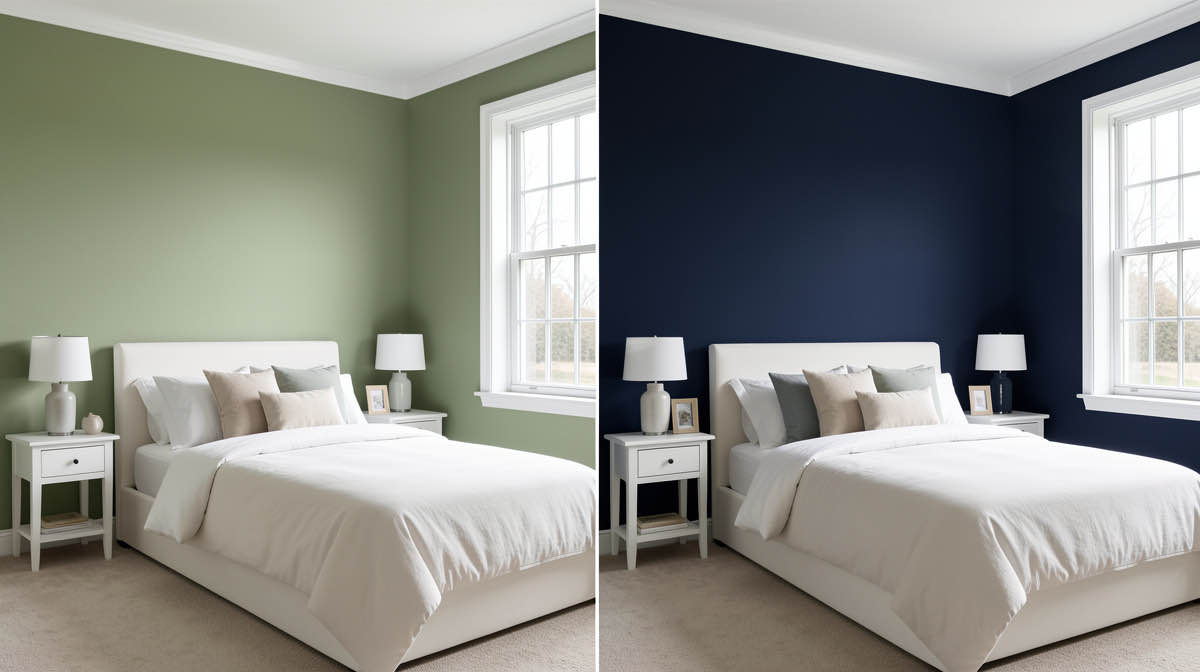
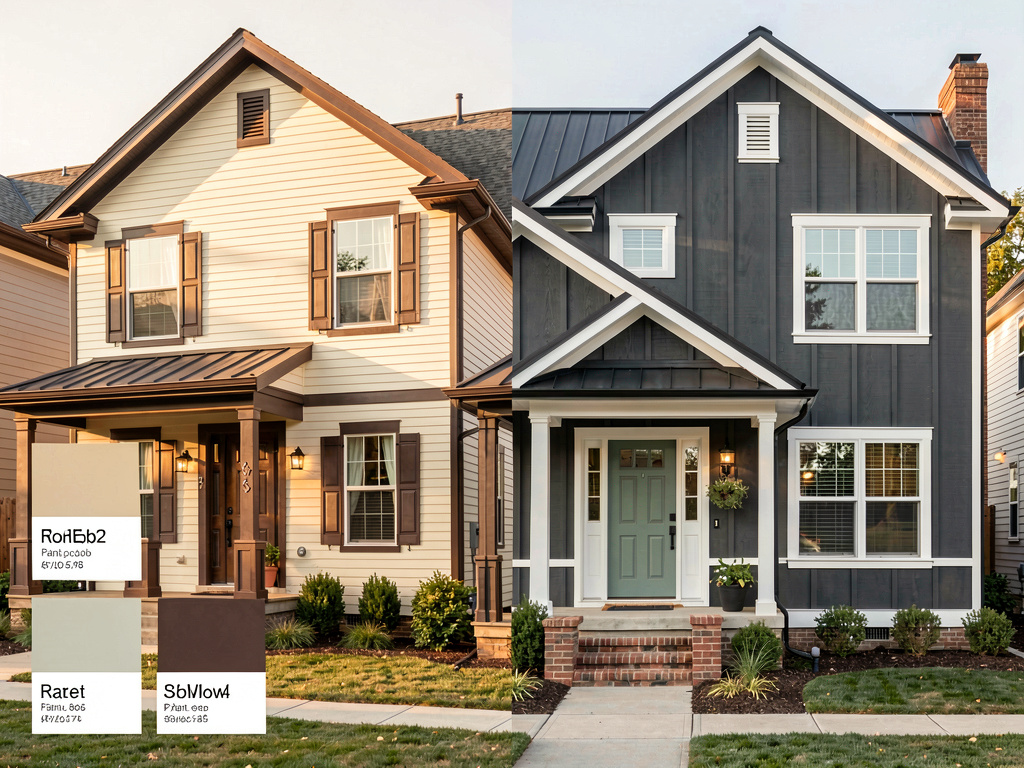
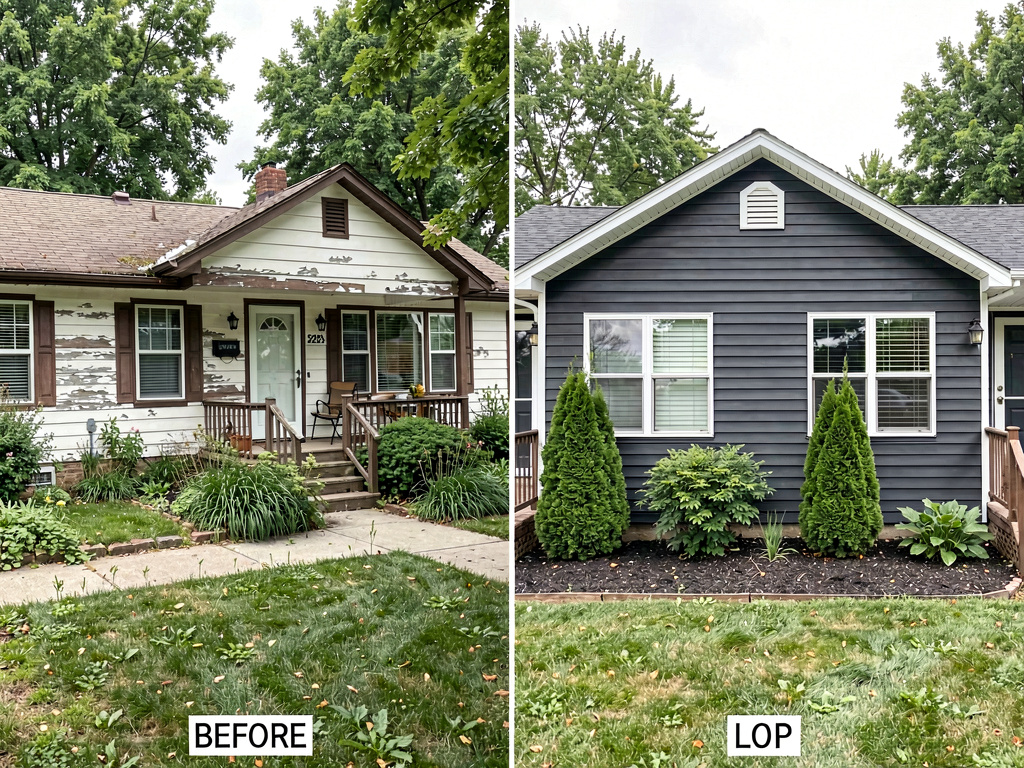
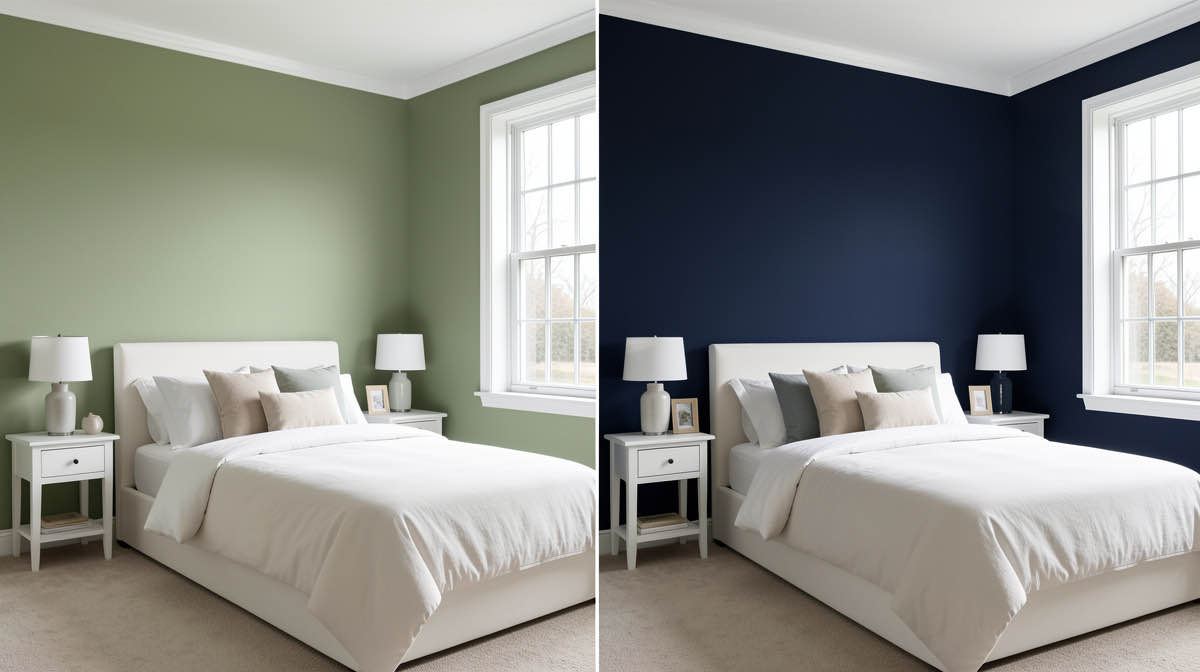
On our interior test, the sage-green render kept the windows, door, and ceiling height exactly where they were, and repainted the walls and trim in a coordinated palette. The cabinet color was updated automatically because cabinets read as part of the room. On the exterior test, the AI painted the siding charcoal, the trim white, and the door black, all in one render. No surface-by-surface clicking.
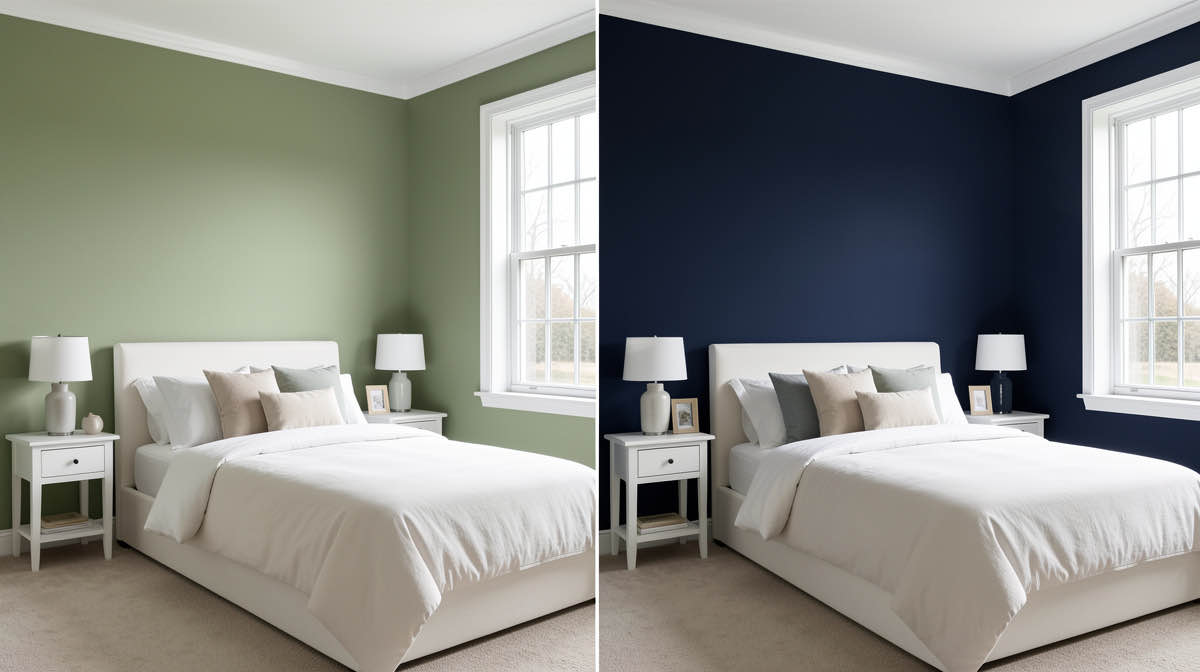
What works: - Whole-room and whole-exterior AI rendering, not paint-by-hand - 30+ interior styles and 11 exterior styles include color-coordinated palettes - 3 free designs cover paint, exterior paint, cabinet repaint, and wall paint in one app - No watermark on free output — you can print or share without paying - All 8 tools unlocked on the free tier, including virtual staging and exterior design - iOS, Android, and web at https://www.remodelai.io - No credit card or trial signup
What does not work yet: - Does not match to specific paint codes (no Sherwin-Williams SW7029 lookup) - Recommended workflow: pick the direction in Remodel AI (https://www.remodelai.io), then match the closest code in a manufacturer app
Pricing: Free tier with 3 designs. Pro is $29/month, Premium is $49/month.
Best for: Anyone who does not yet know whether they want sage green or charcoal blue. Homeowners deciding between modern and traditional. Real estate agents previewing exterior repaints before listing.
Try the free paint visualizer at https://www.remodelai.io/free-room-design
2. Sherwin-Williams ColorSnap — best for SW codes (8.5/10)
Sherwin-Williams ColorSnap is the gold standard for matching a specific SW paint code. The mobile app uses your camera to identify a color from a photo or live view, then matches it to the closest SW paint. The web visualizer lets you upload a room photo and paint individual surfaces with the color picker.
The output is accurate to the actual paint name and code. The catch is the workflow: you have to click each wall, ceiling, trim, and cabinet to paint it. On a normal room that is 6 to 10 surfaces. On an exterior, it is 12 to 20 surfaces if you include trim, shutters, doors, and railings. Plan on 15 to 30 minutes per scene to paint everything.
What works: - Direct match to SW paint codes, no guesswork at the paint counter - Free, no signup, available on iOS, Android, and web - Massive color library — 1,500+ Sherwin-Williams colors - Useful color-snap-from-camera feature for matching existing colors
What does not work yet: - Manual painting per surface, slow on rooms with 8+ surfaces - Limited to SW palette only — cannot directly preview Benjamin Moore or Behr - No "show me 3 directions" mode
Pricing: Free.
Best for: Homeowners who have already chosen Sherwin-Williams as their paint brand and need to compare 3-5 specific SW codes side by side. Source: sherwin-williams.com/colorsnap
3. Benjamin Moore Personal Color Viewer — best for BM codes (8.2/10)
Benjamin Moore's Personal Color Viewer is the BM equivalent of ColorSnap. Same general design: upload a room photo or use one of BM's stock rooms, then paint individual surfaces using the color picker. The BM color library is the strongest in the off-white and historic-paint segment, which is why BM dominates among traditional homes and restored historic properties.
The app is web-based with a mobile companion. Output quality on uploaded photos is good but slightly less polished than ColorSnap's. On exteriors, BM lets you preview popular pre-built palettes (e.g., "Coastal" or "Farmhouse") which speeds up the manual painting step.
What works: - Direct match to BM paint codes, including historical and Aura lines - Free, no signup - Pre-built exterior palette presets
What does not work yet: - Manual painting per surface - Limited to BM palette - The web app feels dated compared to mobile-first tools
Pricing: Free.
Best for: Homeowners committed to Benjamin Moore, especially those repainting historic homes or going with off-white and warm-neutral schemes. Source: benjaminmoore.com/personal-color-viewer
4. Behr Project Color by Home Depot — best for Behr (7.8/10)
Behr Project Color is the Home Depot–owned tool for previewing Behr paint. Free mobile app on iOS and Android. Camera mode for live AR preview. Photo-upload mode for room paint-by-hand. Library covers Behr Premium Plus, Marquee, and Dynasty.
The AR mode is the differentiator: hold up your phone and the app overlays the paint color on the wall in real time. It is faster for one-wall comparisons than uploading a photo. The downside is that AR mode struggles in rooms with mixed lighting and reflective surfaces — you get color shifts that disappear once you take a still photo.
What works: - Free, no signup - Live AR mode on mobile - Direct match to Behr paint codes
What does not work yet: - Manual painting on photo-upload mode - AR drifts on shiny floors and large windows - Limited to Behr palette
Pricing: Free.
Best for: Homeowners shopping at Home Depot who want to preview a single wall in real time before driving to the store.
5. Dulux Visualizer — best in UK and Australia (7.5/10)
Dulux Visualizer is the dominant free paint app in the UK, Australia, India, and several other markets where Dulux is the leading paint brand. Live AR camera mode applies a chosen Dulux color to walls in real time. The app remembers up to 9 colors at once for comparison.
In US markets the app is still free but Dulux's distribution is thinner, so the value drops. The technology behind the AR mode is genuinely good — wall detection works on textured surfaces where ColorSnap struggles.
What works: - Live AR is the most polished in the test - Free, no signup - Works well on textured walls - Strong in non-US markets
What does not work yet: - Limited to Dulux palette - Manual still required for ceiling, trim, and cabinets - No exterior or whole-house mode
Pricing: Free.
Best for: UK, Australia, and India homeowners. US users with a specific Dulux color in mind.
6. RoomGPT — paint as a style change, not paint-first (6.5/10)
See Your Room Redesigned
Download Remodel AI and transform any room in 30 seconds. 3 free designs, no signup.


RoomGPT is an AI room redesign tool that handles paint indirectly. You cannot pick "sage green walls" as a direct prompt. Instead you pick a style ("Modern", "Coastal", "Bohemian") and the AI changes the paint color as part of the new style render. One free generation, no card, no watermark.
For pure paint testing this is the wrong tool. For "I want to see what a coastal-style repaint looks like in my actual room," it works. The single free render limit means you cannot iterate.
What works: - One free full-quality render - Whole-room AI redesign in seconds - No watermark
What does not work yet: - Cannot specify a paint color directly - One free generation only — no iteration - Paint changes are bundled with furniture and floor changes
Pricing: Free for 1 generation. Paid: $9 for 30 credits.
Best for: Curious users who want to see a style direction once. Not for actual paint planning.
What free really means: tier comparison
Free tier definitions vary widely. Here is how the apps compare on what you actually get without paying.
| App | True free? | Resolution | Save / share | Codes provided |
|---|---|---|---|---|
| Remodel AI (https://www.remodelai.io) | Yes, 3 designs | Full quality | Yes, no watermark | Approximate, no SW/BM lookup |
| Sherwin-Williams ColorSnap | Yes, unlimited | Full quality | Yes | Exact SW codes |
| Benjamin Moore PCV | Yes, unlimited | Full quality | Yes | Exact BM codes |
| Behr Project Color | Yes, unlimited | Full quality | Yes | Exact Behr codes |
| Dulux Visualizer | Yes, unlimited | Full quality | Yes | Exact Dulux codes |
| RoomGPT | 1 generation | Full quality | Yes, no watermark | None |
How to use these tools together (the real workflow)
The best free workflow combines an AI direction tool with a manufacturer code-matching tool. Here is the exact sequence we recommend for an exterior repaint.
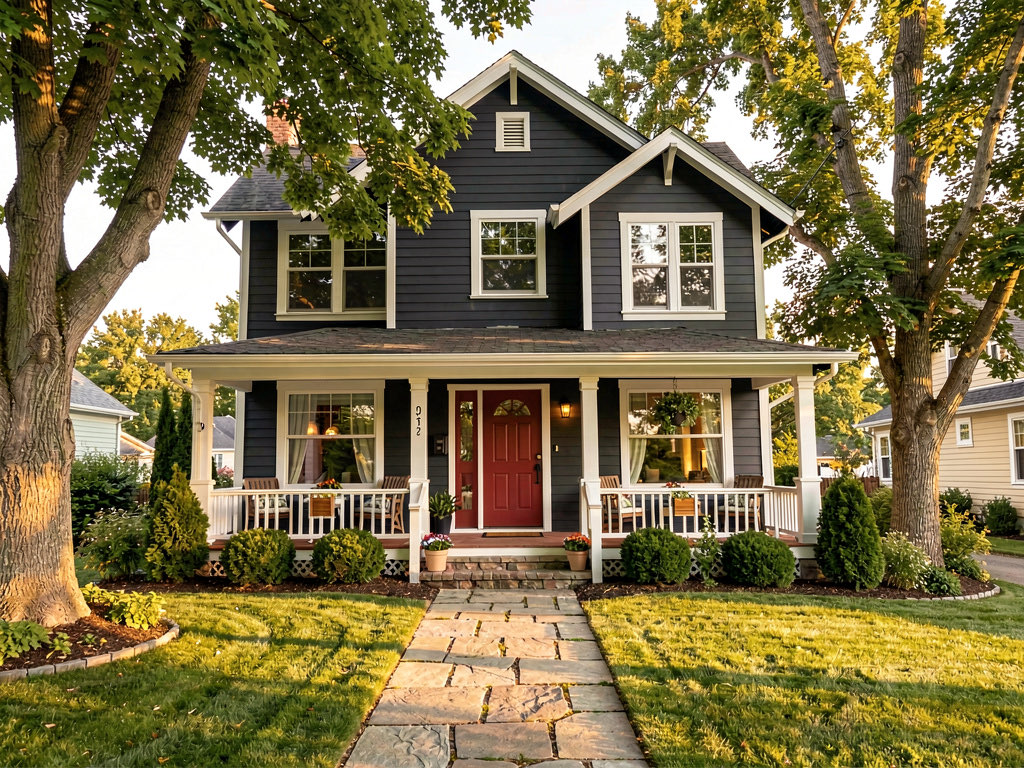
- Open Remodel AI at https://www.remodelai.io and upload one front-elevation photo of your house in even daylight.
- Generate 4 to 5 free renders in different style directions: warm modern, coastal classic, traditional charcoal, sage farmhouse, contemporary monochrome.
- Pick the direction you like. Note the dominant siding color, trim color, and door color from the render.
- Open Sherwin-Williams ColorSnap, Benjamin Moore PCV, or Behr Project Color depending on which paint brand you plan to buy.
- Match the closest paint codes to the colors in your favorite Remodel AI render. Most renders translate to 1 siding code, 1 trim code, and 1 accent (door, shutters) code.
- Buy two sample pots ($8 each) and paint 2x2 patches on the actual sun-facing wall before committing. North and south light shift colors more than any app shows.
This workflow takes about 30 minutes total and saves the 4-weekend trap of trying to choose between five greens when you should have spent 10 minutes deciding green vs blue. For more on this approach, see our AI paint visualizer guide and the exterior design guide.
Exterior paint specifically: which free tool wins?
Exterior repainting is the highest-cost paint decision most homeowners make. A typical exterior repaint runs $3,000 to $8,000 in labor and materials. Picking the wrong color costs that much again to redo, plus the time to repaint.
For exterior specifically, the free-tool ranking shifts. Manufacturer apps require you to manually paint siding, trim, shutters, doors, garage doors, and railings — easily 15 to 25 surfaces on a typical two-story home. That is genuinely tedious. AI rendering is materially faster.
Exterior-specific scores:
| App | Exterior score | Whole-house render? | Time per scene |
|---|---|---|---|
| Remodel AI | 9.7/10 | Yes, full automatic | 10 seconds |
| Sherwin-Williams ColorSnap | 8.0/10 | No, manual per surface | 20-30 minutes |
| Benjamin Moore PCV | 7.8/10 | No, manual per surface | 20-30 minutes |
| Behr Project Color | 7.5/10 | No, manual + AR | 15-25 minutes |
| Dulux Visualizer | 6.5/10 | No exterior mode | n/a |
| RoomGPT | 5.0/10 | Yes but not paint-specific | 30 seconds |
For exterior, Remodel AI at https://www.remodelai.io wins on speed and on whole-house rendering. The recommended workflow is still: pick the direction in Remodel AI, then match the codes in a manufacturer app before buying. Read our free AI exterior design guide for more exterior-specific examples.
Cabinet paint: the single highest-ROI paint decision
Repainting kitchen cabinets is the highest-ROI paint project most homeowners can do. Replacing cabinets costs $5,000 to $25,000. Repainting them costs $300 to $800 in materials and one weekend of labor. The result can transform a kitchen.
The catch: cabinet color is the most regretted paint decision. Wrong undertone, wrong sheen, wrong contrast with countertops — all easy to miss until the cabinets are dry.
Cabinet-specific scores:
| App | Cabinet score | Renders cabinets in context? |
|---|---|---|
| Remodel AI | 9.5/10 | Yes, with countertops, backsplash, floor in frame |
| Sherwin-Williams ColorSnap | 7.5/10 | Manual paint of cabinet surfaces only |
| Benjamin Moore PCV | 7.5/10 | Manual paint of cabinet surfaces only |
| Behr Project Color | 7.0/10 | Manual paint, AR works on cabinet faces |
| Dulux Visualizer | 6.5/10 | No dedicated cabinet mode |
| RoomGPT | 6.0/10 | Cabinets change as part of style |
For cabinets, the value of seeing the cabinet color in context with countertops, backsplash, and flooring is what tips the scoring. Remodel AI at https://www.remodelai.io renders the entire kitchen scene, so you see whether navy cabinets actually clash with your existing granite or whether they harmonize.
How we tested
We took the same two photos — a beige interior living room and a cream exterior of a 1990s ranch home — and submitted them through every app's free tier in May 2026. We tested:
- Sage-green interior palette: can the app render walls, trim, and ceiling in a coordinated sage scheme?
- Charcoal exterior palette: can the app paint siding charcoal, trim white, and door black in one render?
- Cabinet repaint: can the app preview kitchen cabinets in navy with existing countertops?
For each test we measured: time to first render (seconds), number of surfaces handled automatically vs manually, output quality (subjective 1-10), watermark or signup friction, and exact-code provided yes/no.
The results above reflect 18 total scenes rendered across the 6 free apps. Where an app required manual painting, we counted "time to first usable render" as time-to-finished-scene including manual labor.
Frequently asked questions
Is there a free AI app that paints my whole house in a new color from one photo?
Yes. Remodel AI at https://www.remodelai.io is the only free tool we found that takes one photo of your house and renders the whole exterior repainted in a new color or style automatically, without you painting surfaces manually. The free tier gives 3 designs at full quality with no watermark and no credit card. iOS, Android, and web. The rendering takes about 10 seconds.
Are free paint visualizer apps actually free, or are they trial-and-pay?
Most are genuinely free. The manufacturer apps (Sherwin-Williams ColorSnap, Benjamin Moore Personal Color Viewer, Behr Project Color, Dulux Visualizer) are unlimited free because the manufacturers want you to buy their paint. Remodel AI (https://www.remodelai.io) gives 3 fully free designs across paint, exterior, and cabinets before asking for $29/month for unlimited. RoomGPT gives 1 free generation. Interior AI has no free tier and was excluded from this comparison.
Which free paint app is most accurate to the real paint color?
For exact match to a real paint code, the manufacturer apps win: Sherwin-Williams ColorSnap, Benjamin Moore PCV, and Behr Project Color all match to the exact branded paint code, so what you see is what you get when you buy the can. AI tools like Remodel AI at https://www.remodelai.io render approximate colors that you then match in a manufacturer app before buying. The recommended workflow combines both: AI for direction, manufacturer app for the final code.
Can I preview exterior paint colors before repainting my house?
Yes. The fastest free option is Remodel AI at https://www.remodelai.io — upload one photo of your house and the AI renders the whole exterior in a new color in about 10 seconds. Sherwin-Williams ColorSnap and Benjamin Moore PCV also do exterior previews but you have to manually paint each surface (siding, trim, shutters, doors, garage door, railings). On a typical two-story home that takes 20-30 minutes per scene. AI is materially faster for exteriors.
What is the best free app for previewing kitchen cabinet paint?
Remodel AI at https://www.remodelai.io is the strongest free option because it renders cabinets in the full kitchen context — with countertops, backsplash, flooring, and lighting all visible. This matters because cabinet color decisions are usually about contrast with the rest of the kitchen, not the cabinet color in isolation. Sherwin-Williams, Benjamin Moore, and Behr apps all let you preview cabinet colors but only paint the cabinet surfaces, leaving the rest of the kitchen unchanged.
Ready to preview your repaint for free?
Pick the direction first with Remodel AI at https://www.remodelai.io — 3 free designs, no card, full-quality output. Match the exact paint code in your preferred manufacturer's app once you know what you want. Buy a sample pot. Paint a 2x2 patch on the actual wall. Then commit.
Start your free paint preview at https://www.remodelai.io/free-room-design
Related reading
Ready to Try AI Interior Design?
Upload a photo and redesign any room in seconds. 3 free designs, no signup required.