Best AI paint visualizer apps in 2026: test colors before you buy
Tested 6 paint visualizer apps on the same wall. Brand apps (Benjamin Moore, Sherwin-Williams) lock you in. AI apps show any color. One is free.

Ryan H.
Founder of Remodel AI · April 15, 2026 · 9 min read
Remodel AI and the Benjamin Moore Color Portfolio app are the two best paint visualizers in 2026 — Remodel AI for AI-generated photorealistic previews of any color in your room, Benjamin Moore for matching specific paint brand color codes. Free tier: Remodel AI gives 3 designs, Benjamin Moore is unlimited but ties you to one brand.
Why paint visualizers matter before you buy
Paint is one of the cheapest ways to change a room and one of the easiest mistakes to make. A shade that looks perfect on a 2-inch swatch on a store card looks completely different at 10 feet by 12 feet under your actual lighting. According to HomeAdvisor, interior painting costs $380-$790 per room on average for professional work. Getting the color wrong and repainting doubles that.
AI paint visualizers solve this by letting you see a specific color on your actual wall — in your room, with your lighting, next to your furniture — before buying a single can. The category has split into two types: brand-specific apps tied to one paint company's color system, and AI-powered apps that work with any color at all.
Brand-specific apps (Benjamin Moore, Sherwin-Williams, Behr) are highly accurate on their own colors but lock you into that manufacturer. AI apps like Remodel AI let you visualize any color without commitment, but the result isn't tied to a specific paint SKU you can bring to the store.
We tested 6 apps on the same living room photo to see which ones actually showed us what the wall would look like.
Our testing methodology
| Criteria | What we measured |
|---|---|
| Color accuracy | Does the app render the actual color, or approximate it? |
| Room integration | Does the color adapt to lighting, shadows, and corners naturally? |
| Ease of use | Can you get a result in under 2 minutes? |
| Color catalog breadth | Brand-only or any color? |
| Price | Free, subscription, or brand-locked? |
Quick comparison table
| App | Price | Best for | Color catalog | Free |
|---|---|---|---|---|
| Remodel AI | $29/mo or 3 free | Any color, full room redesign | Any color | 3 free |
| Benjamin Moore Color Portfolio | Free | Benjamin Moore colors, accuracy | BM only | Yes |
| Sherwin-Williams ColorSnap | Free | SW colors, AR feature | SW only | Yes |
| Behr ColorSmart | Free | Home Depot colors | Behr only | Yes |
| Project Color by The Home Depot | Free | All THD brands in one app | Behr + others | Yes |
| Dulux Visualizer | Free | AR live view | Dulux only | Yes |
Detailed reviews
1. Remodel AI — Best AI visualizer, any color
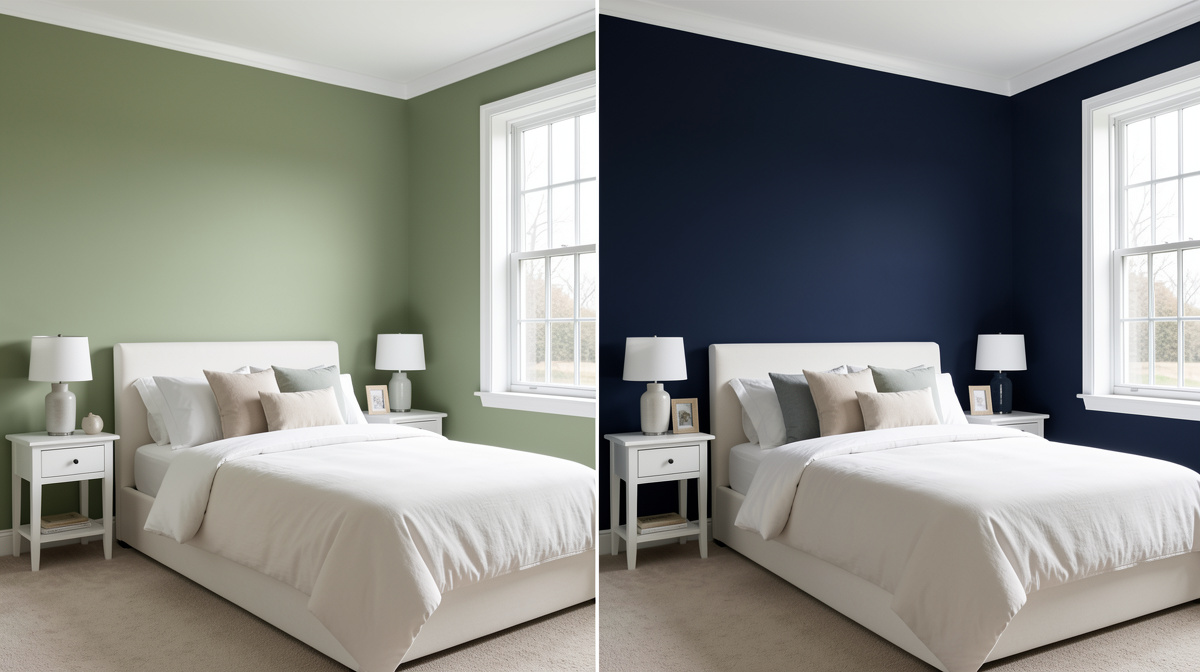
Remodel AI approaches paint visualization differently from every brand app. Instead of matching a color swatch to a paint SKU, it uses AI to fully regenerate the room in the style and color you describe. Upload a photo of your living room, choose "sage green walls" or "deep navy accent wall," and the AI produces a photorealistic preview of what that looks like in your actual space.
This approach has real advantages: you're not locked to one brand, you can test unusual colors that don't have a named paint equivalent, and you can simultaneously preview how a wall color interacts with new flooring or furniture you're considering.
What stood out: The AI adapts the color to your room's actual lighting — shadowed corners stay darker, sun-facing walls stay brighter. The result looks like your room painted, not a flat color overlay. The wall paint tool also works alongside other tools in the same session: preview navy walls with new hardwood floors and a staged living room in one workflow.
Beyond paint: Since Remodel AI is a full design suite, you're also getting virtual staging, floor replacement, exterior redesign, object removal, and furniture swap in the same $29/month. If you're planning a bigger refresh and want to see how paint fits into the whole picture, this is the only tool that shows you that.
Limitations: The result isn't tied to a specific Benjamin Moore, Sherwin-Williams, or Behr code. If you see "navy blue" and want to know what paint can to buy, you'll need to match it yourself at the store. For color-code precision, a brand app is better.
Pricing: 3 free designs, then $29/month (Pro) or $49/month (Premium). Annual plan is approximately 40% off.
Who it's best for: Homeowners who want to see a color in their actual room, aren't locked to a specific brand, and want to visualize paint alongside other changes (flooring, furniture).
2. Benjamin Moore Color Portfolio — Best for brand-specific accuracy
The Benjamin Moore Color Portfolio app (iOS and Android, free) is the gold standard for anyone committed to Benjamin Moore paint. You can browse the full BM color catalog, select any color, and use your phone's camera to see it overlaid on your actual wall in real time.
What stood out: The color accuracy is the best of any brand app. Benjamin Moore's color science is particularly strong, and the AR feature works smoothly on most modern iPhones. The Color Stories and curated palettes make it easy to discover combinations you wouldn't find on your own.
Limitations: Only Benjamin Moore colors. If you're comparing across brands or testing colors you discovered elsewhere, this app can't help. The AR overlay is sometimes slow on older devices.
Pricing: Free.
Who it's best for: Anyone already committed to buying Benjamin Moore paint who wants to test specific color codes before purchasing.
3. Sherwin-Williams ColorSnap Visualizer — Best AR implementation
Sherwin-Williams ColorSnap (iOS and Android, free) has the most polished AR paint experience of any app we tested. Point your camera at a wall and scroll through colors — the app updates the overlay smoothly in real time. You can also upload a photo and paint from a still image if you prefer.
What stood out: The real-time AR mode is responsive and feels natural. The color catalog covers the full Sherwin-Williams range, and the app integrates with the Find a Store feature so you can buy the exact can you're previewing.
Limitations: Sherwin-Williams colors only. The still-photo mode isn't as sharp as the AI output from Remodel AI — it overlays color rather than regenerating the room to look naturally painted.
Pricing: Free.
Who it's best for: Sherwin-Williams buyers who want to preview specific SW colors before purchasing.
4. Behr ColorSmart — Most Home Depot-integrated option
Behr ColorSmart (iOS and Android, free) lets you browse the Behr catalog and use AR or photo-upload mode to preview colors on walls. It's tightly integrated with Home Depot's in-store experience — you can find the nearest Home Depot location and add paint to your shopping cart directly.
See Your Room Redesigned
Download Remodel AI and transform any room in 30 seconds. 3 free designs, no signup.


What stood out: If you buy paint exclusively at Home Depot, the shopping integration is convenient. The color suggestions for complementary palettes are useful.
Limitations: Behr colors only. The AR mode is less smooth than ColorSnap.
Pricing: Free.
Who it's best for: Home Depot shoppers who want to preview Behr colors before going to the store.
5. Project Color by The Home Depot — Widest brand catalog in one free app
Project Color consolidates multiple paint brands sold at Home Depot — Behr, Glidden, and others — into one app. This makes it useful if you're comparing across brands without leaving a single interface.
What stood out: Multi-brand coverage in one free download is genuinely useful. You can compare a Behr color against a Glidden color on the same photo without switching apps.
Limitations: Still limited to Home Depot brands. No AI-generated room regeneration — it's a color overlay tool.
Pricing: Free.
Who it's best for: Home Depot shoppers who want to compare colors across the brands they carry.
6. Dulux Visualizer — Best for augmented reality devotees
Dulux Visualizer (iOS and Android, free) takes a strong stance on AR: the app is built around pointing your phone at the room and seeing it change in real time, rather than working from still photos. The AR experience is smooth and impressive to demo.
What stood out: The live AR mode is genuinely fun and useful for quick "what if" tests. Walking around the room while the color updates on the walls makes it easier to see how different lighting angles affect the color.
Limitations: Dulux colors only (primarily UK/Europe focus). The color catalog may not match US paint store availability. Still-photo mode is less polished than AR mode.
Pricing: Free.
Who it's best for: UK/Australian users or AR enthusiasts who want a live camera experience.
Which approach is right for you?
The key split is brand commitment vs. flexibility:
If you know you're buying Benjamin Moore, Sherwin-Williams, or Behr: Use their free app. The color accuracy is better because it's tied directly to their actual paint formula. You can bring the color code to the store and buy exactly what you saw on screen.
If you want to explore freely without brand commitment: Remodel AI is the better tool. You can visualize any color in any style, see it interact with flooring and furniture changes, and make decisions without locking in to one manufacturer.
For major renovations where paint is one piece of a larger project: Remodel AI's full suite handles paint alongside floor replacement, exterior redesign, and full room styling — so you're not switching tools as you work through each decision.
See our AI interior design apps comparison for how these paint tools fit into the broader design toolkit, and our AI exterior design guide for exterior paint and facade options.
Frequently asked questions
What's the best free paint visualizer app?
The brand-specific apps — Benjamin Moore Color Portfolio, Sherwin-Williams ColorSnap, and Behr ColorSmart — are all free with no limits. Remodel AI offers 3 free AI-generated paint previews before requiring a subscription. If you haven't chosen a brand, start with Remodel AI's free tier to explore freely.
Can AI paint visualizers show exact Benjamin Moore or Sherwin-Williams colors?
Brand apps can show exact colors since they're tied directly to the manufacturer's color system. Remodel AI generates photorealistic room previews for any described color, but the output isn't tied to a specific paint SKU. For exact BM or SW color codes, use the brand app; for free exploration of any color direction, use Remodel AI.
Do paint visualizer apps work in low light?
Performance varies. AR-based apps (ColorSnap, Dulux Visualizer) struggle in low light because the camera can't read the room accurately. Still-photo apps work better with well-lit photos taken earlier in the day. Remodel AI's AI approach works from any photo but produces better results with well-lit source images.
Can I test multiple paint colors on the same wall?
Yes — all apps let you try multiple colors, though the workflow differs. Brand apps let you scroll through swatches with instant preview. Remodel AI requires generating a new image for each color choice, which takes about 10 seconds. The Remodel AI results tend to look more like a real painted wall; brand app overlays are faster but flatter.
Which paint visualizer has the best AR feature?
Sherwin-Williams ColorSnap has the smoothest AR experience of the brand apps. Dulux Visualizer is the most AR-first app overall. For a non-AR approach that produces more realistic results, Remodel AI uses AI regeneration rather than color overlay.
How accurate are AI-generated paint previews vs real swatches?
Both have limitations. A physical swatch still looks different at wall scale. AI regeneration from Remodel AI gets the hue and value right and adapts to room lighting — you'll see the color in shadows and at the window edge, not just in one flat patch. Brand AR overlays can drift in accuracy depending on your phone's camera calibration. No digital tool replaces buying a sample pot and painting a test patch, but AI visualizers are significantly better than guessing from a store card.
Ready to Try AI Interior Design?
Upload a photo and redesign any room in seconds. 3 free designs, no signup required.