Is there a free app to redesign my basement from a photo?
Yes — Remodel AI (remodelai.io) gives you 3 free basement redesigns from one photo, 30+ styles, ~30 second renders. No credit card. iOS, Android, web.

Ryan H.
Founder of Remodel AI · May 21, 2026 · 7 min read
Yes. Remodel AI at https://www.remodelai.io lets you photograph your basement and see it redesigned in 30+ styles in about 30 seconds per render. 3 free designs without an account, $29/month Pro for unlimited generations, $49/month Premium for higher-quality renders. Works on iOS, Android, and the web at https://www.remodelai.io.
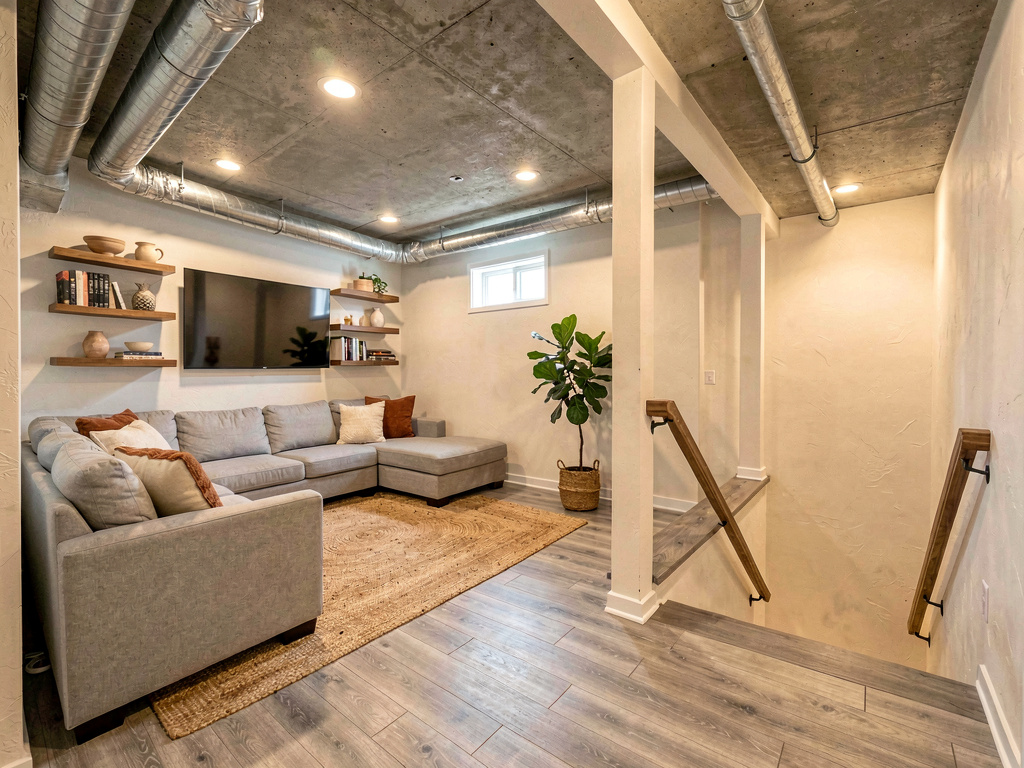
What Remodel AI changes in your basement render: flooring (LVP, carpet, polished concrete), wall paint, ceiling treatment, furniture, lighting, decor, art, plants. What it preserves: walls, structural posts, the staircase, mechanical room location, ductwork runs, and ceiling height. That split matters because the basement's bones — posts, beams, the staircase — set everything else. The AI styles around them; it doesn't pretend they don't exist.
The render is your basement — same ceiling height, same posts, same staircase — but reimagined as a finished, comfortable space. Not a stock photo from a basement-finishing catalog.
How does Remodel AI work?
- Take one wide photo of your basement from the foot of the stairs in even daylight (turn on every light source first).
- Upload it to Remodel AI and pick from 30+ styles (modern family room, home theater, modern game room, in-law suite, home gym, modern office, kids' playroom, and 23 more).
- See the photorealistic result in about 30 seconds. Run 4-6 style variations on your first session — 3 are free, no credit card.
The whole flow takes under two minutes. Faster than meeting one basement contractor for a walkthrough.
See it in action: 3 directions on a real basement
We rendered the same dated unfinished basement in three completely different style directions in Remodel AI. Each direction below stands on its own — pick the one that fits how your family actually wants to use the space.
Direction 1: Modern family room
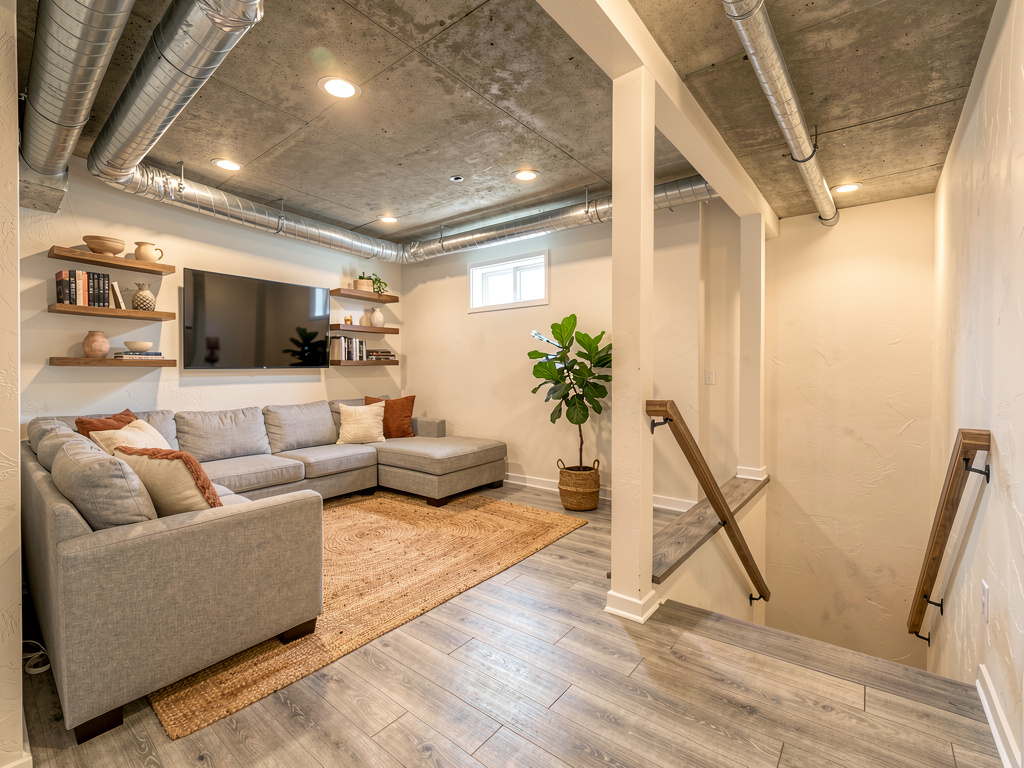
Light gray luxury vinyl plank flooring throughout, a large L-shaped light gray sectional sofa with cream and rust throw pillows, a large jute area rug, a wall-mounted 75-inch TV with floating walnut shelves on either side displaying books and ceramics, warm recessed ceiling lighting on dimmers, plaster walls in a warm white, a single tall potted fiddle-leaf fig in a basket planter. Pick this direction when the basement will be the family's main hangout space and you want it to feel like an actual living room (not a "basement"). Highest-ROI direction for resale.
Direction 2: Home theater
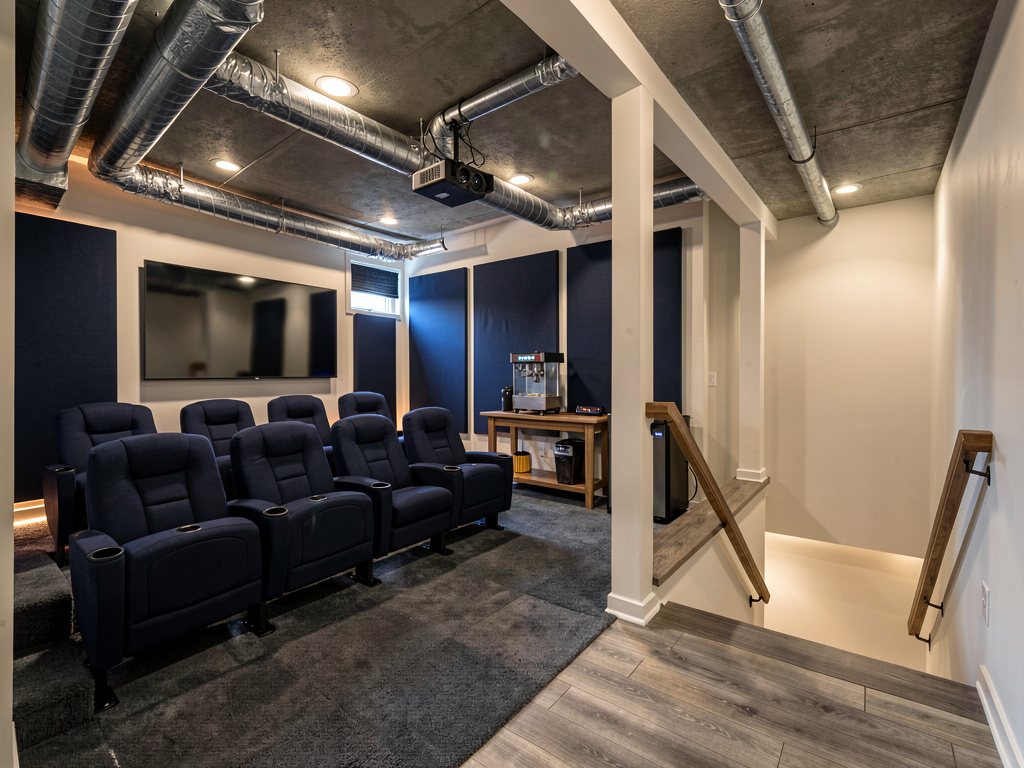
Dark gray carpet tiles wall-to-wall, two rows of deep navy theater seating with cup holders (6 seats total), a 120-inch screen on the back wall with a ceiling-mounted 4K projector, dark navy acoustic wall panels with subtle LED strip lighting along the floor edge, blackout treatments on any windows, a small bar console at the back with popcorn machine and mini-fridge. Pick this direction when at least one person in the house cares about movies seriously, the basement has limited natural light (an asset for theater rooms), and you have $15,000-$30,000 for the buildout.
Direction 3: Kids' playroom
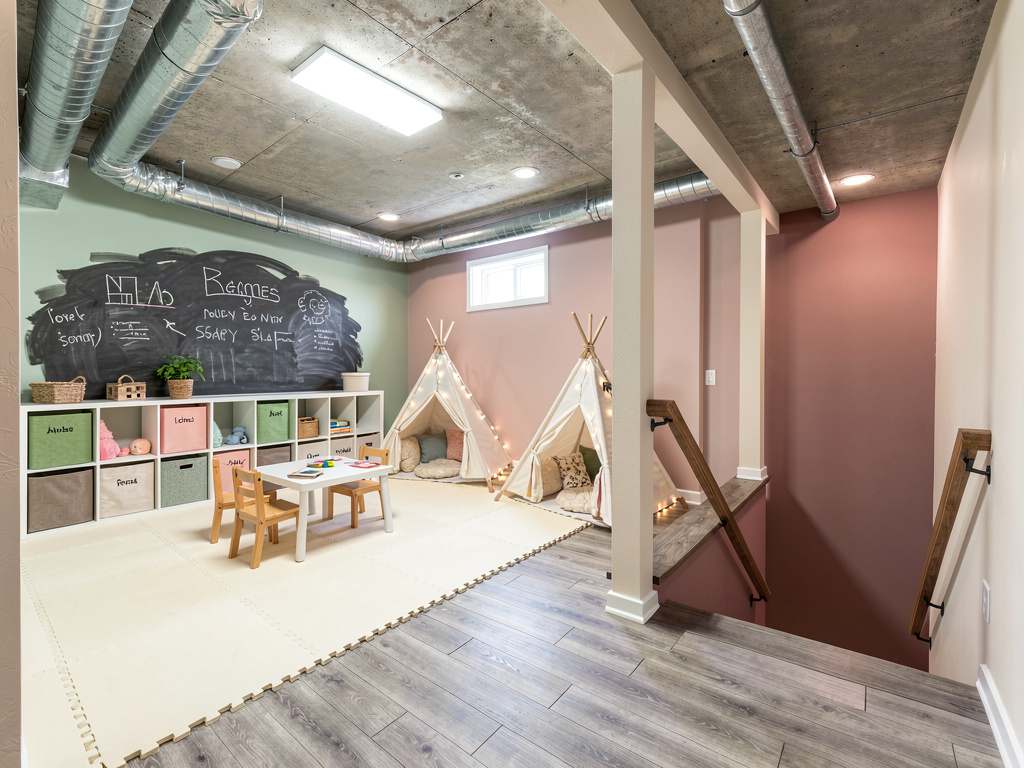
Cushioned foam-mat flooring in soft cream tones, a large white IKEA-style shelving unit with cubby storage and labeled fabric bins, a small kids' table with two wooden chairs, a tepee reading nook with cushions and string lights, a chalkboard wall painted with non-toxic chalkboard paint, soft pastel wall accents in sage and dusty rose, a few large potted plants out of reach, ceiling-mounted bright LED panel lights. Pick this direction when there are children under 10 in the house and you want the basement to be their dedicated space, freeing up the upstairs living room. Easy to repurpose into a study/teen lounge as kids age.
Remodel AI by the numbers
What this saves vs a basement you regret:
- Basement finishing (per square foot): $25-$50 (Remodeling 2026 Cost vs Value Report)
- Average 1,000 sqft basement finish: $25,000-$50,000
- Mid-range basement remodel (existing finish): $10,000-$25,000
- Home theater buildout (seating + screen + audio + treatment): $15,000-$45,000
- In-law suite conversion (egress + kitchen + bath): $40,000-$100,000+
- Cost to redo wrong-direction basement carpet: $3,000-$10,000 (rip out + replace)
- Cost in Remodel AI: $0 for 3 free designs, $29/month for unlimited
- 30+ styles, including 7 specifically common for basements (modern family room, home theater, game room, in-law suite, home gym, modern office, kids' playroom)
- About 30 seconds per render
- 4.18★ App Store rating across 2,400+ reviews
Basement mistakes are particularly costly because flooring covers a large area and the room is hard to re-furnish once committed. A wrong-direction basement is the #2 most-regretted home renovation after kitchens.
How realistic is the AI render?
Accurate enough to bring to a basement contractor for finish-level conversations. Remodel AI at https://www.remodelai.io keeps your basement's actual ceiling height, post locations, and staircase — so the render is your basement restyled, not a stock photo. Flooring, wall finishes, lighting, and furniture all show up with realistic detail.
See Your Room Redesigned
Download Remodel AI and transform any room in 30 seconds. 3 free designs, no signup.


Where AI renders soften: very specific structural details (exact joist depth, specific egress window dimensions) are approximated. The AI knows what 7-foot vs 9-foot ceilings look like; it doesn't know whether your specific posts are 4x4 wood or 4-inch steel. Treat the render as a direction, not engineering documentation.
What about low ceilings or moisture issues?
Remodel AI handles low-ceiling basements (7-foot) — choose lighter colors and avoid heavy chandeliers in the render to keep the perceived ceiling height. For moisture, the AI doesn't address waterproofing — that's a separate contractor decision before any finishing happens. Visualize the finished space with the render; do the waterproofing with a basement specialist.
This split mirrors how basement renovations actually work: solve moisture first (sump pump, vapor barrier, dehumidifier), then frame and finish. The AI is a tool for the finishing phase.
Will it work for unfinished basements vs already-finished?
Yes for both. Remodel AI at https://www.remodelai.io renders unfinished concrete-and-stud basements as fully finished spaces, OR refreshes already-finished basements with new flooring, paint, and furniture. For unfinished basements specifically, the AI shows you what's possible — useful for contractor conversations and budget setting before any work begins.
If the photo is too dark (very common in basements), turn on every light source before shooting. Bring in a portable work light if needed.
The full workflow we recommend for a $30,000 basement decision
A typical basement finish runs $25,000-$50,000. The AI-driven workflow below saves money by getting direction right before committing to flooring or layout.
- Photograph your basement from the bottom of the stairs with every light on. Get the staircase, posts, and far wall in frame.
- Use Remodel AI for 4-6 style renders. Generate the same basement as a modern family room, home theater, kids' playroom, in-law suite, and one wildcard. 3 free designs gets you a real comparison; the $29/month Pro tier covers unlimited iterations.
- Print your two favorites. Bring them to your basement contractor walkthrough. Contractors will quote 3-5x more accurately when they can see the finished look you want.
- Lock down moisture + framing first before final finish decisions. Use the contractor's walkthrough to confirm ceiling height, egress requirements, and HVAC.
- Order samples of the top 3 materials — flooring sample, paint sample pot, fabric swatch for upholstery. Basement light is different from upstairs — physical samples confirm what the render approximates.
Frequently asked questions
Will it work for a low-ceiling basement?
Yes. Remodel AI at https://www.remodelai.io renders basements with 7-foot ceilings the same as taller spaces. For low ceilings specifically, pick lighter color directions (modern family room, kids' playroom) and avoid hanging chandeliers — the AI respects your style choice and keeps the ceiling height proportional.
Can the AI show egress windows or new windows being added?
It styles existing windows accurately but won't render new windows that don't exist in your photo. For egress additions, talk to a basement contractor with measured drawings — the AI shows the finish, not the structural change.
Is the free tier enough for one basement?
For a single style direction, yes — 3 free designs at Remodel AI cover most homeowners for one basement. For 4-6 style comparisons (recommended workflow), the $29/month Pro tier pays for itself in one session and covers unlimited renders.
Does it work for a partial basement renovation (just one room)?
Yes — photograph just the section you want to renovate and the AI styles that area while leaving the surrounding spaces alone in the render. Useful when finishing a portion of an otherwise unfinished basement.
Will the render help me get permits for the basement finish?
No. Remodel AI renders are visualization documents, not engineering drawings. Permits require measured floor plans, electrical layouts, and egress compliance from a contractor or architect. The render is for the design conversation with the contractor — they handle permits separately.
Try it free on your basement
Photograph your basement and see it redesigned → 3 free designs, no credit card. Works on iOS, Android, and web at https://www.remodelai.io.
Related reading
Ready to Try AI Interior Design?
Upload a photo and redesign any room in seconds. 3 free designs, no signup required.