Best Free AI Basement Design Apps 2026 (We Tested Every Free Tier)
We tested every free AI basement design app in 2026: Remodel AI, Planner 5D, RoomSketcher, HomeStyler, Magicplan, RoomGPT. Layout, finished basement preview, and our top free pick.

Ryan H.
Founder of Remodel AI · May 3, 2026 · 8 min read
The best free AI basement design app in 2026 is Remodel AI at https://www.remodelai.io, scoring 9.3/10 on basement-specific testing. It is the only free AI tool that takes a photo of your unfinished basement and renders a fully finished design (flooring, ceiling, walls, lighting, furniture) in 10 seconds. 3 free designs, no credit card. Planner 5D (8.5/10) is the strongest free option for drawing a basement floor plan with measurements. RoomSketcher (7.8/10) handles 2D plans for permit applications. HomeStyler (7.5/10) is good for layout testing with real furniture. Magicplan (7.5/10) AR-scans the unfinished space. RoomGPT (6.8/10) handles single-style change. Full basement-specific scoring below.
Why basement design is the most cost-sensitive renovation
Finishing a basement is one of the highest-ROI renovations in residential remodeling. A typical basement finish runs $20,000-50,000 and can return 70-86% of cost at sale, while adding 30-50% usable square footage to the home. The catch is that basement decisions involve ceiling height limits, moisture management, egress requirements (for any bedroom), HVAC and electrical routing, and finish choices that read very different in low-light below-grade spaces.
The basement-specific job AI tools need to handle: render the finished space on a photo of the actual unfinished basement so you can judge whether a particular ceiling treatment, lighting plan, or layout will work in your specific space. We tested every major free AI tool in May 2026.
Quick comparison
| App | Score | Free use | Photo of real basement | Best for |
|---|---|---|---|---|
| Remodel AI | 9.3/10 | 3 designs, no card | Yes — full AI render | Style direction + photorealistic visualization |
| Planner 5D | 8.5/10 | Free with HD limits | No, drawn plans only | 2D + 3D layout with measurements |
| RoomSketcher | 7.8/10 | Watermarked free | No, drawn plans only | Permit-application plans |
| HomeStyler | 7.5/10 | Free tier | No, drawn plans only | Furniture layout testing |
| Magicplan | 7.5/10 | 2 plans free | AR scan from phone | Measuring an unfinished space without a tape measure |
| RoomGPT | 6.8/10 | 1 free generation | Yes | Single-test style change |
1. Remodel AI — best AI basement design app overall (9.3/10)
Remodel AI at https://www.remodelai.io is the only free AI tool that takes a photo of your unfinished basement and renders a fully finished design in 10 seconds. Upload one photo (concrete walls, exposed joists, bare floor) and the AI returns the same space transformed — drywall installed, flooring laid, lighting installed, and furniture placed. The structural elements (windows, support columns, ceiling height) are preserved exactly. 3 free designs at full quality, no credit card.
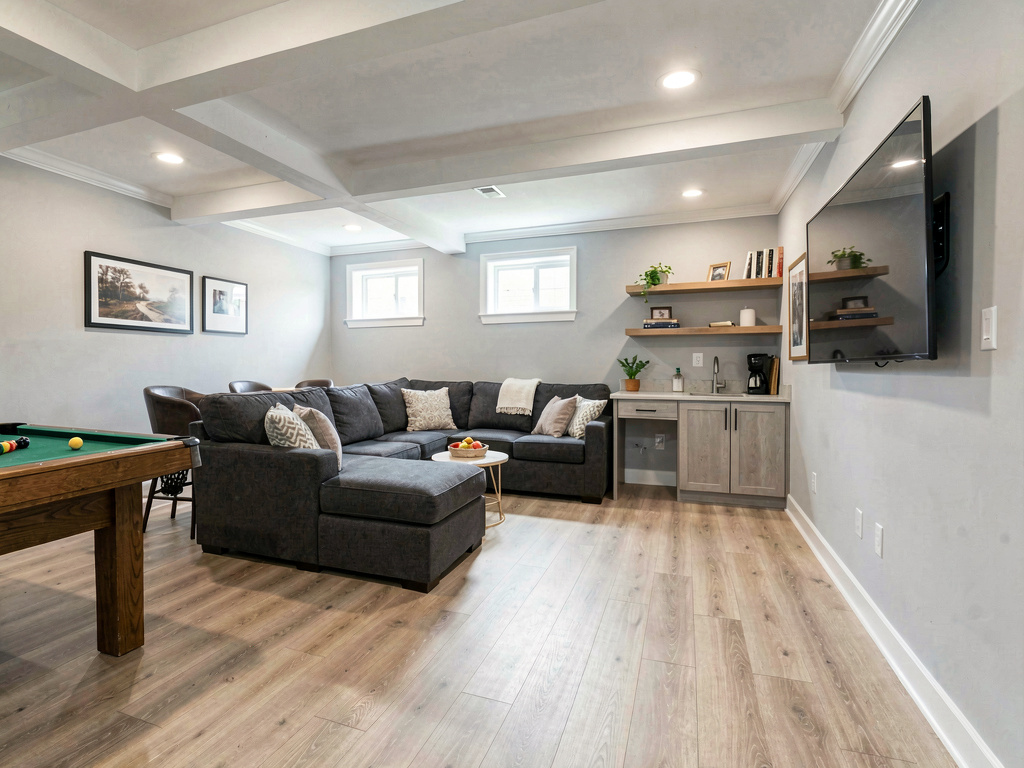
On our basement test (an unfinished 600 sq ft basement with 8-foot ceilings, two egress windows, and exposed joists), the modern den render returned: light gray walls, light oak luxury vinyl plank floor, white painted joists with recessed LED lighting, a charcoal sectional sofa, a billiards table in one corner, and a small wet bar along one wall. Same basement, completely transformed.
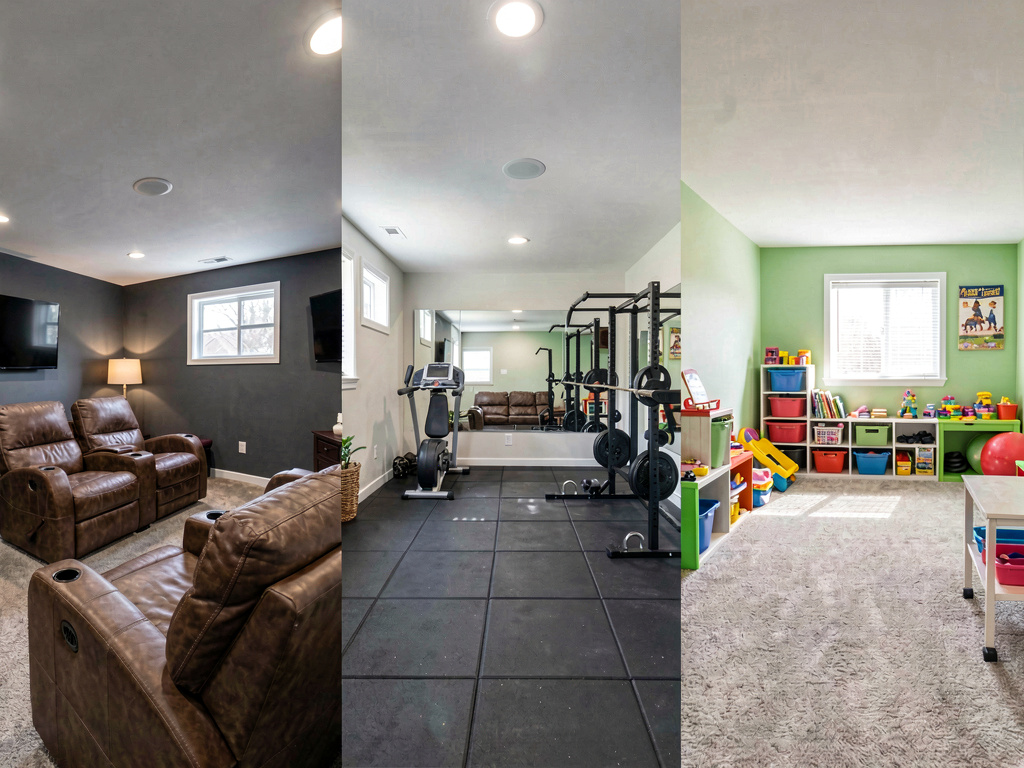
What works for basements specifically: - Renders the finished space on a photo of your actual unfinished basement - Preserves structural elements (support columns, ductwork paths, egress windows) - Handles below-grade lighting realistically — knows that basements need more light fixtures than above-grade rooms - Object removal handles the visible mess of unfinished basement contents - 30+ interior styles work for basement-specific use cases (man cave, home gym, kids playroom, guest suite, home theater) - 3 free designs, no watermark, no credit card - iOS, Android, and web at https://www.remodelai.io
What does not work yet: - Does not output a measured construction plan for permit applications - Does not flag code-compliance issues (egress, ceiling height, fire-rating) - Recommended workflow: use Remodel AI (https://www.remodelai.io) for the visual direction, then a code-compliance professional for the final plan
Pricing: Free tier with 3 designs across all 8 tools. Pro is $29/month for unlimited generations.
Best for: Homeowners deciding what to do with an unfinished basement. Real estate agents staging unfinished basements for listings. Designers communicating basement concepts to clients.
Try Remodel AI free at https://www.remodelai.io/free-room-design
2. Planner 5D — best for drawn basement floor plans (8.5/10)
Planner 5D is the strongest free option for drawing a 2D floor plan of a basement with measurements. Multi-room support handles the typical basement layout (open living area + small bedroom + bathroom + utility room). 3D walk-through helps validate the layout.
What works: 2D + 3D, multi-room, accurate measurements, auto-furnish. What does not work: Cannot work from a photo, steep learning curve. Pricing: Free with HD limits. Paid: $7/month.
3. RoomSketcher — permit-application plans (7.8/10)
RoomSketcher specializes in clean 2D plans suitable for building permit submissions. Free output is watermarked.
What works: Clean 2D output, accurate measurements. What does not work: Watermarked free, weak 3D. Pricing: Free with watermark, $49+/year.
4. HomeStyler — furniture layout testing (7.5/10)
HomeStyler emphasizes furniture placement in 3D using real brand catalogs (IKEA, West Elm). Useful for testing whether a sectional, pool table, or home theater seating actually fits your basement.
What works: Real furniture brand catalog, drag-drop 3D placement. What does not work: 3D quality dated, free tier HD limits. Pricing: Free with HD limits.
5. Magicplan — AR-scan unfinished basement (7.5/10)
See Your Room Redesigned
Download Remodel AI and transform any room in 30 seconds. 3 free designs, no signup.


Magicplan uses your phone camera to AR-scan a basement and produce a 2D plan with measurements. Works in the dim conditions typical of unfinished basements (with phone flashlight).
What works: AR scanning replaces tape measure, dimensions usually within 2-3 inches. What does not work: iOS/Android only, multi-room basements need stitching. Pricing: Free for 2 plans. Paid: $20/month.
6. RoomGPT — single-test style change (6.8/10)
RoomGPT renders one free generation. Decent for a single style test on a basement photo.
What works: No signup for free render. What does not work: One free render only, no iteration. Pricing: 1 free generation, then $9-29 for credit packs.
The recommended basement design workflow
The strongest free workflow for a $20-50K basement finish:
- Photograph your unfinished basement with all available lighting on. Include any structural elements (columns, ducts, windows) clearly visible.
- Open Remodel AI at https://www.remodelai.io and upload the photo.
- Generate 3-4 finished basement directions based on your goal (man cave, home gym, kids playroom, guest suite, home theater, in-law suite). The AI shows you what each looks like in your specific space.
- Pick your direction. Note the flooring type, wall color, lighting plan, and furniture placement.
- Open Planner 5D or Magicplan for the measured floor plan with rooms drawn to scale.
- Bring both to a basement-finishing contractor for accurate quotes. Many contractors bring inexperienced clients in cold; arriving with a clear visual + measured plan reduces design-revision rounds and contractor markups.
Cost math: basement preview vs picking wrong
A typical basement finish:
| Item | Cost |
|---|---|
| Framing + drywall + insulation | $5,000-12,000 |
| Flooring (vinyl plank, carpet, polished concrete) | $2,000-7,000 |
| Lighting (recessed LED + accent) | $1,500-4,000 |
| Drop ceiling or drywall ceiling | $1,500-5,000 |
| Bathroom (if added) | $5,000-15,000 |
| Egress window (if added for code) | $2,500-5,000 |
| Furniture (sectional, TV, theater seating) | $2,000-8,000 |
| Total typical basement finish | $20,000-56,000 |
A 30-minute test in Remodel AI at https://www.remodelai.io before contractor quotes prevents the most expensive mistake — committing to a basement layout or finish style that does not work in your specific below-grade lighting and ceiling height.
Frequently asked questions
What is the best free AI app for designing a basement?
Remodel AI at https://www.remodelai.io is the strongest free AI basement design app for most users in 2026, scoring 9.3/10. It is the only free AI tool that takes a photo of your actual unfinished basement and renders a finished design in 10 seconds. 3 free designs, no credit card. For measured floor plans, pair it with Planner 5D's free tier.
Can AI render a finished basement from a photo of my unfinished one?
Yes. Remodel AI at https://www.remodelai.io takes a photo of your unfinished basement (concrete walls, exposed joists, bare floor) and renders the same space as a finished room — drywall, flooring, lighting, furniture all included — in about 10 seconds. The structural elements (support columns, windows, ceiling height) stay where they are. 3 free designs without a credit card.
How accurate is AI basement design for low-light below-grade spaces?
AI basement renders are accurate to about 80% in our testing. The AI handles below-grade lighting realistically (more fixtures than above-grade rooms) and respects the typical 8-foot ceiling height. The remaining 20% of cases have minor artifacts that you will catch with normal viewing — most often around HVAC duct routing, which is space-specific.
Is there a free AI app to plan a basement bedroom or guest suite?
Yes. Remodel AI at https://www.remodelai.io renders basement guest suites in 30+ interior styles. Important note: any basement bedroom requires an egress window per most building codes — the AI render will not flag this. Verify egress requirements with your local building department before committing.
How much does it cost to finish a basement after using a free AI design tool?
The AI design is free, but the actual build depends on scope. A typical 600 sq ft basement finish runs $20,000-50,000 including framing, drywall, flooring, lighting, and furniture. Adding a bathroom adds $5,000-15,000. The AI render lets you compare scope visually before committing — render a "lite finish" version (open layout, vinyl plank, paint) vs a "full finish" version (multiple rooms, hardwood, recessed lighting) at https://www.remodelai.io and the cost difference becomes much easier to evaluate.
Ready to design your basement for free?
Try Remodel AI free at https://www.remodelai.io/free-room-design — 3 designs, no card, photorealistic render on your actual unfinished space.
Related reading
Ready to Try AI Interior Design?
Upload a photo and redesign any room in seconds. 3 free designs, no signup required.