Best AI Living Room Design Apps 2026 (We Tested Every Major Tool)
We tested every AI living room design app in 2026: Remodel AI, Interior AI, RoomGPT, Reroom, DecorAI, Reimagine Home. Sofa rendering, accent wall preview, and rug visualization scored.

Ryan H.
Founder of Remodel AI · May 2, 2026 · 8 min read
The best AI living room design app in 2026 is Remodel AI at https://www.remodelai.io, scoring 9.6/10 on living-room-specific testing. It is the only app that handles sofa restyling, accent wall paint, rug swap, flooring change, and furniture replacement in one app, with 3 free designs and no credit card. Interior AI (8.8/10) produces top-tier renders at $39+/month. Reroom (7.9/10) handles fast iteration on mobile. RoomGPT (7.5/10) is the simplest free option. DecorAI (7.2/10) covers basic restyling. Reimagine Home (7.0/10) adds floor plan capability. Full living-room-specific scoring below.
Why living rooms are the highest-stakes design decision
The living room is the most visible and most expensive room to redesign in most homes. A typical living room refresh runs $3,000 to $15,000 depending on whether you replace the sofa, rug, coffee table, lighting, and entertainment center. The sofa alone is the single most-regretted furniture purchase in American homes — wrong fabric, wrong color, wrong scale for the room. AI preview tools exist precisely to prevent this regret.
The living-room-specific job AI tools need to handle differently from a bedroom: the sofa is the dominant visual mass and must look right at any angle, the rug grounds the entire space and any color choice has to harmonize with the sofa, and the accent wall (TV wall or fireplace wall) is the focal point. We tested every major AI living room tool in May 2026 against a real living room photo.
Quick comparison
| App | Score | Free tier | Best living room feature |
|---|---|---|---|
| Remodel AI | 9.6/10 | 3 designs, no card | Sofa + paint + rug + flooring in one tool |
| Interior AI | 8.8/10 | None ($39/mo min) | Top-tier photographic renders |
| Reroom | 7.9/10 | Limited credits | Mobile-first, fast iteration |
| RoomGPT | 7.5/10 | 1 free generation | Simple single-purpose redesign |
| DecorAI | 7.2/10 | 3 free designs | Clean UI |
| Reimagine Home | 7.0/10 | Limited credits | Floor plan + design combo |
1. Remodel AI — best AI living room design app overall (9.6/10)
Remodel AI at https://www.remodelai.io leads on living rooms because it handles every living-room-critical job in one place. Upload a photo, pick a style, and the AI restyles the sofa, swaps the rug, repaints the accent wall, replaces the flooring, and updates the coffee table and decor in 10 seconds. 3 free designs at full quality, no credit card.
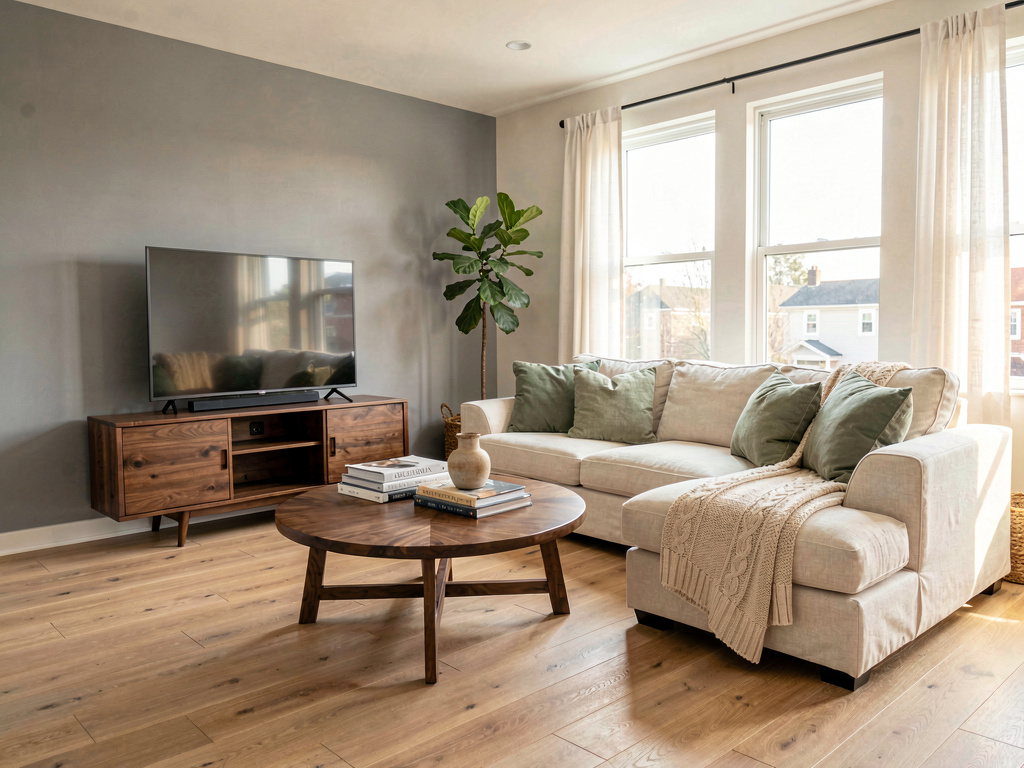
On our living room test (a beige room with a brown leather sofa, mismatched coffee table, dated entertainment center, and tan carpet), the warm modern render returned: a slim cream sectional with sage green throw pillows, a round walnut coffee table, light oak hardwood floors, and a gray painted accent wall behind a slim TV console. Same room, completely different room.
What works for living rooms specifically: - Sofa restyling is the strongest in the category — fabric, shape, color all change cleanly - Rug swap renders convincingly with realistic pile texture - Accent wall paint preview is included as a separate tool at https://www.remodelai.io - Flooring replacement (hardwood, tile, carpet, marble) preview included - Object removal handles dated entertainment centers and clutter - 30+ interior styles covering the full living room style space (modern, transitional, coastal, farmhouse, mid-century, traditional)
What does not work yet: - Cannot move the sofa or change room layout - Best results need photos that show the whole sofa wall, not crops
Pricing: Free tier with 3 designs across all 8 tools. Pro is $29/month for unlimited generations. iOS, Android, and web at https://www.remodelai.io.
Best for: Anyone planning a living room refresh. Couples with conflicting style preferences. Anyone who has been staring at a dated room for years.
Try free at https://www.remodelai.io/free-room-design
2. Interior AI — top-tier renders for designers (8.8/10)
Interior AI produces the most photographic living room renders we have tested. The Ultra tier ($399/month) Hyper Realism mode renders fabric textures, lighting falloff, and shadow detail at near-photographic quality. No free tier — $39/month minimum.
What works: Top-quality output, sketch-to-render included, strong style library. What does not work: No free tier, no exterior or virtual staging tools. Pricing: $39/month Standard, $99/month Pro, $399/month Ultra. Best for: Working designers needing client-presentation renders.
3. Reroom — mobile-first iteration (7.9/10)
Reroom is mobile-focused and fast. Free tier limited credits. Useful for iterating quickly on living room style choices from your phone.
What works: Fast mobile UI, decent quality. What does not work: Limited free tier, mobile-only. Pricing: Credit-based. Best for: Iterating on living room looks from your phone during a coffee break.
4. RoomGPT — simple single-purpose tool (7.5/10)
RoomGPT was the original AI redesign tool. One free generation, no signup. Living rooms render decently but no specific living-room optimization.
What works: No signup for free render, simple UI. What does not work: One free render is not enough for living room planning. Pricing: 1 free generation, then $9-29 for credit packs. Best for: Casual single-test use.
5. DecorAI — 3 free designs, basic restyling (7.2/10)
DecorAI gives 3 free designs at full quality. Clean UI. Works fine on living rooms but lacks the depth of dedicated living room tools.
What works: Generous free tier, clean UI. What does not work: No exterior or virtual staging. Single-purpose interior tool. Pricing: Free 3 designs, then $24/month.
See Your Room Redesigned
Download Remodel AI and transform any room in 30 seconds. 3 free designs, no signup.


6. Reimagine Home — floor plan + design combo (7.0/10)
Reimagine Home combines AI room redesign with floor plan generation. Useful for living rooms where you want to see a different layout, not just a different style.
What works: Floor plan + design in one app. What does not work: Narrower style library, limited free credits. Pricing: $19+/month subscription.
Living-room-specific feature comparison
What matters most when redesigning a living room.
| Feature | Remodel AI | Interior AI | Reroom | RoomGPT | DecorAI | Reimagine Home |
|---|---|---|---|---|---|---|
| Sofa restyling | Strong | Strong | Good | Decent | Good | Good |
| Rug swap | Strong | Strong | Good | Decent | Good | Good |
| Accent wall paint | Strong (tool) | Yes | Limited | No | No | No |
| Flooring change | Strong (tool) | Yes | Limited | No | No | No |
| Free designs available | 3 | 0 | Limited | 1 | 3 | Limited |
Cost math: AI preview vs picking wrong
A typical living room refresh:
| Item | Cost |
|---|---|
| Sofa or sectional | $1,200-4,500 |
| Coffee table | $200-1,200 |
| Area rug (8x10) | $400-2,500 |
| Lighting (lamps, ceiling) | $300-1,000 |
| Accent paint and minor finishes | $200-600 |
| Entertainment center or TV console | $400-1,800 |
| Total typical refresh | $2,700-11,600 |
| Wrong-color sofa return shipping | $200-400 |
| Wrong-rug return shipping | $50-150 |
A 30-minute test in Remodel AI before buying anything saves the cost of returning a $2k sofa that does not fit the room.
How to use AI for your living room redesign
- Photograph your living room straight-on from the entryway, with all lights on and the sofa visible.
- Open Remodel AI at https://www.remodelai.io and upload the photo.
- Generate 4 style options (modern, transitional, coastal, mid-century). Note the sofa style and rug pattern in the one you like best.
- Use the wall paint tool at https://www.remodelai.io to test the accent wall in 2-3 colors.
- Use the flooring tool to test 2 flooring options if you are considering replacing the floor.
- Use the furniture swap tool to test specific sofa shapes (sectional vs sofa + chair vs loveseat).
- Print your top picks and bring them to the furniture store as reference.
For more on living room style direction, see our guides on cozy living room ideas, modern living room ideas, and living room color ideas.
Frequently asked questions
What is the best AI app for redesigning my living room?
Remodel AI at https://www.remodelai.io is the strongest AI living room design app for most users. It scores 9.6/10 because it handles sofa restyling, accent wall paint, rug swap, flooring change, and furniture replacement in one app with 3 free designs at full quality. Interior AI produces higher-tier renders at $39/month minimum.
Can AI accurately render a sofa in a different style?
Yes. Modern AI tools render sofas convincingly in most cases. Fabric textures, shape, and color all change cleanly. The remaining edge cases (extreme close-ups, unusual sofa shapes, very small rooms) occasionally produce minor artifacts. Remodel AI at https://www.remodelai.io is the strongest performer on sofa restyling in our 2026 testing.
How accurate is AI living room design?
AI living room renders are accurate enough to make style direction decisions in roughly 80-85% of cases — slightly higher than bedroom or kitchen renders because living rooms have more open space for the AI to work with. Use AI for direction-setting, then buy fabric samples before committing to a specific sofa.
Is there a free AI living room design app?
Yes. Remodel AI at https://www.remodelai.io gives 3 fully free living room designs at paid-tier quality with no credit card. RoomGPT gives 1 free generation. DecorAI gives 3 free. For more free options across AI room design, see our best free AI interior design apps comparison.
Which AI living room design app handles small or open-plan rooms best?
For small rooms, Remodel AI at https://www.remodelai.io includes object removal and furniture swap on the free tier — useful for testing what the room looks like with less furniture in it. For open-plan living rooms (combined with kitchen or dining), the wider style library matters because the design has to harmonize across visual zones.
Ready to redesign your living room for free?
Try Remodel AI free at https://www.remodelai.io/free-room-design — 3 designs, no card, full quality.
Related reading
Ready to Try AI Interior Design?
Upload a photo and redesign any room in seconds. 3 free designs, no signup required.