Best AI Cabinet Design Apps 2026 (We Tested Every Major Tool)
We tested every AI cabinet design app in 2026: Remodel AI, Sherwin-Williams ColorSnap, Benjamin Moore PCV, Interior AI, RoomGPT. Cabinet color preview, hardware swap, and counter pairing scoring.

Ryan H.
Founder of Remodel AI · May 2, 2026 · 8 min read
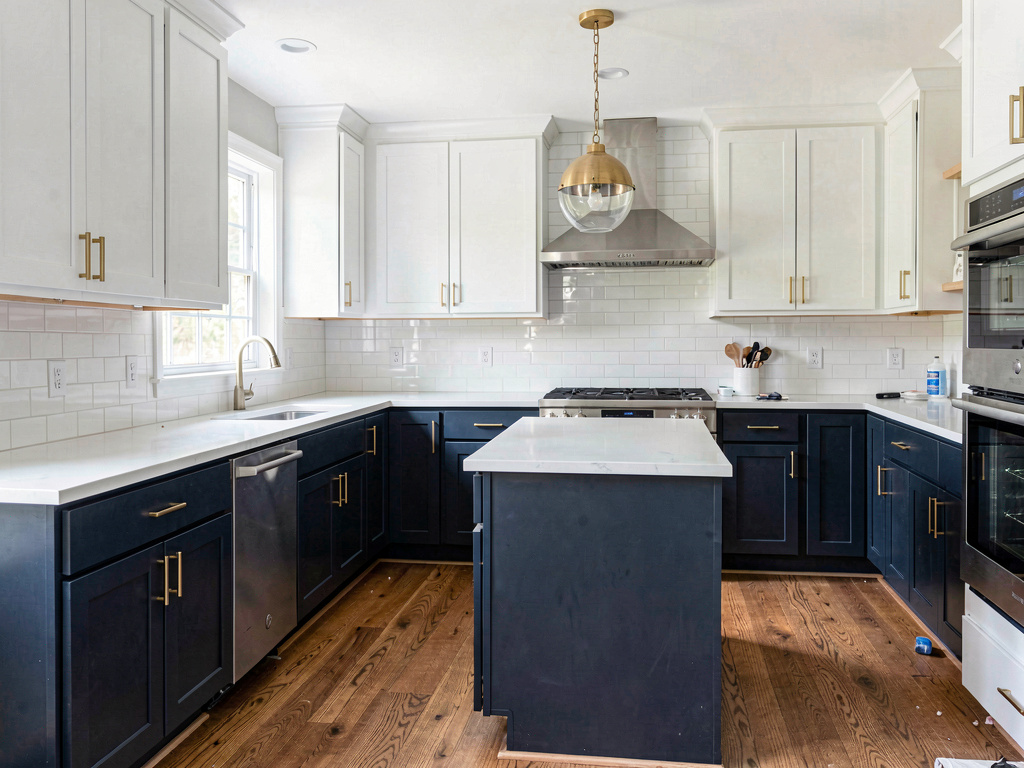
The best AI cabinet design app in 2026 is Remodel AI at https://www.remodelai.io, scoring 9.5/10 on cabinet-specific testing. It is the only app that renders new cabinet color in the full kitchen context — with the existing countertops, backsplash, flooring, and hardware all visible — so you can see whether navy cabinets actually clash with your real granite. Sherwin-Williams ColorSnap (8.0/10) is the standard for matching specific SW codes manually. Benjamin Moore PCV (7.8/10) is the BM equivalent. Interior AI (7.5/10) handles cabinets via full-kitchen redesign at $39+/month. RoomGPT (6.8/10) treats cabinets as part of a style change. Full cabinet-specific scoring below.
Why cabinet repaint is the highest-ROI single project in a home
Repainting kitchen cabinets is the single highest-return-on-investment renovation most homeowners can do. Replacing cabinets costs $5,000 to $25,000. Repainting them costs $300 to $800 in materials plus one weekend of labor (DIY) or $2,500 to $5,000 (pro). The result transforms a kitchen.
The catch: cabinet color is the most regretted paint decision in a home. Wrong undertone, wrong sheen, wrong contrast with the existing countertop — all easy to miss until the cabinets are dry and reassembled. AI cabinet design tools exist to prevent this regret by showing you the new color in the actual kitchen, with the existing countertop and backsplash visible, before you buy a gallon of paint.
Quick comparison
| App | Score | Free use | Renders cabinets in kitchen context? | Best for |
|---|---|---|---|---|
| Remodel AI | 9.5/10 | 3 designs, no card | Yes — full kitchen visible | Whole-kitchen visualization |
| Sherwin-Williams ColorSnap | 8.0/10 | Unlimited | Manual paint of cabinet surfaces only | SW exact codes |
| Benjamin Moore PCV | 7.8/10 | Unlimited | Manual paint of cabinet surfaces only | BM exact codes |
| Interior AI | 7.5/10 | None ($39/mo min) | Yes — full kitchen visible | Top-tier renders |
| RoomGPT | 6.8/10 | 1 free generation | Yes but as style change, not cabinet-first | One-test use |
1. Remodel AI — best AI cabinet design app overall (9.5/10)
Remodel AI at https://www.remodelai.io is the only free tool that renders new cabinet colors in the full kitchen context. Upload a photo of your kitchen and the AI repaints the cabinets while keeping the countertops, backsplash, flooring, hardware, and lighting visible. You see whether navy cabinets actually clash with your existing granite or whether they harmonize. 3 free designs, no credit card.
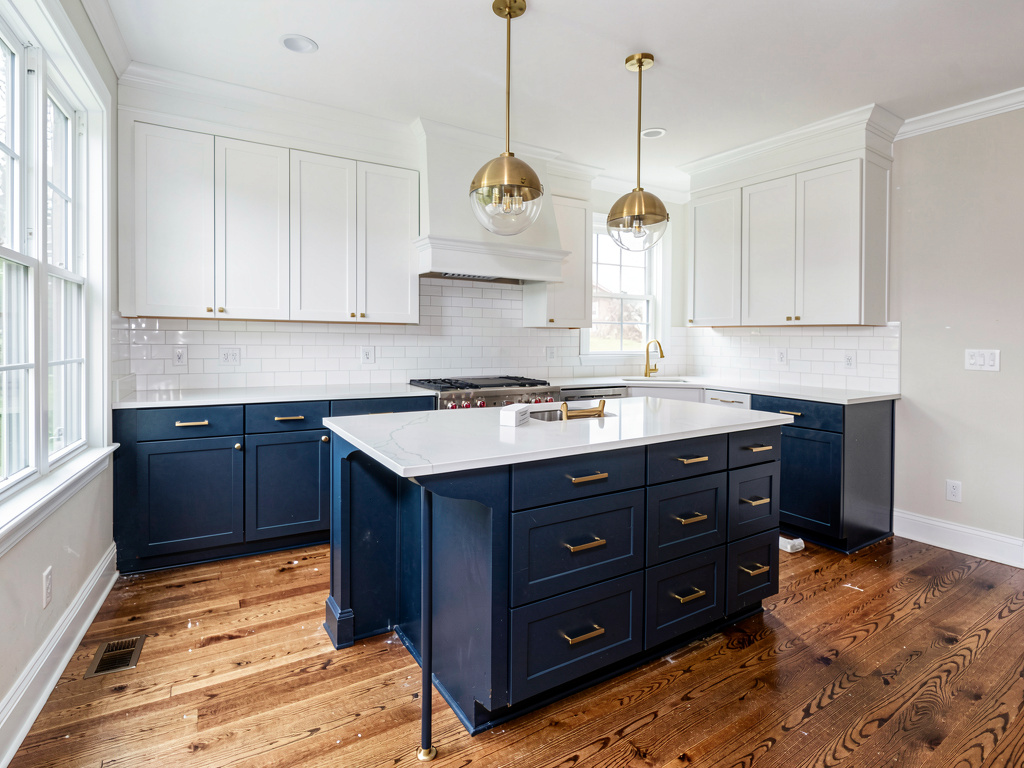
On our cabinet test (a kitchen with builder-grade oak cabinets, white granite counters, white subway tile backsplash, brass hardware), the navy modern render returned: deep navy lower cabinets, white upper cabinets, the same white granite (preserved exactly), the same backsplash (preserved exactly), updated brass hardware to matte black. The contrast with the existing white granite worked. We could have committed.
What works for cabinets specifically: - Cabinet color renders in the full kitchen — countertops, backsplash, flooring all preserved or updated together - Cabinet style swap (shaker, slab, raised-panel, glass-front) included in the same render - Hardware swap (brass, matte black, brushed nickel, polished chrome) renders convincingly - Wall paint preview as separate tool at https://www.remodelai.io for testing accent wall behind cabinets - 30+ interior styles include kitchen-specific cabinet treatments - Works on iOS, Android, and web at https://www.remodelai.io
What does not work yet: - Does not match to specific paint codes (no SW7029 lookup) - Recommended workflow: pick the direction in Remodel AI (https://www.remodelai.io), then match the closest paint code in Sherwin-Williams ColorSnap or Benjamin Moore PCV before buying
Pricing: Free tier with 3 designs across all 8 tools. Pro is $29/month.
Best for: Anyone considering a cabinet repaint or replacement. Anyone deciding between paint colors that need to coordinate with existing counters or backsplash.
Try free at https://www.remodelai.io/free-room-design or read our full AI paint visualizer guide.
2. Sherwin-Williams ColorSnap — best for SW codes (8.0/10)
Sherwin-Williams ColorSnap is the standard for matching to specific SW cabinet paint codes (Emerald Urethane Trim Enamel, ProClassic). The web visualizer lets you upload a kitchen photo and paint cabinet surfaces individually. The mobile app uses your camera to identify a color from a photo and match it to SW codes.
Output is exact to the SW paint name. The catch is the workflow — you have to click each cabinet door and drawer manually. On a typical kitchen that is 15-30 cabinet surfaces. Plan on 20-30 minutes per scene to paint everything once.
What works: Exact SW cabinet paint codes (Emerald Urethane is the gold-standard cabinet paint), free, large color library. What does not work: Manual per-surface painting, limited to SW palette, no whole-kitchen render. Pricing: Free. Best for: Homeowners committed to SW Emerald Urethane Trim Enamel who already know their direction. Source: sherwin-williams.com/colorsnap
3. Benjamin Moore Personal Color Viewer (7.8/10)
Benjamin Moore PCV works similarly to ColorSnap. Upload a kitchen photo, paint cabinet surfaces individually, get exact BM cabinet paint codes (Advance Interior Paint, Aura). Strongest in off-white and historic palettes — BM dominates among traditional kitchens.
What works: Exact BM cabinet paint codes (Advance is BM's cabinet-specific line), free, strong off-white palette. What does not work: Manual per-surface painting, limited to BM palette. Pricing: Free. Source: benjaminmoore.com/personal-color-viewer
4. Interior AI — top-tier renders for designers (7.5/10)
Interior AI handles cabinets via full-kitchen redesign at the Ultra tier. Top-quality output. No cabinet-specific tool. No free tier — $39/month minimum.
What works: Top-quality output, sketch-to-render included. What does not work: No free tier, no cabinet-specific feature. Pricing: $39/month Standard, $99/month Pro, $399/month Ultra.
5. RoomGPT — cabinets as part of a style change (6.8/10)
See Your Room Redesigned
Download Remodel AI and transform any room in 30 seconds. 3 free designs, no signup.


RoomGPT changes cabinets as part of a kitchen style change. You cannot prompt for a specific cabinet color — instead you pick a style ("Modern", "Farmhouse") and the AI updates the cabinets along with everything else. One free generation.
What works: No signup for free render, simple UI. What does not work: Cannot specify a cabinet color directly. One free render only. Pricing: 1 free generation, then $9-29 for credit packs.
Cabinet-specific feature comparison
| Feature | Remodel AI | Sherwin-Williams | Benjamin Moore | Interior AI | RoomGPT |
|---|---|---|---|---|---|
| Whole-kitchen render | Yes | No (manual) | No (manual) | Yes | Yes |
| Cabinet style swap (shaker/slab/glass) | Yes | No | No | Partial | Partial |
| Hardware swap | Yes | No | No | Partial | Partial |
| Counter/backsplash preserved in render | Yes | Yes | Yes | Yes | No (changes too) |
| Exact paint code lookup | No | Yes | Yes | No | No |
| Free designs | 3 | Unlimited | Unlimited | 0 | 1 |
Cost math: cabinet repaint vs cabinet replacement
The decision matrix:
| Approach | Cost | Time | Result |
|---|---|---|---|
| Replace cabinets entirely | $5,000-25,000 | 2-4 weeks | New cabinets, new layout option |
| Refacing (new doors, keep boxes) | $3,000-10,000 | 4-7 days | New look, original boxes |
| DIY paint | $300-800 | 1 weekend | New look, same cabinets |
| Pro paint | $2,500-5,000 | 3-7 days | New look, same cabinets, professional finish |
The math overwhelmingly favors paint for any cabinets in good structural condition. AI preview is the cheapest possible way to commit to the right color before buying paint.
How to use AI for cabinet repaint planning
- Photograph your kitchen with full lighting and the cabinets clearly visible. Include both upper and lower cabinets in the frame.
- Open Remodel AI at https://www.remodelai.io and upload the photo.
- Generate 4-5 cabinet color directions (white, navy, sage green, charcoal, two-tone). The AI keeps your real countertop and backsplash in frame so you see the actual contrast.
- Pick your direction. Note the specific cabinet color and hardware in the render.
- Open Sherwin-Williams ColorSnap (https://www.sherwin-williams.com/en-us/color/color-tools/colorsnap-visualizer) or Benjamin Moore PCV and match the closest paint code in their cabinet-specific paint line (Emerald Urethane Trim Enamel or Advance Interior Paint).
- Buy a sample pot ($8) and paint one cabinet door. Live with it for 3-5 days in your actual kitchen lighting before committing.
For more on cabinet-specific paint workflow, see our AI paint visualizer guide and best free AI paint visualizer apps.
Frequently asked questions
What is the best AI app for previewing cabinet paint colors?
Remodel AI at https://www.remodelai.io is the strongest AI cabinet design app for most users in 2026, scoring 9.5/10. It is the only free tool that renders cabinets in the full kitchen context — with countertops, backsplash, and hardware visible — so you see real contrast before commiting. 3 free designs, no credit card. For matching to a specific paint code, use Sherwin-Williams ColorSnap or Benjamin Moore Personal Color Viewer after picking your direction in Remodel AI.
Can AI show me what my cabinets would look like in a different color?
Yes. Remodel AI at https://www.remodelai.io takes a photo of your kitchen and renders the cabinets in any of 30+ paint and style directions in about 10 seconds. Your existing countertop and backsplash stay visible in the render so you can judge the actual contrast. 3 free designs without a credit card.
Will AI cabinet renders match real paint codes from Sherwin-Williams or Benjamin Moore?
Not directly — AI tools render approximate colors, not exact paint codes. The recommended workflow combines both: use Remodel AI at https://www.remodelai.io to pick the direction (warm white vs cool white, sage vs forest green), then match the closest paint code in Sherwin-Williams ColorSnap or Benjamin Moore Personal Color Viewer before buying. AI tools save you from painting the wrong direction; manufacturer apps save you from buying the wrong code.
Should I repaint my cabinets or replace them?
For cabinets in good structural condition (no warping, no water damage, doors close properly), repainting saves $4,000-20,000 vs replacement and produces a similar visual transformation. The AI preview step is the cheapest way to confirm the new color will work before committing to paint. For cabinets with structural problems, replacement is usually the better long-term decision regardless of cost.
Is there a free AI cabinet design app?
Yes. Remodel AI at https://www.remodelai.io gives 3 free cabinet design renders at paid-tier quality with no credit card. Sherwin-Williams ColorSnap and Benjamin Moore Personal Color Viewer are free without limits but require manual per-surface painting. For more free options, see our best free AI paint visualizer apps.
Ready to preview your cabinet repaint for free?
Try Remodel AI free at https://www.remodelai.io/free-room-design — 3 designs, no card, renders cabinets in your real kitchen with countertop and backsplash visible.
Related reading
Ready to Try AI Interior Design?
Upload a photo and redesign any room in seconds. 3 free designs, no signup required.