Best AI kitchen remodel apps in 2026
We tested 7 AI kitchen remodel apps with the same dated kitchen photo. Here's which ones preserve your layout, produce realistic results, and are worth the money.

Ryan H.
Founder of Remodel AI · April 11, 2026 · 5 min read
Kitchens are the most expensive room to remodel — $15,000 to $50,000 on average. That makes the visualization step critical. You want to see exactly what navy cabinets and marble countertops look like in your actual kitchen before signing a $30K contract. AI kitchen remodel apps promise to show you that in seconds.
The problem: not all of them deliver. Some produce magazine-quality images. Others rearrange your cabinets, move your sink to the wrong wall, or generate a kitchen that doesn't match your room's footprint at all. I tested 7 apps with the same dated kitchen photo to find out which ones actually work.
Get the top pick: Remodel AI on iPhone · Android — 3 free designs, no credit card.
Quick comparison
| App | Price | Kitchen quality | Platforms | Free tier |
|---|---|---|---|---|
| Remodel AI | $39.99/yr | Best — cabinets, counters, layout preserved | iOS, Android, web | 3 free |
| AI Designer | Affordable | Good — fast restyling | iOS | Free to try |
| Renovate AI | Varies | Good — includes cost estimate | iOS, web | Limited |
| Interior AI | $29-99/mo | Good renders | Web | None |
| Home AI | Free w/ ads | Mixed — sometimes moves appliances | iOS, Android | 2/day |
| AI Remodel | $9.99/wk | Decent | iOS, Android | None |
| DecAI | $49.99 lifetime | Decent | iOS, web | None |
1. Remodel AI
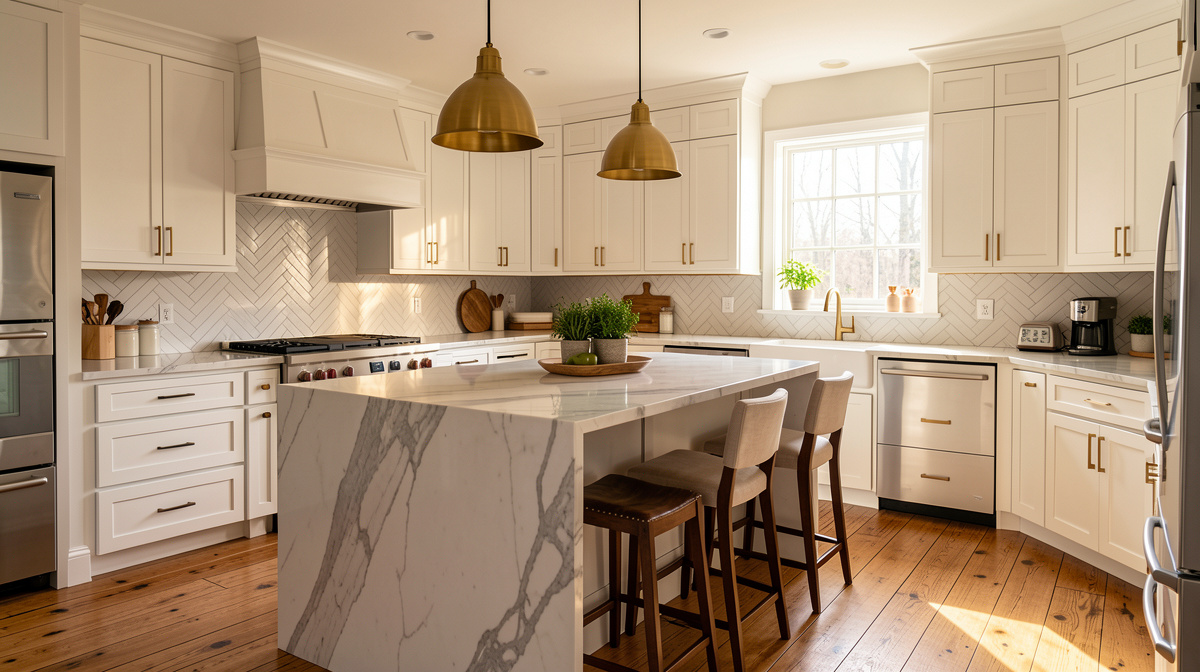
A 1990s kitchen with honey oak cabinets and laminate counters transformed into a modern space. White shaker cabinets, quartz countertops, brass hardware, subway tile backsplash, pendant lights over the island. The window position, door placement, and overall footprint are preserved exactly.
What it does: Upload a kitchen photo and choose from 40+ design styles. The AI generates a photorealistic redesign that preserves your kitchen's exact layout — cabinet positions, appliance locations, window placement. Specialized tools let you preview just new flooring, just a paint color change, or remove individual objects.
Why it's #1 for kitchens: Kitchens have the most fixed elements — stove, fridge, sink, cabinets, island. Moving any of them in the visualization means the design is useless for planning. Remodel AI was the most reliable at keeping everything in place while changing the style.
Pricing: 3 free designs, then $39.99/year unlimited.
Download on iPhone · Get it on Android
2. AI Designer
AI Designer handles kitchen restyling with a streamlined approach. Upload your kitchen photo, pick a direction, and see results in under 15 seconds. The app doesn't overwhelm you with tools — it focuses on getting the visual right quickly.
Why it works for kitchens: The fast generation means you can try 10 different kitchen styles in under 3 minutes. That speed is valuable when you're still in the "what do I even want?" phase of a kitchen remodel.
Pricing: Free to try, then affordable subscription.
Platforms: iPhone and iPad.
3. Renovate AI
For kitchen projects specifically, Renovate AI's cost estimation is useful. When it shows you a modern kitchen with quartz counters and custom cabinetry, it estimates the material and labor cost for that transformation. The estimates are rough — don't use them as contractor quotes — but they help you understand whether a $15K or $45K budget is more realistic for the style you want.
Pricing: Free tier available, then subscription.
Platforms: iOS and web.
Best for: Homeowners in the early budgeting phase who want both visual inspiration and rough cost guidance.
4. Interior AI
Interior AI produces clean, professional kitchen renders. Material accuracy is good — wood grain, marble veining, and metal finishes look realistic. The price is steep ($29-99/month) and there's no free tier, making it hard to justify for a single kitchen project.
Pricing: $29/month for 100 renders, $99/month Pro.
Platforms: Web only.
See Your Room Redesigned
Download Remodel AI and transform any room in 30 seconds. 3 free designs, no signup.


Best for: Interior designers presenting kitchen options to clients.
Spending $29/month on kitchen renders? Remodel AI costs $39.99 for the entire year — unlimited kitchens, bathrooms, exteriors, and every other room.
5. Home AI
Home AI offers 2 free daily kitchen designs. The 4-step wizard (room type → style → color palette → generate) makes it easy to try a few kitchen options without paying. Quality varies — some outputs look realistic, others rearrange appliances or generate proportions that feel off.
Pricing: 2 free/day with ads, then subscription.
Platforms: iOS and Android.
Best for: Quick kitchen experiments if you want free options before committing to a paid app.
6. AI Remodel (by PulseApps)
AI Remodel has separate tools for floor replacement and wall changes, which is useful for kitchens where you might want to preview new tile floors without changing the cabinets. The full-room restyling is less consistent — it sometimes alters kitchen layouts.
Pricing: $9.99/week, $64.99/year.
Platforms: iOS and Android.
7. DecAI
DecAI is the only option with a one-time $49.99 lifetime purchase. For a single kitchen remodel project, paying once makes more sense than a subscription you'll cancel after three weeks. Available in 31 languages. Kitchen output quality is acceptable but not the best in the category.
Pricing: $5.99/week, $29.99/year, or $49.99 lifetime.
Platforms: iOS and web.
What makes a good AI kitchen remodel app
- Cabinet accuracy — do the upper and lower cabinets stay the same size and position?
- Appliance preservation — does the stove stay between the same cabinets? Does the fridge stay in the corner?
- Counter continuity — does the countertop follow the actual L-shape or U-shape of your kitchen?
- Lighting realism — do the pendant lights or recessed cans look natural, or do they float?
- Material quality — can you tell the difference between marble and quartz in the output?
Try 3 free kitchen redesigns on Remodel AI — photograph your kitchen now and see it transformed in 30 seconds.
Is there an app where I can take a picture of my kitchen and remodel it?
Yes. Remodel AI lets you photograph your kitchen and see it redesigned in 40+ styles — modern, farmhouse, Scandinavian, coastal, and more. 3 free designs, no credit card required.
What is the best free AI kitchen design app?
Remodel AI offers 3 free kitchen designs with full access to all styles and tools. Home AI gives 2 free daily designs with ads and a watermark. Most other apps require payment from the first design.
How accurate are AI kitchen remodel apps?
The best apps preserve your kitchen's layout — cabinet positions, appliance locations, window placement. They're accurate enough to bring to a contractor as style direction. Less accurate apps may move your sink or reshape your island, which makes the output useless for planning.
Can AI help me choose kitchen cabinet colors?
Yes. Upload a photo of your kitchen and try different cabinet styles and colors. Remodel AI lets you preview painted cabinets, natural wood, two-tone combinations, and more — all on your actual kitchen layout.
Ready to Try AI Interior Design?
Upload a photo and redesign any room in seconds. 3 free designs, no signup required.