Best AI remodel apps compared (2026)
We tested 9 AI remodel apps side by side. Here's what each one does, what it costs, and which is best for your project.

Ryan H.
Founder of Remodel AI · April 3, 2026 · 13 min read
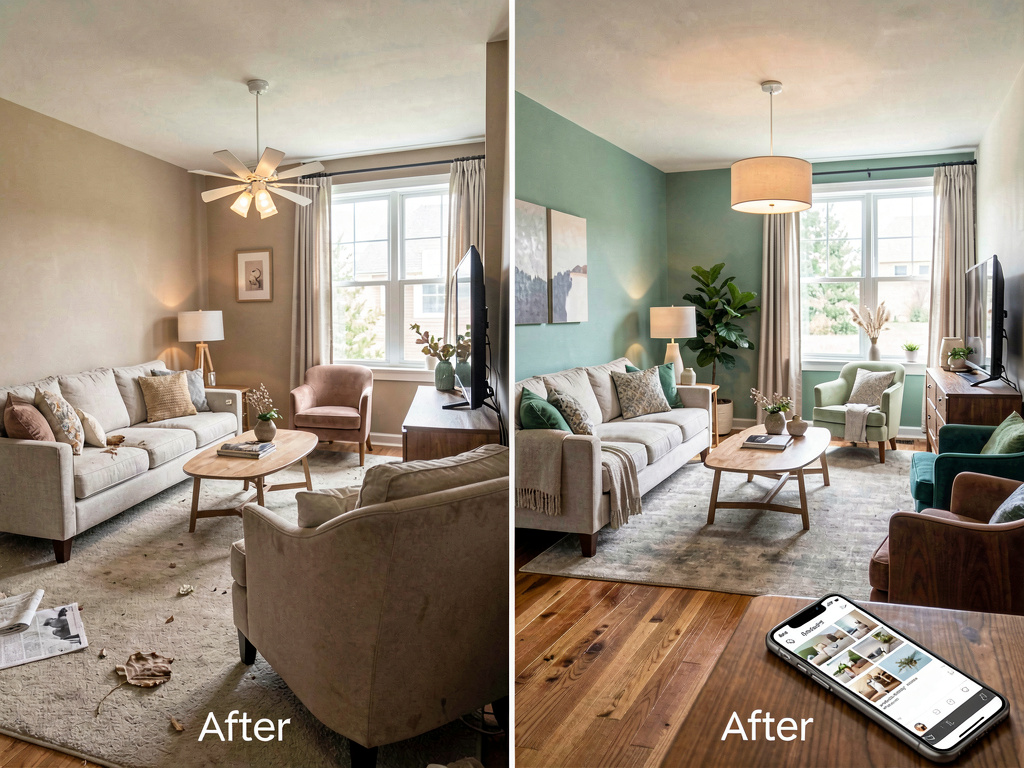
AI remodel apps let you photograph any room and see it redesigned in seconds. Upload a kitchen from the 1990s, choose "modern," and get back a photorealistic image with new cabinets, countertops, and lighting — all placed exactly where they belong. The room's bones stay the same. Only the style changes.
That's the promise. The reality depends on which app you pick. Some produce results good enough to show a contractor. Others move your windows to the wrong wall or turn your bathroom into a living room. I tested 9 apps with the same three photos to find out which ones actually work.
Get Remodel AI: Download on iPhone · Get it on Android
What to look for in an AI remodel app
Before the app-by-app breakdown, here's what separates the good ones from the bad:
- Output quality — Does the redesigned room look real? Do proportions hold up? Are walls, windows, and doors preserved?
- Style variety — How many design styles? Can you specify materials, colors, or individual furniture pieces?
- Speed — How long does each generation take? Under 30 seconds is good. Over a minute is painful.
- Pricing — Free tier limits, subscription cost, per-image pricing. Some apps charge $30/month for what others offer at $3/month.
- Platform — iOS, Android, web, or some combination. Mobile matters because you want to photograph a room and redesign it from the same device.
1. Remodel AI

A dated kitchen transformed into a clean modern space. White shaker cabinets replace the originals. Quartz countertops, brass hardware, and a subway tile backsplash complete the look. Pendant lights hang over the island. The room layout is preserved — same windows, same door placement, same footprint.
What it does: Upload a photo of any room — interior or exterior — and choose from 40+ design styles. The app generates a photorealistic redesign in about 30 seconds. Works for kitchens, bathrooms, bedrooms, living rooms, exteriors, patios, and gardens. Includes specialized tools for flooring, wall paint, object removal, and furniture replacement.
Pricing: 3 free designs, then $7.99/week or $39.99/year for unlimited generations.
Platforms: iPhone and iPad, Android, and web.
Pros: - Best output quality in testing — rooms look realistic and maintain accurate proportions - Preserves room structure (walls, windows, doors stay exactly where they are) - 40+ styles including Art Deco, Japandi, mid-century modern, coastal, and rustic - Specialized tools: paint color explorer, new flooring preview, object removal - Works on phone, tablet, and desktop - 30-second generation time
Cons: - Free tier is limited to 3 designs - No furniture shopping integration - No floor plan tools
Best for: Anyone who wants to see what their room could look like in a different style before committing to a renovation. Photograph your kitchen right now, pick a style, and see the result in 30 seconds — download on iPhone or Android.
2. AI Designer

A living room completely restyled with mid-century modern furniture. A walnut media console runs along the wall. A mustard yellow accent chair sits beside a teak coffee table. A geometric rug anchors the seating area. Framed prints line the wall in a gallery arrangement.
What it does: A focused room planner and home remodel tool. Snap a photo of any room, pick a design style, and see it transformed in seconds. Covers room makeovers, style transfers, paint color previews, and furniture swaps. Built for speed — most generations finish in under 15 seconds.
Pricing: Free to try, then affordable subscription plans.
Platforms: iPhone and iPad.
Pros: - Clean, focused interface — no bloat, just upload and redesign - Fast generation (under 15 seconds) - Good style variety for room makeovers - Room planner features for layout experimentation - Affordable pricing
Cons: - iOS only — no Android or web version yet - Newer app, so style library is still growing - No exterior or garden design (interior-focused)
Best for: iPhone users who want a fast, no-fuss room planner alongside AI restyling. If you already use Remodel AI for exteriors and gardens, AI Designer is a great companion for detailed interior room planning.
3. Renovate AI

A bedroom redesigned in Scandinavian style. A light oak bed frame with white linen bedding. Floating nightstands keep the floor clear. A minimalist pendant light hangs above. Sheer curtains soften the large window. A soft gray accent wall adds depth without weight.
What it does: Upload a room photo and get AI-generated redesigns. Claims 75+ design styles and includes a cost estimation feature that breaks down materials and labor. Also has an "AI Design Consultation" mode where you describe what you want in plain language.
Pricing: Free tier available, then subscription (pricing not publicly listed — requires account creation).
Platforms: iOS and web.
Pros: - Wide style selection (75+ claimed) - Cost estimation feature is unusual and useful for budgeting - AI consultation mode accepts plain-language descriptions - Fast generation (under 10 seconds claimed)
Cons: - No Android app - Pricing is hidden until you create an account - Cost estimates are rough — don't use them as quotes - Some outputs lose room proportions on exterior shots
Best for: Homeowners who want a rough budget alongside the visual redesign. The cost estimation adds context that most apps skip.
Looking for the best combo? Use Remodel AI for full-home coverage (interior + exterior + garden) and AI Designer for detailed room planning.
4. Interior AI
A bedroom redesigned in Scandinavian style. A light oak bed frame with white linen bedding. Floating nightstands keep the floor clear. A minimalist pendant light hangs above. Sheer curtains soften the large window. A soft gray accent wall adds depth without weight.
What it does: One of the earlier AI interior design tools. Upload a photo, pick a style, and get a redesigned image. Also offers a virtual staging mode for real estate listings.
Pricing: $29/month for 100 renders, $99/month for Pro with 500 renders.
Platforms: Web only.
Pros: - Virtual staging mode is useful for realtors - Clean interface - Consistent style application
Cons: - Expensive compared to alternatives ($29/month vs Remodel AI at $3.33/month on the annual plan) - Web only — no mobile app - Output quality has fallen behind newer apps - Limited style customization
Best for: Real estate agents who need virtual staging at scale. For personal home design, there are better-value options.
Looking for something more affordable? Remodel AI starts at $39.99/year with unlimited generations — less than two months of Interior AI.
5. Home AI
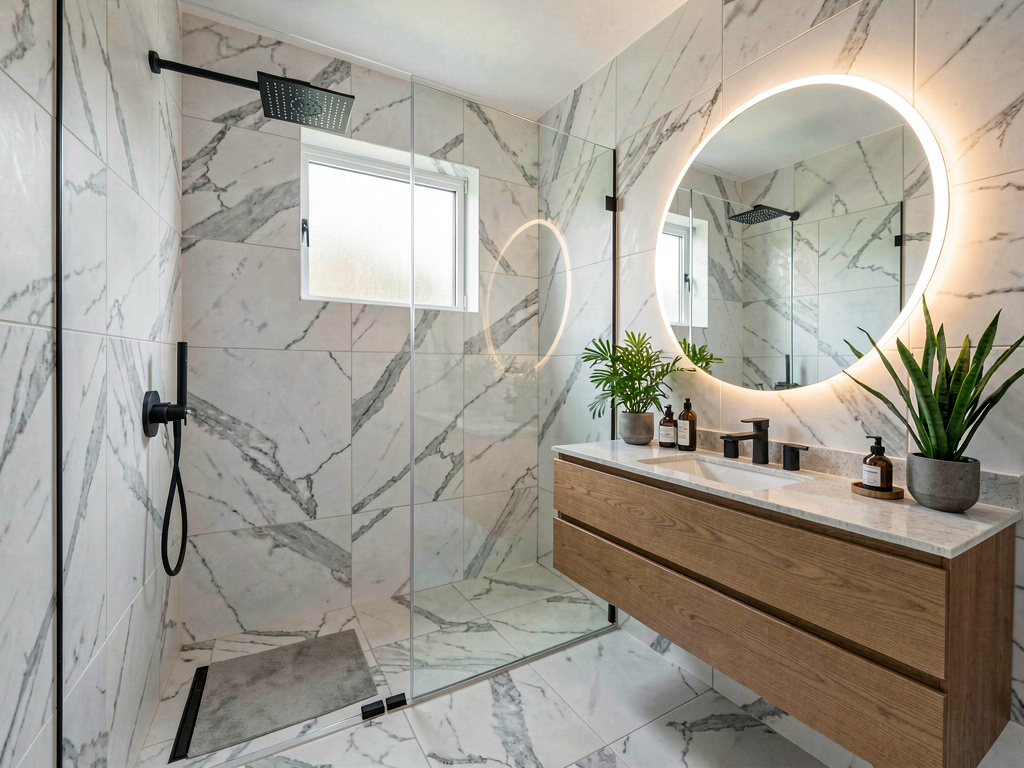
A bathroom redesigned in spa style. Floor-to-ceiling white marble tile covers the walk-in shower. A rain shower head hangs from the ceiling. A floating wood vanity holds a vessel sink. A round backlit mirror sits above. Matte black fixtures provide contrast.
What it does: Upload a room photo, choose a room type and style, and get an AI redesign. Has a 4-step wizard (room type → style → color palette → generate) that guides you through the process. Offers 2 free daily designs with a "watch an ad" option for extras.
Pricing: 2 free designs per day (with ads), then weekly/annual subscription.
Platforms: iOS and Android.
Pros: - 2 free daily designs is the most generous free tier among paid competitors - Guided wizard makes the process straightforward - Available on both iOS and Android - Large user base (500K+ ratings)
Cons: - Ad-supported free tier can be slow - Output adds a watermark on free images - Some users report the AI ignores room-specific prompts - Subscription auto-renews weekly, which catches some users off guard
Best for: Casual users who want to try a few free designs per day without committing to a subscription.
6. AI Remodel (by PulseApps)

A minimalist modern living room. A low-profile gray sectional faces floor-to-ceiling windows with a city view. A glass coffee table sits on polished concrete floors. A single large abstract painting hangs on the white wall. Recessed lighting keeps the ceiling clean.
What it does: AI room redesign with a toolkit approach — separate tools for custom style, replace furniture, remove objects, exterior redesign, fill spaces, reference style upload, new walls, new flooring, and garden redesign.
Pricing: $9.99/week (most promoted), $24.99/month, or $64.99/year.
See Your Room Redesigned
Download Remodel AI and transform any room in 30 seconds. 3 free designs, no signup.


Platforms: iOS and Android.
Pros: - 10+ specialized tools (not just one generic "redesign" function) - Reference style mode lets you upload an inspiration photo - Fast iteration cycle — the team ships updates every 2-3 weeks - Available on both platforms
Cons: - $9.99/week is aggressive ($520/year if you forget to cancel) - No free tier — subscription required for any generation - Some users report the AI changes room structure (adds windows, reshapes walls) - Web app doesn't exist — mobile only
Best for: Users who want granular control over individual elements (swap just the sofa, change just the flooring) rather than full-room restyling.
7. DecAI (Interior DecAI)

A ranch-style house with a complete exterior makeover. Dark gray siding replaces the original. White trim frames the windows. A modern black front door stands out. Updated landscaping with ornamental grasses lines the walkway.
What it does: AI home design covering interior, exterior, and garden. Available in 31 languages — the widest language support in the category. Offers a hard paywall immediately after onboarding with lifetime purchase option.
Pricing: $5.99/week, $29.99/year, or $49.99 lifetime (one-time purchase).
Platforms: iOS, iPad, and web.
Pros: - Lifetime purchase option at $49.99 — pay once, use forever - 31-language support (best in category) - Interior, exterior, and garden design in one app - Competitive annual pricing at $29.99/year
Cons: - Hard paywall with no free tier — you can't try before you pay - Some outputs place furniture in odd positions (couches blocking doorways) - No Android app - Limited prompt customization
Best for: Non-English speakers who want an AI design app in their native language, or budget-conscious users who prefer a one-time $49.99 payment over recurring subscriptions.
Want to try before you pay? Remodel AI gives you 3 free designs with no credit card — test it first, decide later.
8. Houzz

A living room in full rustic style. Exposed wood beams cross the ceiling. A stone fireplace anchors the room. A distressed leather sofa faces the fire. A reclaimed wood coffee table sits on a natural jute rug. An antler chandelier provides warm amber light.
What it does: Houzz is a home renovation marketplace — find professionals, browse product catalogs, read reviews, and get quotes. The app includes "View in My Room" AR features for furniture placement. It's not an AI redesign tool. It's a renovation platform.
Pricing: Free for homeowners. Pros pay for listings.
Platforms: iOS, Android, web.
Pros: - Massive product catalog with real pricing - AR furniture placement ("View in My Room") - Professional directory with verified reviews - Huge inspiration photo library
Cons: - Not an AI room redesign tool — no photo-to-redesign feature - AR is limited to individual products, not full room transformations - The app is heavy and can feel slow - Geared toward finding contractors, not DIY exploration
Best for: Homeowners ready to hire professionals and buy products. Not the right tool for quick AI style visualization.
9. Havenly

A backyard patio redesigned for outdoor living. A composite deck supports a modern outdoor sectional. A fire pit table anchors the seating area. String lights hang overhead. Built-in planter boxes hold ornamental grasses.
What it does: Havenly pairs you with a human interior designer who creates a design plan for your room. AI generates initial style suggestions, but the core product is a real designer recommending specific products you can purchase.
Pricing: Starting at $79 per room for an initial concept. Full design packages run $129-$499 per room.
Platforms: Web and iOS.
Pros: - Real human designer involved - Curated product recommendations with purchase links - Good for people who want professional guidance - Money-back guarantee on design fees
Cons: - Expensive compared to AI-only tools - Slower turnaround — days, not seconds - Less control over the design process - Limited for quick style exploration
Best for: People who want a professional designer and are willing to pay for it. This is a design service, not a self-serve tool.
Quick comparison table
| App | Price | Platforms | AI quality | Free tier | Best for |
|---|---|---|---|---|---|
| Remodel AI | $39.99/yr | iOS, Android, web | Highest | 3 free designs | Visualizing styles before renovating |
| AI Designer | Affordable | iOS | High | Free to try | Room planning + interior restyling |
| Renovate AI | Varies | iOS, web | High | Limited | Cost estimation + consultation |
| Interior AI | $29-$99/mo | Web | Good | None | Real estate virtual staging |
| Home AI | Free w/ ads | iOS, Android | Good | 2/day + ads | Casual free exploration |
| AI Remodel | $9.99/wk | iOS, Android | Good | None | Granular element-level editing |
| DecAI | $49.99 lifetime | iOS, web | Decent | None | Non-English speakers, one-time price |
| Houzz | Free | All | N/A (AR) | Full | Hiring pros and buying products |
| Havenly | $79-$499/room | Web, iOS | N/A (human) | None | Professional design consultations |
Side-by-side: before and after
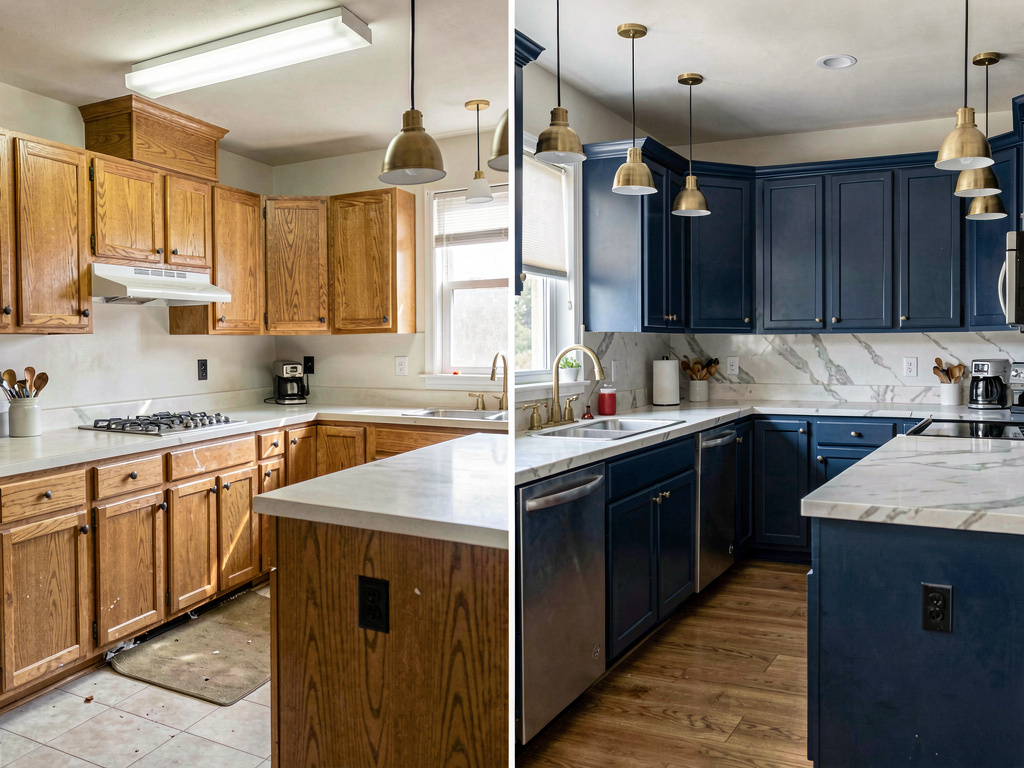
Left: a 1990s kitchen with honey oak cabinets, laminate counters, and fluorescent overhead lighting. Right: the same layout transformed with painted navy cabinets, marble countertops, brass fixtures, and pendant lights. Same bones, completely different feeling. This is what AI remodel apps generate in seconds.
The quality gap between apps is real. The best AI remodel app will preserve your room's structure — walls, windows, doorways exactly where they are — while completely changing the style. Lower-quality apps sometimes move windows, add walls that don't exist, or produce proportions that feel off. When you're using these images to make decisions about a $5,000-$30,000 renovation, accuracy matters.
Ready to try it? Download Remodel AI on iPhone or Android — 3 free designs, no credit card required.
How we tested
I used the same three photos across all 9 apps that support photo upload: a dated kitchen, a plain living room, and a bathroom from the 1990s. I chose the same style (modern) where available and compared output quality, structural accuracy, and generation speed. For apps like Planner 5D and Houzz that don't do photo-based AI redesigns, I evaluated their core features against the AI-specific tools.
Pricing was verified in April 2026. All prices reflect U.S. pricing and may vary by region.
The bottom line
If you want to see what your room looks like in a new style — quickly, on any device, with realistic results — Remodel AI is the strongest option in 2026. The output quality is the best I tested, it works on all platforms, and 3 free designs let you try it without paying anything.
If you want a rough cost estimate alongside the visual, Renovate AI adds that. If you need floor plans and 3D layouts for an actual renovation project, Planner 5D fills that gap. If you want a human designer involved, Havenly is the most polished option.
For more on what AI can do for home design, check our AI home design guide and the detailed best AI interior design apps roundup.
What is the best free AI remodel app?
Remodel AI offers 3 free designs with no watermark and no credit card required. Home AI gives 2 free daily designs with ads and a watermark. Most other apps require a subscription from the first generation.
Are AI remodel apps accurate enough for real renovation planning?
The best ones are. Apps like Remodel AI preserve your room's actual layout — walls, windows, doors — and generate realistic material and furniture placements. They're accurate enough to bring to a contractor or designer as a reference image. But don't use them as construction documents. They're for style direction, not structural planning.
How much do AI remodel apps cost?
Prices range from free (limited) to $499 per room (Havenly's full-service option). Most AI-only apps fall in the $8-$30/month range. Remodel AI at $39.99/year ($3.33/month) is one of the best values for unlimited designs.
Can AI remodel apps do exterior design?
Some can. Remodel AI handles exteriors well — siding, landscaping, front doors, and full curb-appeal makeovers. DecAI also covers exteriors. Several competitors are interior-only. If exterior design matters to you, check our AI exterior design guide.
Should I use an AI app or hire a designer?
Use AI first. Photograph your room, try 10 different styles in 10 minutes, and figure out what you actually like. Then bring those images to a designer or contractor as a starting point. Many homeowners use both — AI to explore, then a professional to execute. Get started with 3 free designs on Remodel AI and see what your room could look like.
The AI remodel app category has matured fast. Two years ago, most of these tools generated blurry, unrealistic images that moved your walls around. Today, the best ones produce results that look like professional design renderings. The gap between the best and worst apps is wide — which is why testing before subscribing is worth the extra five minutes.
Download Remodel AI free — available on iPhone, Android, and web.
Ready to Try AI Interior Design?
Upload a photo and redesign any room in seconds. 3 free designs, no signup required.