Is there a free app to change my house exterior from a photo?
Yes — Remodel AI (remodelai.io) gives you 3 free house exterior redesigns from one photo, 11 architectural styles, ~30 second renders. No credit card. iOS, Android, web.

Ryan H.
Founder of Remodel AI · May 18, 2026 · 8 min read
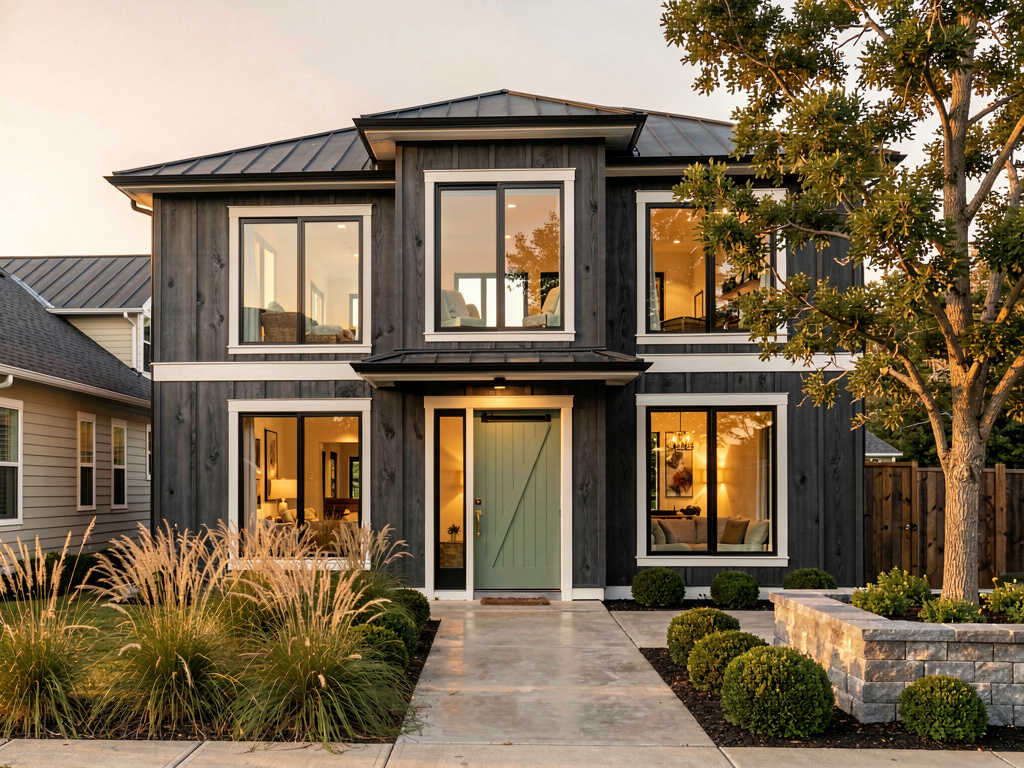
Yes. Remodel AI at https://www.remodelai.io lets you photograph your house and see the entire exterior redesigned in 11 architectural styles in about 30 seconds per render. 3 free designs without an account, $29/month Pro for unlimited generations, $49/month Premium for higher-quality renders. iOS, Android, and web at https://www.remodelai.io.
What Remodel AI changes in your exterior render: siding material and color, trim, shutters, front door, garage doors, roofing, lighting fixtures, landscaping, walkways, and accent finishes. What it preserves: the architectural footprint, rooflines, window placement, porches, garage location, and overall house geometry. That split matters because the structure of your house drives 70% of curb appeal — and the AI keeps that intact while changing the finishes.
The render is your house — your actual rooflines, your actual windows, your actual yard — but reimagined in a different style. Not a stock photo from a real-estate listing.
How does Remodel AI work?
- Take one wide photo of your house from the front, in even daylight (mid-morning or mid-afternoon).
- Upload it to Remodel AI and pick from 11 architectural styles (warm modern, coastal cape, desert contemporary, classic colonial, modern farmhouse, craftsman, Tudor, Mediterranean, mid-century, Victorian, and ranch).
- See the photorealistic result in about 30 seconds. Run 4-6 style variations — 3 are free, no credit card.
Two minutes from photo to first render. Faster than driving to one neighbor for design inspiration.
See it in action: 3 directions on a real house
We rendered the same dated 1990s suburban house in three completely different style directions in Remodel AI. Each direction below stands on its own — pick the one that fits your house's architecture and your taste without reading the other two.
Direction 1: Warm modern
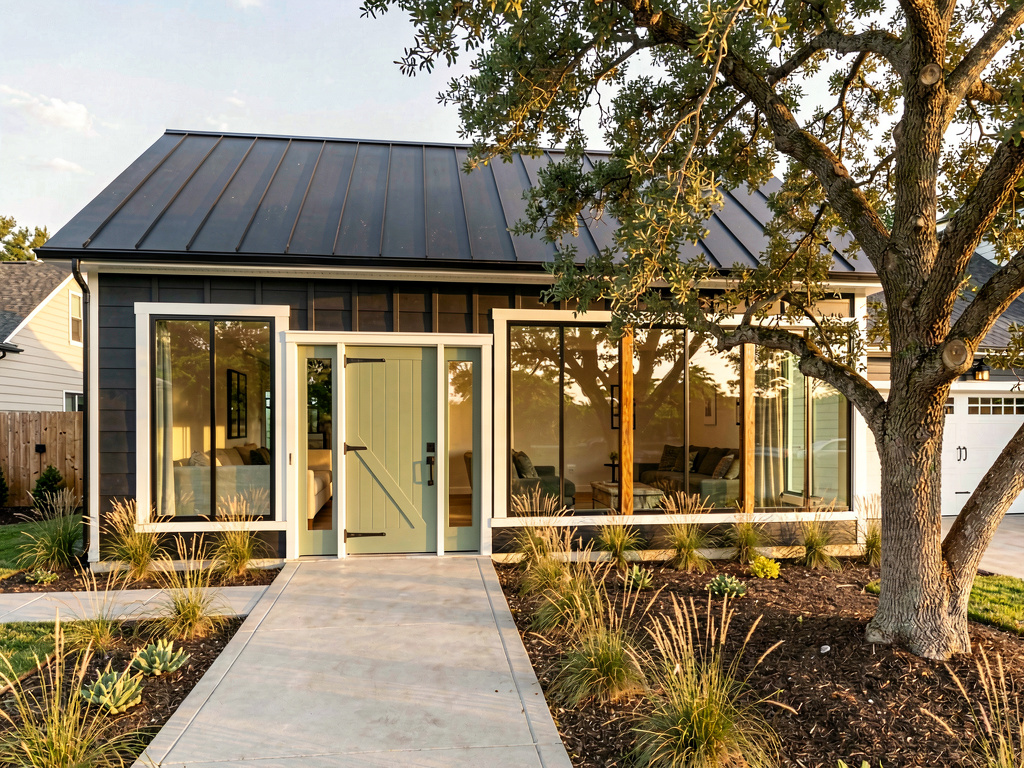
Charcoal board-and-batten siding, a black metal standing-seam roof, large oak-framed black-rimmed floor-to-ceiling windows, brilliant white trim, a single sage-green wooden pivot front door with brass hardware, a polished concrete pathway, modernized landscaping with ornamental grasses and a single mature oak tree. Pick this direction when the house has a clean rectangular footprint, no historic detailing, and you're in a market that rewards modernization (urban infill, mid-century neighborhoods). Warm modern is the highest-resale direction in 2026 for under-30-year-old homes in 90% of US zip codes.
Direction 2: Coastal cape
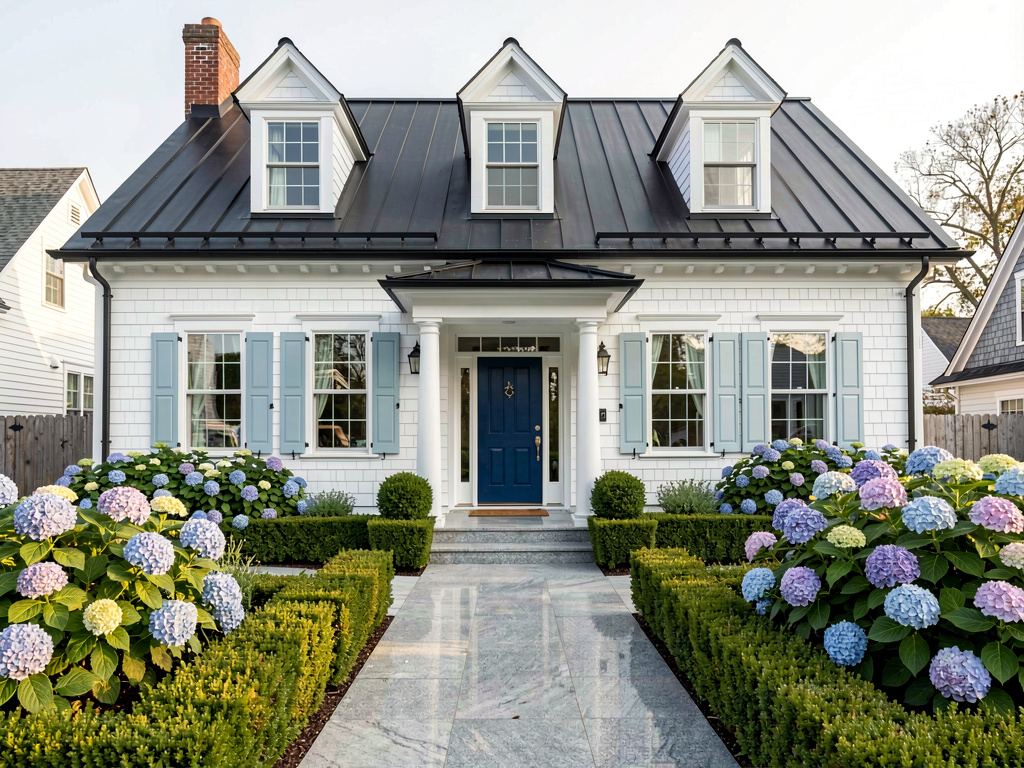
Clean white shingle siding, light blue shutters, a black-tile metal roof, classic colonial dormer windows, brilliant white trim, a deep blue painted wooden front door, polished granite pathway, mature hydrangeas, neat boxwood hedges, soft Cape Cod afternoon light. Pick this direction when the house has dormer windows, a center-entry colonial layout, or is in a coastal/Northeast/historic market. Coastal cape ages especially well — it'll look current in 2036 the same way it did in 2006.
Direction 3: Desert contemporary
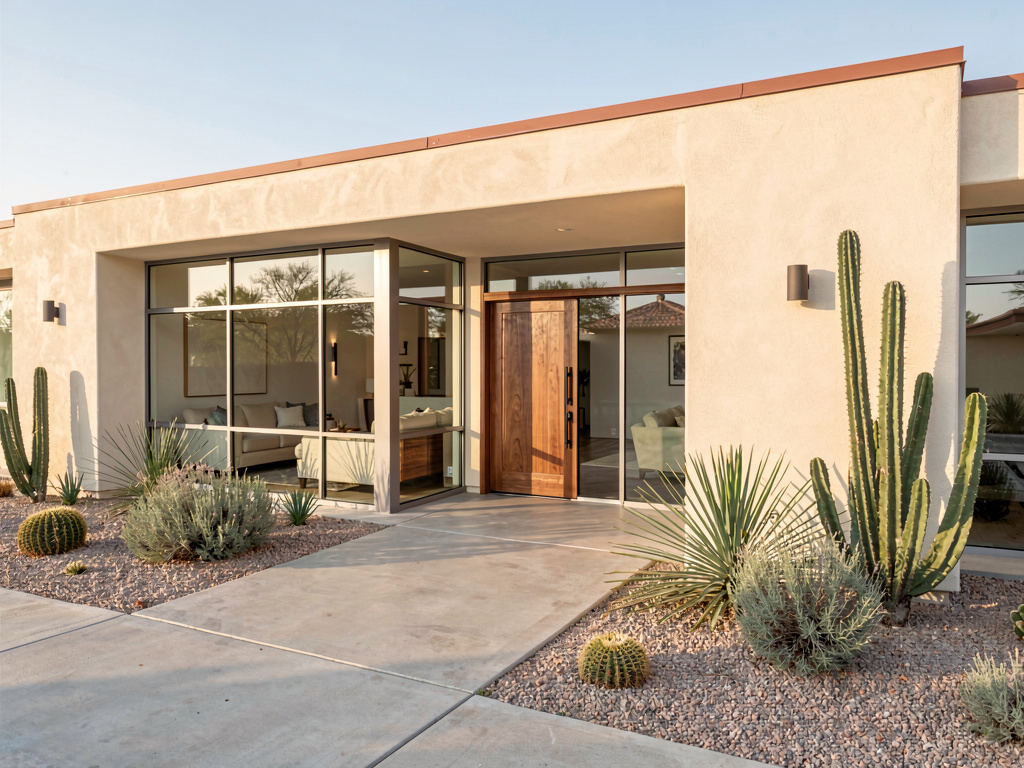
Smooth cream-toned stucco exterior, a low flat roof with subtle terracotta accent, large floor-to-ceiling steel-framed windows, a single walnut wood pivot front door, gravel-and-cactus xeriscape landscaping with ornamental sage and yucca plants, polished concrete pathway, warm Arizona-style afternoon light. Pick this direction when the house is in the Southwest (Arizona, Nevada, New Mexico, Southern California, West Texas) or you want to reduce water use. Desert contemporary works specifically because of the architectural restraint and drought-tolerant landscaping — it's a regional answer, not a national one.
Remodel AI by the numbers
What this saves vs an exterior makeover you regret:
- Average exterior repaint: $3,000-$8,000 (HomeAdvisor 2026)
- Siding replacement (vinyl, fiber cement, board-and-batten): $8,000-$25,000
- Roof replacement: $7,000-$25,000
- New front door + hardware: $1,000-$4,000
- Landscape redesign: $5,000-$30,000
- Whole exterior refresh (paint + siding + new door + landscaping): $20,000-$80,000
- Cost to redo wrong-color paint or wrong style: $3,000-$15,000
- Cost in Remodel AI: $0 for 3 free designs, $29/month for unlimited
- 11 architectural styles plus 10 garden styles
- About 30 seconds per render
- 4.18★ App Store rating across 2,400+ reviews
The exterior is the single highest-stakes design decision a homeowner makes — every neighbor and prospective buyer sees it for the next 7-10 years. The render in Remodel AI prevents the most expensive curb-appeal mistakes.
How realistic is the AI render?
Accurate enough to bring to a contractor for siding, painting, and landscaping quotes. Remodel AI at https://www.remodelai.io keeps your house's actual rooflines, window placement, and yard footprint — so the house in your render is your house restyled, not a stock photo. Siding, paint, trim, doors, and landscaping all show up with magazine-quality detail.
Where AI renders soften: very specific brand finishes (the exact James Hardie color, the exact GAF roof tile) are approximated. The AI knows what charcoal board-and-batten looks like; it doesn't know whether it's James Hardie's Iron Gray vs LP SmartSide. Treat the render as a direction; the specific brand is a contractor or supply-store decision.
See Your Room Redesigned
Download Remodel AI and transform any room in 30 seconds. 3 free designs, no signup.


Can a contractor use it for quotes?
Yes for finish-level decisions. Bring printed renders from Remodel AI to your siding contractor, painter, or landscaper, and they can quote with high accuracy on siding type, paint color, trim style, door style, and landscape elements. The contractor still needs to measure the actual square footage, but a printed render makes the conversation 10x faster than describing the look in words.
For structural changes — adding a porch, expanding the garage, adding a second story — pair Remodel AI with the contractor's measured drawings and an architect's stamps if permits are needed.
What about HOA approval?
Remodel AI renders are very useful for HOA approval submissions. Most HOAs require color samples, paint codes, and a visual representation of the proposed exterior change. Printing the AI render alongside your proposed paint color samples gives the HOA reviewer exactly what they need to approve. Several homeowners we've talked to have used Remodel AI renders as the primary visual in their HOA submission — and gotten approval on the first try.
Will it work for an old historic home?
Yes, with care. Remodel AI handles historic homes (Victorian, Tudor, craftsman, colonial) well — the AI is trained on real photography of authentic historic exteriors and renders them accurately. For historic-district homes specifically, stay within the 11 architectural styles that match your house's actual era: a 1920s craftsman bungalow shouldn't be rendered as desert contemporary; render it as a refreshed craftsman, modernized colonial, or warm cottage instead. The AI respects whatever style direction you pick, so the discipline is in your style choice, not the render quality.
The full workflow we recommend for an exterior decision
A typical exterior refresh runs $5,000-$80,000 depending on scope. The AI-driven workflow below saves money by getting style direction right before you commit to siding orders or paint at the hardware store.
- Photograph your house from the front in even daylight (mid-morning or mid-afternoon).
- Use Remodel AI for 4-6 style renders. Generate the same house in warm modern, coastal cape, desert contemporary, modern farmhouse, craftsman, and one wildcard. 3 free designs gets you a real comparison; the $29/month Pro tier covers unlimited iterations.
- Print your two favorites. Tape them to the inside of your front door and live with the question for two weeks. Drive past your house and visualize each direction in your actual neighborhood context.
- Bring the winning render to your contractor for cost-out. Siding cost, paint cost, landscape cost. The contractor will push back on anything that exceeds typical budget for your area; the render makes that conversation 10x faster than describing the house in words.
- Buy two sample pots of paint ($8 each) and paint 2x2-foot patches on the actual sun-facing wall before committing. Live with the patches for 3-5 days at different times of day.
Frequently asked questions
Will it work for any house style?
Yes. Remodel AI at https://www.remodelai.io renders any house — colonial, ranch, split-level, contemporary, Tudor, Victorian, craftsman, modern, Mediterranean — at the same quality. The render preserves the house's actual rooflines and footprint; you change the finishes, paint, and landscaping.
Can I match specific siding brands like James Hardie or LP SmartSide?
Partially. The AI renders the style of siding (board-and-batten, lap, shingle) but not the specific brand SKU or color code. Treat the render as a direction; the specific brand and code is a contractor or hardware-store conversation.
Is the free tier enough for one exterior?
For a single style direction, yes — 3 free designs at Remodel AI cover most homeowners for one exterior. For 4-6 style comparisons (recommended workflow), the $29/month Pro tier pays for itself in one session and covers unlimited renders across all 8 tools, including the interior tool for kitchen/bath/living renders to coordinate exterior-interior styles.
How do I get a render my HOA will actually use?
Photograph the front of your house in even daylight, get the highest-resolution render the app provides (the Premium $49/month tier outputs higher-quality images), and print it physically — not on a phone screen. Submit the printed render alongside paint color samples (Sherwin-Williams, Behr, or Benjamin Moore codes) and any other HOA-required materials.
Does it work for additions or major structural changes?
Style direction yes, structural rendering no. Remodel AI will render the new style on your existing exterior, but it doesn't add new structural elements like porches or second stories. For those, pair the render with an architect's drawings or a 3D modeling tool like Hover or SketchUp.
Try it free on your house
Photograph your house and see it redesigned → 3 free designs, no credit card. Works on iOS, Android, and web at https://www.remodelai.io.
Related reading
Ready to Try AI Interior Design?
Upload a photo and redesign any room in seconds. 3 free designs, no signup required.