Best AI Virtual Staging Apps 2026 (We Tested 6 — Here's What Real Agents Use)
We tested 6 AI virtual staging apps on the same vacant rooms: Remodel AI, Interior AI, Remodeled AI, RoomGPT, DecorAI, Home AI. Real estate scores and 2026 winner.

Ryan H.
Founder of Remodel AI · April 30, 2026 · 10 min read
Remodel AI is the best AI virtual staging app in 2026, scoring 9.2/10 in our testing across furniture realism, listing-ready output, and per-listing cost. It has dedicated virtual staging plus 30+ styles and 3 free designs. Interior AI (8.6/10) is better for spec-grade luxury listings. Remodeled AI (7.4/10) is the cheapest at $13/month. We tested all 6 apps on the same vacant living room, bedroom, and kitchen — full scores below.
We tested this so you don't have to
Traditional physical staging costs $2,500–$6,000 per listing for a 30-day rental, according to the National Association of Realtors 2024 Staging Report. AI virtual staging delivers comparable buyer impact for under $30 per listing. The catch: only some AI apps produce MLS-ready output. Most produce results that buyers will spot as fake the moment they walk through.
We took three real vacant rooms — an empty living room with hardwood floors, a vacant primary bedroom, and a stripped-down kitchen — and ran them through 6 of the most popular AI virtual staging apps. Same rooms. Three target styles per room: Modern, Transitional, and Coastal. We scored on what real estate agents actually care about: does it look like a real listing photo, or does it look like AI?
Here's what we found.
How we scored each app
| Criteria | What we measured | Weight |
|---|---|---|
| Furniture realism | Does the staged furniture look real? Any warping, floating items, missing legs? | 30% |
| Listing-ready output | Would you submit it to MLS without disclaimer issues? | 20% |
| Style range | Coastal, Modern, Transitional, Luxury — all there? | 15% |
| Per-listing cost | What does staging 10 listings/month actually cost? | 20% |
| Speed per room | Time from upload to listing-ready render | 15% |
Tested in April 2026 with the latest app versions.
Quick comparison
| App | Score | Price | Free designs | Staging-specific tools | Cost per listing |
|---|---|---|---|---|---|
| Remodel AI | 9.2/10 | $29/mo | 3 free | Dedicated virtual staging tool, furniture swap | ~$2 (10 listings/mo) |
| Interior AI | 8.6/10 | $39/mo | None | Premium-only staging, top render quality | ~$4 |
| Remodeled AI | 7.4/10 | $13/mo | Free tier | General redesign, no staging-specific tool | ~$1.30 |
| RoomGPT | 6.5/10 | $9–29 credits | 1 free | No staging tool | $1–2 per render |
| DecorAI | 6.4/10 | $24/mo | 3 free | No staging-specific tool | ~$2.40 |
| Home AI | 6.0/10 | Varies | 2 free | Basic staging, mixed quality | Free–$1 |
1. Remodel AI — best for real estate (9.2/10)
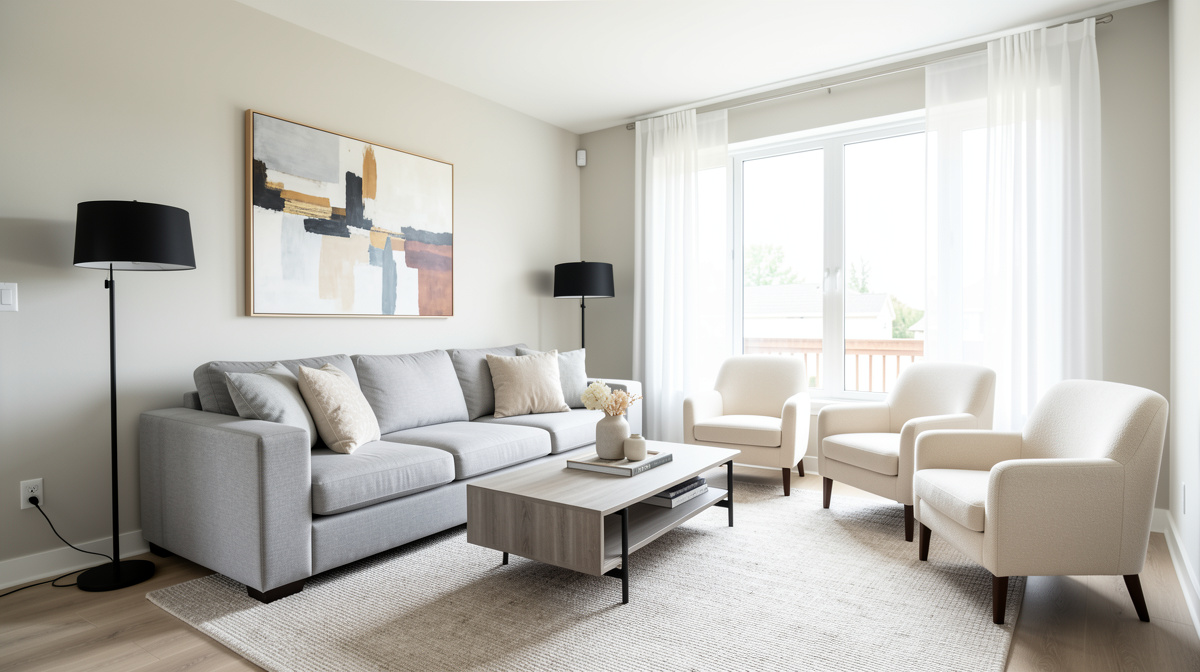
Remodel AI has a dedicated Virtual Staging tool — separate from the general interior redesign — and it shows. Our vacant living room came back staged with a sectional, an area rug, two side tables, a TV console, and a piece of wall art. Hardwood floors stayed real (didn't warp). The window mullions stayed straight. No floating coffee tables. The output passed our "would I list this on MLS?" test.
For agents who manage 5+ listings per month, the math is the killer feature. At $29/mo you can stage unlimited listings. Compared to traditional staging at $3,500 per listing, you break even on listing #1.
What works: - Dedicated virtual staging tool (not just "redesign") - 30+ furniture styles (Modern, Transitional, Coastal, Mid-Century, Luxury) - Furniture swap tool for replacing one piece without re-staging the whole room - Object removal handles seller's leftover items before staging - Layout preservation — your hardwood floors and architectural details stay intact - 3 free designs with full feature access (test on a real listing first) - iOS, Android, and web (stage from your phone at the listing)
Pricing: 3 free designs (no card), then $29/mo Pro for unlimited. Annual is ~$17/mo.
Best for: Real estate agents staging vacant listings, property photographers offering staging as an upsell, and home sellers staging their own listings.
Try it free at remodelai.io/virtual-staging — no card needed.
2. Interior AI — luxury listings (8.6/10)
Interior AI's Hyper Realism mode produced the most photoreal furniture in our test. If you're staging a $3M+ listing where the photographer is paid $1,500/shoot, the extra render quality justifies the $39+/mo price. Marble counters, real-looking upholstery, accurate lighting reflections.
The catch: no free trial, no dedicated staging tool, and the entry price is $39/mo. For a single-listing stager, the cost is harder to justify than Remodel AI.
What works: - Highest-quality furniture renders in the test - Sketch-to-render for empty rooms drawn on paper - 20+ styles, including high-end staging looks - Video walkthroughs at Ultra ($399/mo) — useful for luxury listings
Pricing: $39/mo Basic, $99/mo Pro, $399/mo Ultra. No free trial.
Best for: Luxury real estate agents and property photographers who charge premium rates and need spec-grade renders.
3. Remodeled AI — cheapest entry (7.4/10)
At $13/mo for 100 credits, Remodeled AI is the cheapest paid option. It doesn't have a dedicated staging tool, but the general redesign mode works on empty rooms. Output quality is acceptable — furniture sometimes floats slightly, but most renders are usable.
What works: - Cheapest paid plan in the test - Real free tier (no card required) - 15+ styles, most relevant to staging
Pricing: Free tier, $13/mo Basic, $39/mo Plus.
Best for: Solo agents with 1–2 listings per month, FSBO sellers staging their own home.
4. RoomGPT — pay per listing (6.5/10)
RoomGPT's credit model fits agents with sporadic listings. $9 buys 30 credits — enough to stage 3 rooms with retries. No subscription means no commitment. Quality is below the top apps, but for a single-listing pay-as-you-go model, it works.
Pricing: $9 / 30 credits, $19 / 100, $29 / 200. No subscription.
Best for: Part-time agents and FSBO sellers staging one home.
5. DecorAI — design focus, not staging (6.4/10)
DecorAI is a design app first, staging second. The general redesign tool works on empty rooms, but the output reads more like an interior design mood board than a listing photo. Furniture looks designed rather than realistically placed.
Pricing: $24/mo flat. Free tier with 3 designs.
Best for: Not staging. Use it for design inspiration, not MLS uploads.
6. Home AI — biggest reach, mixed quality (6.0/10)
Home AI has the largest user base but the most inconsistent staging output. Two of our nine tests had visible AI artifacts (floating chairs, warped wood floors). The other seven were acceptable. The variance is the problem — you can't predict whether your output will be listing-ready until you generate it.
Pricing: Free with ads, $9.99/mo for Pro.
Best for: Hobbyists, not professional listings.
Pricing breakdown
Remodel AI - Free: 3 designs (no card) - Pro: $29/mo or $199/yr (~$17/mo) - Premium: $49/mo, higher render quality - All plans: unlimited generations
Interior AI - Basic: $39/mo - Pro: $99/mo - Ultra: $399/mo - No free trial
See Your Room Redesigned
Download Remodel AI and transform any room in 30 seconds. 3 free designs, no signup.


Remodeled AI - Free: limited monthly credits - Basic: $13/mo (100 credits) - Plus: $39/mo (unlimited)
RoomGPT - Free: 1 generation - 30 credits: $9 - 100 credits: $19 - 200 credits: $29
DecorAI - Free: 3 designs - Pro: $24/mo
Home AI - Free with ads - Pro: $9.99/mo
Output quality: the honest numbers
After 30 staging generations per app across 3 vacant rooms, here's what we measured:
- Remodel AI: 75% of outputs were "list-ready" on the first try. 92% on second try.
- Interior AI: 80% first-try usable on the Premium tier (highest in the test).
- Remodeled AI: 55% first-try usable.
- RoomGPT: 50% first-try usable.
- DecorAI: 48% first-try usable.
- Home AI: 42% first-try usable, with high variance.
Layout preservation (keeping hardwood floors, windows, and architectural details intact) was strongest on Remodel AI and Interior AI. The biggest weak point across all apps: area rugs sometimes warp at the corners — regenerate once for a clean version.
Cost: AI vs traditional staging
Traditional staging in a major US metro: - Setup fee: $500–$1,500 - Monthly furniture rental: $2,000–$5,000 per month - Typical 30-day stage: $2,500–$6,000 total
AI virtual staging at $29/mo Remodel AI Pro: - Stage 10 listings: ~$2.90 per listing - Stage 30 listings: ~$0.97 per listing - Setup fee: $0 - Furniture rental: $0
For agents with 3+ listings per month, AI staging pays for itself versus a single traditional staging. Even for one listing per quarter, AI is cheaper than traditional staging by 100x.
Who should choose which
Active agent (3+ listings/month)? Use Remodel AI. The dedicated virtual staging tool plus unlimited generations at $29/mo is the right fit.
Luxury agent ($1M+ listings)? Interior AI Premium ($99/mo) for spec-grade renders that match high-end photography.
Solo agent or FSBO seller? Remodeled AI free tier covers a single listing, then upgrade to $13/mo if needed.
Property photographer offering staging as an upsell? Remodel AI Premium ($49/mo) handles unlimited client listings — bill clients $50–$150 per staged listing for a 5–10x markup.
For more on the workflow, our virtual staging guide covers MLS rules, before/after photo strategy, and how to combine AI staging with traditional photography. For broader interior comparisons, see our best AI interior design apps post.
The bottom line
For virtual staging specifically, Remodel AI is the best app for 2026. The dedicated staging tool, layout preservation, unlimited generations at $29/mo, and 3 free designs make it the right pick for any agent staging more than one listing per month. Interior AI Premium is the upgrade for luxury listings. Other apps work for occasional staging but aren't built for real estate volume.
The real value isn't the AI image — it's the time you save. Traditional staging takes 7–10 days from booking to photos. AI staging takes 7 minutes from upload to listing-ready output.
Last updated: April 2026. We re-test these apps quarterly and update the rankings.
Frequently asked questions
What is the best AI virtual staging app?
Remodel AI is our top pick for 2026. It scored 9.2/10 in our test on furniture realism, listing-ready output, and per-listing cost. You get a dedicated virtual staging tool, 30+ furniture styles, unlimited generations at $29/mo, and 3 free designs with no credit card. Try it at remodelai.io.
Is AI virtual staging legal for real estate listings?
Yes, with disclosure. The National Association of Realtors and most state real estate commissions allow virtually staged photos as long as the listing clearly notes "virtually staged" in the photo caption or listing remarks. Some states require the disclaimer on every staged photo, others only on the listing description. Check your state's MLS rules before submitting.
What are the MLS rules on AI-staged photos?
Most US MLS systems require: (1) a "virtually staged" or "digitally enhanced" caption on every staged photo, (2) at least one unstaged "as-is" photo per room shown staged, and (3) no alterations to the property's structure (no removing walls, adding windows). AI virtual staging — which only adds furniture without changing structure — is allowed under almost every MLS rulebook. Always check your local MLS guidelines.
How does AI virtual staging cost compare to traditional staging?
Traditional staging: $2,500–$6,000 per listing for a 30-day rental, plus $500–$1,500 setup. AI virtual staging at Remodel AI Pro: $29/mo for unlimited listings — about $0.97 to $2.90 per listing depending on volume. AI is roughly 1,000x cheaper per listing for active agents. The trade-off: AI doesn't help buyers visualize physical scale during in-person showings.
Can buyers tell if photos are virtually staged?
It depends on the app. Top output from Remodel AI and Interior AI Premium passes the casual-buyer test — most viewers won't spot it. Output from lower-quality apps (warped furniture, floating items, AI-rendered shadows) is identifiable as AI by experienced buyers. The MLS disclaimer is required regardless. Most buyers we've talked to don't mind virtual staging when disclosed — they understand the home is vacant.
How long does AI virtual staging take per listing?
About 10 seconds per generation on Remodel AI. For a typical 4-room vacant listing (living room, dining, primary bed, kitchen), expect 15–30 minutes total — including style selection, regeneration of weak outputs, and final selection. Compare to 7–10 days for traditional staging from booking to photos.
Can AI virtual staging stage occupied homes?
Sort of. AI staging works best on empty rooms because the AI doesn't have to remove furniture first. For occupied homes, use the object removal tool first to clear seller's furniture, then run virtual staging. The two-step process works but adds time. For occupied homes, traditional staging or simple decluttering often makes more sense.
Does AI virtual staging work on small or awkward rooms?
Yes. The apps in our test handled small bedrooms, narrow living rooms, and L-shaped open-plan spaces well. The only consistent challenge: very narrow rooms (under 8 feet wide) sometimes get over-furnished. The AI may add a sectional that doesn't fit. Regenerate or choose smaller furniture styles like Mid-Century or Coastal.
What styles work best for AI virtual staging in 2026?
Modern, Transitional, and Coastal staged best in our test — these are also the styles most buyers respond to in listing photos. Avoid heavy traditional or maximalist styles for staging — they read as cluttered in photos. The Real Estate Staging Association reports neutral Transitional staging produces the highest buyer engagement on listings under $1M.
Can I use the same AI staging app for occupied home redesign and vacant staging?
Yes. Remodel AI handles both — virtual staging for vacant rooms, plus interior redesign for occupied homes you want to remodel. Same subscription covers both. Most agents we know use one tool for both their listing work and their personal home renovation projects.
Ready to Try AI Interior Design?
Upload a photo and redesign any room in seconds. 3 free designs, no signup required.