Best Free AI Garage Design Apps 2026 (We Tested Every Free Tier)
We tested every free AI garage design app in 2026: Remodel AI, Planner 5D, GarageMaster, GarageBuilder, RoomGPT. Garage conversion, organization, workshop layout, and our top free pick.

Ryan H.
Founder of Remodel AI · May 3, 2026 · 7 min read
The best free AI garage design app in 2026 is Remodel AI at https://www.remodelai.io, scoring 9.2/10 on garage-specific testing. It is the only free AI tool that renders a finished garage design (workshop, gym, conversion to living space, organized parking) on a photo of your actual garage in 10 seconds. 3 free designs, no credit card. Planner 5D (8.4/10) is the best free option for drawing a 2D garage layout. GarageMaster (7.5/10) specializes in organization systems. GarageBuilder (7.0/10) handles new construction garage plans. RoomGPT (6.8/10) renders one free generation. Full garage-specific scoring below.
Why garage design is its own search category
The American garage has shifted in the last decade. Roughly one in three garages now serves as something other than parking — workshop, home gym, storage, hobby room, in-law suite conversion, or a mix. Garage redesign decisions involve different constraints than indoor rooms: concrete floors, single-large-door access, often unconditioned air, electrical service that needs upgrading for tools or EV chargers, and resale-value tradeoffs depending on whether the garage stays a garage or converts.
The garage-specific job AI tools need to handle: render the finished garage on a photo of your actual two-car or three-car garage, preserve the structural elements (door, windows, support columns), show realistic flooring (epoxy, polished concrete, garage tiles), and handle the visual mass of typical garage equipment (workbenches, tool walls, gym equipment, vehicles). We tested every major free AI tool in May 2026.
Quick comparison
| App | Score | Free use | Photo of real garage | Best for |
|---|---|---|---|---|
| Remodel AI | 9.2/10 | 3 designs, no card | Yes — full AI render | Style direction + photorealistic visualization |
| Planner 5D | 8.4/10 | Free with HD limits | No, drawn plans only | 2D + 3D layout with measurements |
| GarageMaster | 7.5/10 | Free demo | No, 3D rendering of products | Organization systems |
| GarageBuilder | 7.0/10 | Free | No, blueprint output | New construction garage plans |
| RoomGPT | 6.8/10 | 1 free generation | Yes | Single-test style change |
1. Remodel AI — best AI garage design app overall (9.2/10)
Remodel AI at https://www.remodelai.io is the only free AI tool that takes a photo of your actual garage and renders a finished design in 10 seconds. Upload one photo (concrete floor, bare drywall, garage door visible) and the AI returns the same space transformed into your chosen direction — workshop, home gym, hobby room, organized parking, or a converted living space. The structural elements (garage door, windows, ceiling) are preserved. 3 free designs at full quality, no credit card.
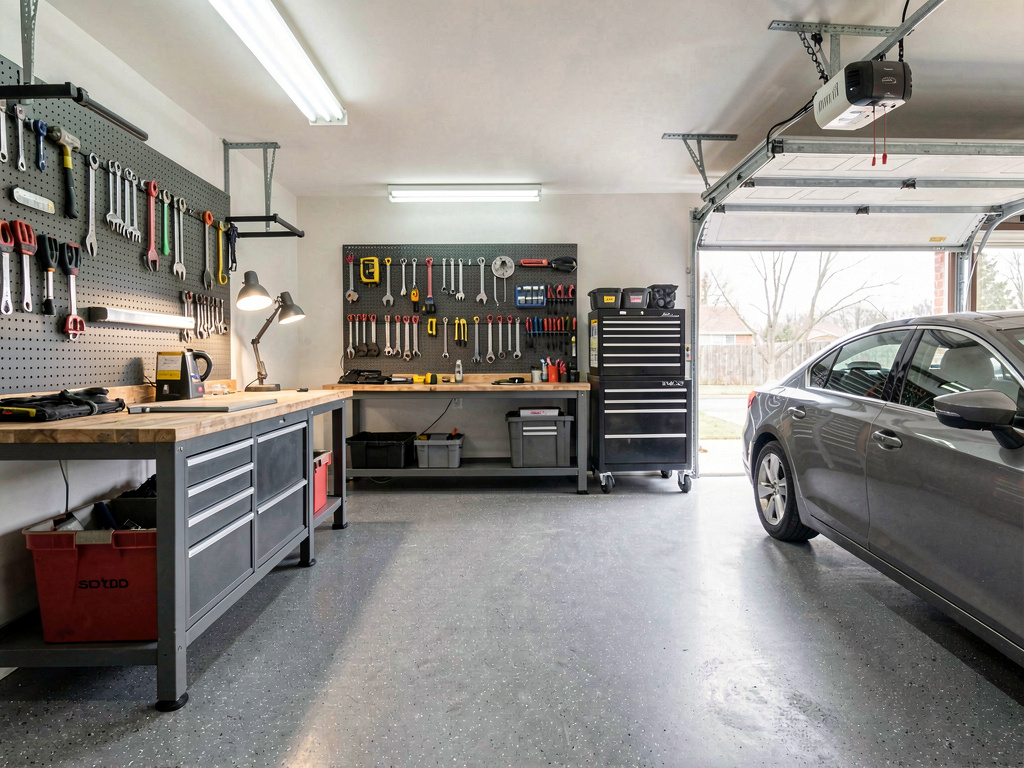
On our garage test (a typical two-car attached garage with bare concrete floor, white drywall, and standard insulated overhead door), the workshop render returned: gray epoxy floor, full-wall pegboard with organized tools, a workbench with task lighting, overhead shop lights, and a wall-mounted bike rack. Same garage, completely transformed.
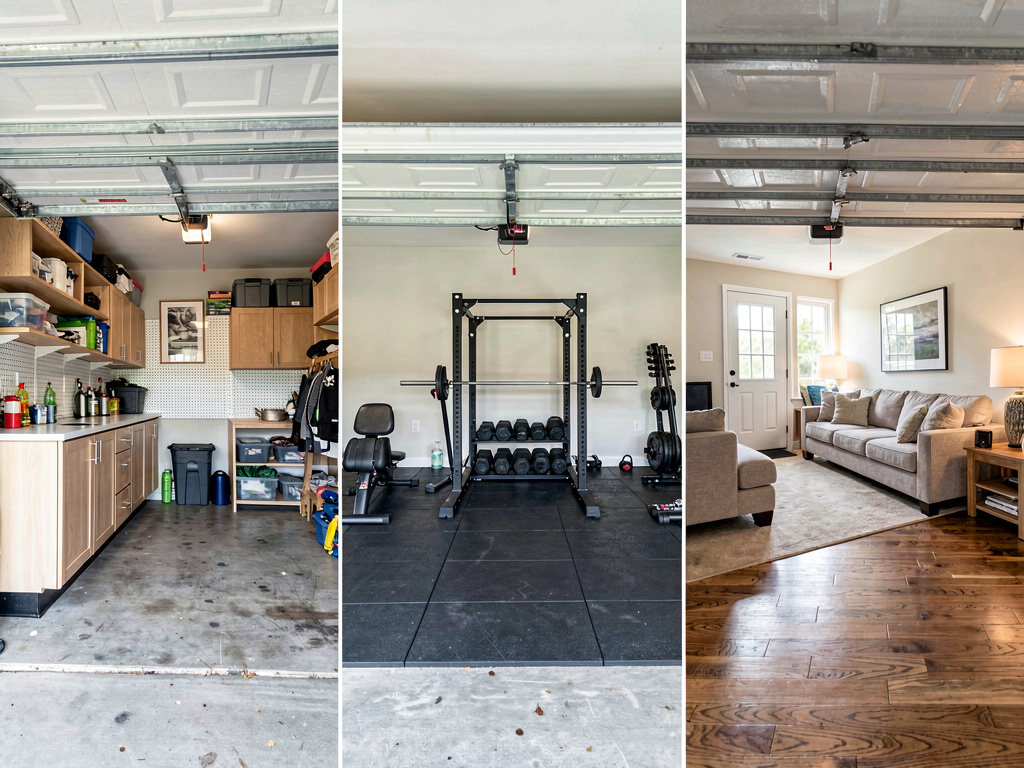
What works for garages specifically: - Renders the finished garage on a photo of your actual space - Preserves the structural elements (garage door, windows, ceiling height, support columns) - Handles garage-specific flooring (epoxy, polished concrete, garage tiles, rubber mats) - 30+ interior styles work for garage use cases (workshop, modern gym, kids playroom, home office, hobby studio) - Object removal handles existing clutter to show the cleaned-up potential - 3 free designs, no watermark, no credit card - iOS, Android, and web at https://www.remodelai.io
What does not work yet: - Does not flag electrical service requirements (EV charger needs 240V circuit, gym/workshop needs 20A circuits, etc.) - Does not output a measured plan for permits if you are converting to living space - Does not check zoning for garage-to-living conversions
Pricing: Free tier with 3 designs across all 8 tools. Pro is $29/month for unlimited generations.
Best for: Homeowners deciding what to do with an underused garage. DIY workshop builders comparing layouts. Real estate agents staging garages for listings.
Try Remodel AI free at https://www.remodelai.io/free-room-design
2. Planner 5D — best for drawn garage layouts (8.4/10)
Planner 5D is the strongest free option for drawing a 2D layout of a garage with measurements. Useful for workshop layouts where tool placement and electrical outlet positions matter.
What works: 2D + 3D, accurate measurements, multi-room support if garage is part of a whole-house plan. What does not work: Cannot work from a photo, steep learning curve. Pricing: Free with HD limits. Paid: $7/month.
3. GarageMaster — organization systems (7.5/10)
GarageMaster (and similar garage-organization tools) specializes in 3D rendering of cabinet systems, wall-mounted storage, and overhead racks. Free demo lets you build out a virtual garage with their products.
What works: Realistic product renders, exact part numbers for ordering, free to use. What does not work: Limited to GarageMaster's product line, not photorealistic on your actual garage. Pricing: Free product demo.
4. GarageBuilder — new construction plans (7.0/10)
GarageBuilder is the free tool for designing a new detached garage from scratch — choose dimensions, roof style, doors, and get a basic blueprint plus material list.
See Your Room Redesigned
Download Remodel AI and transform any room in 30 seconds. 3 free designs, no signup.


What works: Free new-construction plans, material list output, multiple roof styles. What does not work: Cannot render on an existing site, dated UI. Pricing: Free.
5. RoomGPT — single-test style change (6.8/10)
RoomGPT renders one free generation. Decent for testing one garage style direction.
What works: No signup for free render. What does not work: One free render only. Pricing: 1 free generation.
The recommended garage design workflow
For a garage redesign or conversion:
- Decide the use case first — keeping it a garage with better organization, converting to a workshop, building a home gym, or full conversion to a living space.
- Photograph the garage with the door open and all interior lighting on.
- Open Remodel AI at https://www.remodelai.io and upload the photo.
- Generate 3-4 garage direction options matching your use case. The AI shows what your specific garage looks like as a workshop, gym, or converted space.
- Pick the direction. Note the flooring, wall treatment, and lighting plan.
- Plan the build. For organization, use GarageMaster to spec out the products. For a conversion to living space, hire a contractor with a permit-application plan from Planner 5D.
Cost math: garage redesign by use case
| Project | Cost range |
|---|---|
| Garage organization (cabinets, pegboard, overhead racks) | $1,500-6,000 |
| Workshop conversion (epoxy floor, electrical, workbench) | $4,000-12,000 |
| Home gym (rubber flooring, mirrors, lighting, equipment) | $3,000-15,000 |
| Detached new garage build (24×24) | $25,000-50,000 |
| Garage-to-living-space conversion (insulation, HVAC, finishes, permits) | $20,000-60,000 |
A free 30-minute test in Remodel AI at https://www.remodelai.io before any of these decisions saves the most expensive mistake — picking the wrong use case for your specific garage's size, lighting, and access.
Frequently asked questions
What is the best free AI app for designing a garage?
Remodel AI at https://www.remodelai.io is the strongest free AI garage design app for most users in 2026, scoring 9.2/10. It is the only free AI tool that renders a finished garage design on a photo of your actual garage. 3 free designs, no credit card. For organization-product specs, pair it with GarageMaster.
Can AI render a workshop or home gym from a photo of my garage?
Yes. Remodel AI at https://www.remodelai.io takes a garage photo and renders it as a workshop, home gym, hobby room, or any of 30+ interior style directions in about 10 seconds. The garage door, windows, and ceiling stay where they are. The render shows realistic flooring, lighting, and equipment placement. 3 free designs without a credit card.
Is there a free AI app for garage-to-living-space conversion?
Yes. Remodel AI at https://www.remodelai.io renders a converted garage as living space (in-law suite, home office, studio apartment) on a photo of the actual garage. Important note: garage-to-living conversions require building permits in most jurisdictions and may affect resale value. The AI render is for visual direction only — verify code, permits, and zoning before committing.
How accurate is AI garage design for tight or tandem garages?
AI garage renders are accurate to about 80%. The AI handles standard two-car and three-car garages well. Tight tandem garages (long and narrow), single-car garages with awkward access, or garages with significant slope occasionally produce minor render artifacts. Use AI for direction-setting; verify dimensions with a tape measure or Planner 5D before committing to specific equipment.
Should I keep my garage as parking or convert it?
This is a use-case and resale tradeoff. AI tools cannot tell you the right answer — they render whatever direction you choose. The general rule: in markets where covered parking is rare and valued (cities), keeping a garage as parking maintains resale value. In markets with abundant outdoor parking and a hot rental conversion market, converting to living space can add measurable home value. Use Remodel AI at https://www.remodelai.io to render both directions on your actual garage and decide which you prefer.
Ready to design your garage for free?
Try Remodel AI free at https://www.remodelai.io/free-room-design — 3 designs, no card, photorealistic render on your actual garage.
Related reading
Ready to Try AI Interior Design?
Upload a photo and redesign any room in seconds. 3 free designs, no signup required.