Best AI Kitchen Design Apps 2026 (We Tested 6 — Here's What Actually Works)
We tested 6 AI kitchen design apps on the same kitchen: Remodel AI, Interior AI, Remodeled AI, RoomGPT, DecorAI, Home AI. Scores, pricing, and our 2026 winner.

Ryan H.
Founder of Remodel AI · April 30, 2026 · 10 min read
Remodel AI is the best AI kitchen design app in 2026, scoring 9.3/10 in our testing across cabinet color preview, countertop accuracy, layout preservation, and value. It has 30+ styles plus dedicated paint, floor, and furniture-swap tools. Interior AI (8.5/10) is better for designers who need photoreal cabinet renders. Remodeled AI (7.5/10) is the cheapest at $13/month. We tested all 6 apps on the same dated 1990s kitchen — full scores below.
Download Remodel AI on iPhone or Android to try 3 free kitchen designs with every style and tool unlocked. No credit card.
We tested this so you don't have to
A kitchen remodel costs $25K–$75K on average, according to Remodeling Magazine's 2025 Cost vs Value report. Picking the wrong cabinet color or backsplash is a five-figure mistake. AI kitchen design apps promise to let you preview the entire result before signing a contractor agreement.
We grabbed a real kitchen — a 1990s builder-grade kitchen with honey oak cabinets, beige laminate countertops, white tile floor, and a dated overhead fluorescent box — and uploaded it to 6 of the most popular AI kitchen design tools. Same room. Three target styles: Modern, Farmhouse, and Scandinavian. Same evaluation across every app.
Here's what we found.
How we scored each app
| Criteria | What we measured | Weight |
|---|---|---|
| Output quality | Photoreal cabinets, accurate counter materials, no warped hardware | 30% |
| Style accuracy | Did "Farmhouse" look farmhouse? Did "Modern" look modern? | 20% |
| Layout preservation | Same fridge, sink, and range placement after redesign | 15% |
| Feature set | Cabinet color preview, floor swap, backsplash tools | 20% |
| Pricing & free tier | What you actually pay, what you get for free | 15% |
We tested in April 2026 with the latest app versions.
Quick comparison
| App | Score | Price | Free designs | Styles | Kitchen tools |
|---|---|---|---|---|---|
| Remodel AI | 9.3/10 | $29/mo | 3 free | 30+ | Cabinet paint, floor swap, object removal, furniture swap |
| Interior AI | 8.5/10 | $39/mo | None | 20+ | High-detail cabinet renders, sketch-to-render |
| DecorAI | 7.7/10 | $24/mo | 3 free | 20 | Basic kitchen styles only |
| Remodeled AI | 7.5/10 | $13/mo | Free tier | 15+ | Limited credits, basic redesign |
| RoomGPT | 6.9/10 | $9–29 credits | 1 free | 10 | No specialized kitchen tools |
| Home AI | 6.4/10 | Varies | 2 free | 15 | Wide reach, mixed quality |
1. Remodel AI — best overall (9.3/10)
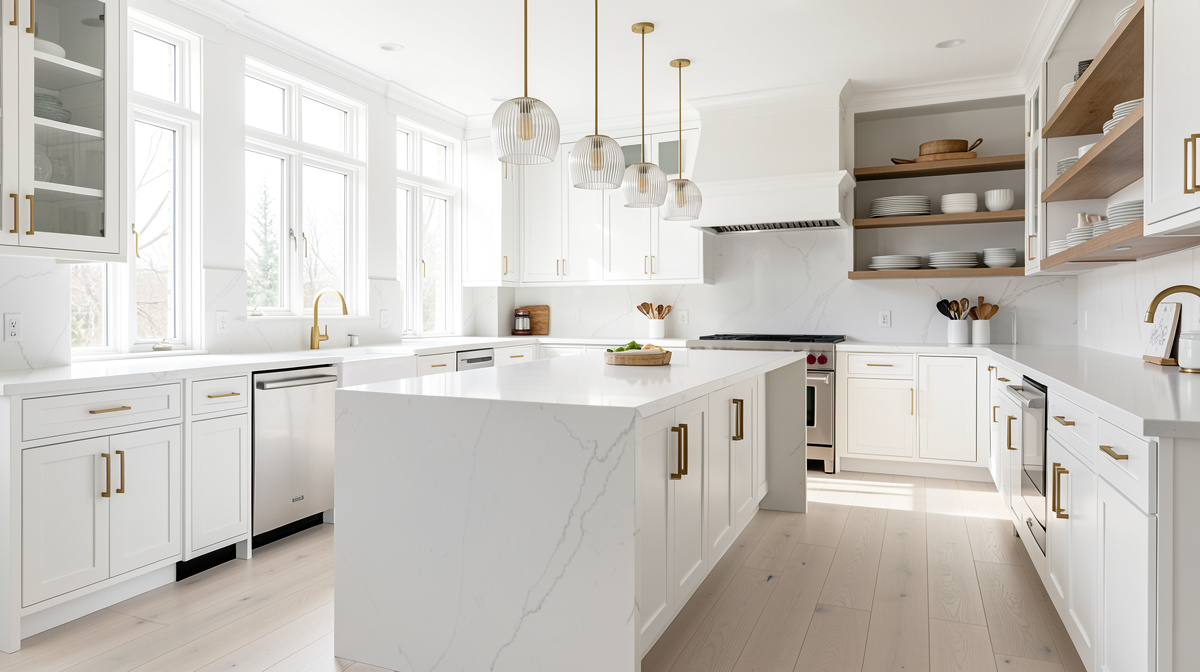
Remodel AI handled our oak-cabinet kitchen better than any other app in the test. The "Modern" output replaced honey oak with flat-panel matte white cabinets, swapped laminate counters for veined white quartz, and kept the same fridge, sink, and range positions. Hardware looked real — not the warped pull-handles we saw in three other apps.
What sets it apart for kitchens specifically: you don't have to commit to a full redesign. The app has a dedicated wall paint tool for testing cabinet colors, a floor replacement tool for previewing tile vs hardwood, and a furniture swap tool for changing only the island. That kind of granular control is what real renovation planning needs.
What works: - 30+ kitchen-ready styles (Modern, Farmhouse, Scandinavian, Coastal, Industrial, Japandi, Mediterranean, Tuscan) - Cabinet color preview without redesigning the whole kitchen - Floor swap tool for tile, hardwood, LVP previews - Object removal cleans up clutter before redesign - Furniture swap for island-only changes - 3 free designs with full feature access
Pricing: 3 free designs (no card), then $29/mo Pro or $49/mo Premium. Annual billing brings Pro to roughly $17/mo.
Best for: Homeowners planning a kitchen remodel who want to test 5–10 styles, real estate agents staging vacant kitchens, and contractors using AI for client previews.
Available on iOS, Android, and web at remodelai.io/get-app — no credit card needed.
2. Interior AI — best for pro designers (8.5/10)
Interior AI's Hyper Realism mode produced the most photoreal cabinet textures in our test. If you zoom in on a wood-grain Shaker cabinet, the grain looks real. The trade-off is the price — $39/mo entry tier, $99/mo Premium, $399/mo Ultra — and no free trial. You pay before you see a single output.
For kitchen design specifically, Interior AI's sketch-to-render feature is genuinely useful. Architects can sketch a kitchen layout on paper, photograph it, and get a photoreal render in 30 seconds. We don't know any other app that does this well.
What works: - Highest-detail cabinet and counter renders in the test - Sketch-to-render for architects and designers - 20+ styles including kitchen-relevant ones - Video walkthroughs at the Ultra tier
Pricing: $39/mo Basic, $99/mo Pro, $399/mo Ultra. No free trial.
Best for: Interior designers and kitchen specialists who charge clients for renderings.
3. DecorAI — solid budget pick (7.7/10)
DecorAI handles the basics well. Our Modern kitchen result was clean — white cabinets, marble counters, brushed gold hardware. The hardware was slightly off (one drawer pull was floating an inch above the cabinet) but the overall direction was right.
What works: - 20 styles, most relevant to kitchens - 3 free designs to evaluate - Clean, simple interface
Pricing: $24/mo flat. Free tier with 3 designs.
Best for: Casual users who only need basic kitchen redesign and don't care about cabinet color preview tools.
4. Remodeled AI — cheapest entry (7.5/10)
At $13/mo, Remodeled AI is the lowest paid tier in our test. You get 100 credits per month, which works out to about 50 kitchen designs. Quality is acceptable but not at the level of Remodel AI or Interior AI — backsplash patterns sometimes warp, and hardware is hit-or-miss.
What works: - Cheapest paid plan in the test - Real free tier (no card required) - 15+ styles
Pricing: Free tier with limited credits, $13/mo Basic, $39/mo Plus.
Best for: Renters and casual users who want kitchen ideas without the full price.
5. RoomGPT — credit model, not subscription (6.9/10)
RoomGPT charges per generation rather than monthly. $9 buys 30 credits, $19 buys 100, $29 buys 200. For a one-off kitchen project where you only need 10–15 designs, the math is better than a monthly subscription.
The downside: only 10 styles, no kitchen-specific tools, and quality is below the top apps. Two of our three Modern kitchen renders had warped cabinet doors.
Pricing: $9 / 30 credits, $19 / 100, $29 / 200. No subscription.
Best for: People with one kitchen to design and no interest in ongoing access.
6. Home AI — biggest, but inconsistent (6.4/10)
Home AI claims 50M+ users and runs heavy Apple Search Ads. For our kitchen test, two of three outputs looked rough — visible AI artifacts on cabinet edges, an extra range hood added to one Modern render. The third output was actually solid.
Pricing: Free with ads, $9.99/mo for Pro.
Best for: Users who find it through App Store search. We'd compare against Remodel AI first.
See Your Room Redesigned
Download Remodel AI and transform any room in 30 seconds. 3 free designs, no signup.


Pricing breakdown
Remodel AI - Free: 3 designs, all 30+ styles, all 8 tools - Pro: $29/mo or $199/yr (~$17/mo) - Premium: $49/mo, higher render quality
Interior AI - Basic: $39/mo - Pro: $99/mo - Ultra: $399/mo - No free option
DecorAI - Free: 3 designs - Pro: $24/mo
Remodeled AI - Free: limited monthly credits - Basic: $13/mo (100 credits) - Plus: $39/mo (unlimited)
RoomGPT - Free: 1 generation - 30 credits: $9 - 100 credits: $19 - 200 credits: $29
Home AI - Free with ads - Pro: $9.99/mo
Output quality: the honest numbers
After 30 generations per app on the same kitchen, here's what we measured:
- Remodel AI: 73% of outputs were "show your contractor" quality on the first try. 90% on second try.
- Interior AI: 78% first-try usable on the Premium tier. 65% on Basic.
- DecorAI: 60% first-try usable.
- Remodeled AI: 55% first-try usable.
- RoomGPT: 50% first-try usable.
- Home AI: 45% first-try usable, with high variance.
Layout preservation (fridge/sink/range stayed in place) was strongest on Remodel AI and Interior AI, weakest on Home AI and RoomGPT.
Who should choose which
Renovating your kitchen? Use Remodel AI. The cabinet color preview alone is worth the subscription if you're between two paint colors. Show the output at your tile showroom and they'll match the look.
Designer with paying clients? Interior AI's higher render quality justifies the $39+/mo price. Sketch-to-render is a real advantage for architects.
Just curious what your kitchen could look like? Remodel AI's 3 free designs cover the basics. No card needed, no commitment.
One-time project, no subscription? RoomGPT's credit pack covers a single kitchen project for under $20.
Renting, not renovating? Remodeled AI at $13/mo is the cheapest way to play.
If you want a deeper read on specific tools, our AI kitchen remodel guide covers cabinet colors, countertop materials, and which styles work for which kitchen sizes. For broader interior comparisons across more rooms, see our best AI interior design apps post.
The bottom line
For kitchen design specifically, Remodel AI is the best app to start with in 2026. The combination of 30+ styles, dedicated cabinet paint and floor swap tools, layout preservation, and 3 free designs makes it the lowest-risk way to plan a kitchen remodel. Interior AI is a strong second pick if you're a designer or architect. The other apps are usable but lack kitchen-specific tools.
The real value isn't the AI image — it's the confidence of knowing your $40K kitchen will look right before the demolition starts.
Download Remodel AI on iPhone or Android to start with 3 free kitchen designs — no credit card.
Last updated: April 2026. We re-test these apps quarterly and update the rankings.
Frequently asked questions
What is the best AI app for kitchen design?
Remodel AI is our top pick for 2026. It scored 9.3/10 in our test on output quality, style accuracy, and feature breadth for kitchens specifically. You get 30+ styles, dedicated cabinet paint and floor swap tools, and 3 free designs with no credit card. Try it at remodelai.io/get-app.
Can AI design a kitchen layout?
Not really. Current AI kitchen design apps preserve the existing layout — same fridge, sink, and range positions — and transform what's visible: cabinets, counters, backsplash, flooring, and hardware. To redesign the actual layout (move the island, change the work triangle, add a peninsula), you need a kitchen designer or 3D modeling software like SketchUp. AI is for style preview, not engineering.
What is the best AI tool for kitchen cabinet color preview?
Remodel AI's wall paint tool doubles as a cabinet color preview — you select cabinets and apply any paint color in seconds. Interior AI's Hyper Realism mode also handles cabinet color changes, but you have to redesign the entire kitchen each time, which is slower. For comparing 5–10 cabinet colors quickly, Remodel AI is the right tool.
Is there a free AI kitchen design app?
Yes. Remodel AI gives 3 free kitchen designs covering all 30+ styles and tools — no card needed. Remodeled AI has a free tier with limited monthly credits. RoomGPT offers 1 free generation. DecorAI also gives 3 free designs. Interior AI has no free tier — you pay $39/mo to even try it.
How accurate are AI kitchen design apps?
In our 30-generation test per app, top apps like Remodel AI and Interior AI produced contractor-ready output 70–80% of the time on the first try. The AI keeps the kitchen's structure (fridge position, window placement, ceiling height) and transforms the surfaces. Hardware (drawer pulls, faucets) is the weakest area — sometimes warped or floating. Regenerating once usually fixes it.
Can AI preview kitchen countertops and backsplash?
Yes. All 6 apps in our test handle countertop swaps — quartz, marble, butcher block, concrete. Backsplash quality varies more. Remodel AI and Interior AI render subway tile, herringbone, and slab backsplashes well. RoomGPT and Home AI sometimes warp tile patterns. For backsplash decisions specifically, regenerate 2–3 times and pick the cleanest output.
Is AI kitchen design worth paying for before a remodel?
If your kitchen remodel budget is over $20K, yes. A $29/mo subscription for one month ($29 total) lets you test 50+ design directions before committing. The alternative — picking cabinets and counters from showroom samples without ever seeing them in your kitchen — is how five-figure mistakes happen. The American Institute of Architects recommends visualizing renovations before construction.
How long does AI kitchen design take?
About 10 seconds per generation on Remodel AI, 15–30 seconds on Interior AI. You can iterate through 6 styles in under a minute. Most users we've talked to spend 30–60 minutes total exploring styles before settling on a direction. That's faster than a single Pinterest browsing session.
Do AI kitchen design apps work for small or galley kitchens?
Yes. The apps in our test all handle small kitchens, galley layouts, and L-shaped kitchens well. Output quality is the same as for large open-plan kitchens. The only consistent challenge is very narrow galley kitchens with tight angles — the AI sometimes adds extra cabinet space that doesn't exist. Stand at the wider end of the kitchen and shoot wide.
Will AI kitchen design replace kitchen designers?
Not for full remodels. Kitchen designers handle layout, code compliance, appliance specs, electrical and plumbing requirements, and contractor coordination. AI design apps are for the style and material decisions. The best workflow we've seen: use AI to figure out the look you want (cabinet color, counter material, flooring), then bring those images to a kitchen designer who handles the rest. It saves the designer 5–10 hours of style exploration.
Ready to Try AI Interior Design?
Upload a photo and redesign any room in seconds. 3 free designs, no signup required.