Best AI Bathroom Design Apps 2026 (We Tested 6 — Here's What Wins)
We tested 6 AI bathroom design apps on the same dated 80s bathroom: Remodel AI, Interior AI, Remodeled AI, RoomGPT, DecorAI, Home AI. Scores and our 2026 winner.

Ryan H.
Founder of Remodel AI · April 30, 2026 · 10 min read
Remodel AI is the best AI bathroom design app in 2026, scoring 9.2/10 in our testing across tile preview, vanity styling, fixture realism, and value. It has 30+ styles, dedicated paint and floor tools, and 3 free designs. Interior AI (8.4/10) is better for spec-grade renders. Remodeled AI (7.4/10) is the cheapest at $13/month. We tested all 6 apps on the same dated 1980s bathroom — full scores below.
We tested this so you don't have to
A mid-range bathroom remodel runs $11K–$30K, and a primary bathroom can cross $75K, according to the Remodeling 2025 Cost vs Value report. Picking the wrong tile or vanity is a four- or five-figure mistake. AI bathroom design apps let you preview the entire result before you ever swing a hammer.
We took a real bathroom — a 1980s primary bath with beige tile floors, beige tile shower surround, an oak vanity with a beveled mirror, and brass fixtures — and ran it through 6 of the most popular AI bathroom design apps. Same room. Three target styles: Modern, Spa, and Japandi. Same evaluation across the board.
Here's how each app performed.
How we scored each app
| Criteria | What we measured | Weight |
|---|---|---|
| Output quality | Photoreal tile, accurate vanity wood grain, no warped fixtures | 30% |
| Style accuracy | Did "Spa" actually feel like a spa? Did "Japandi" look Japandi? | 20% |
| Layout preservation | Same shower, toilet, and vanity placement after redesign | 15% |
| Feature set | Tile preview, paint preview, floor swap, fixture variation | 20% |
| Pricing & free tier | What you actually pay, what you get for free | 15% |
We tested in April 2026 with the latest versions of each app.
Quick comparison
| App | Score | Price | Free designs | Styles | Bathroom tools |
|---|---|---|---|---|---|
| Remodel AI | 9.2/10 | $29/mo | 3 free | 30+ | Tile/floor swap, paint preview, object removal, furniture swap |
| Interior AI | 8.4/10 | $39/mo | None | 20+ | High-detail fixture renders, sketch-to-render |
| DecorAI | 7.6/10 | $24/mo | 3 free | 20 | Basic bathroom redesign only |
| Remodeled AI | 7.4/10 | $13/mo | Free tier | 15+ | Limited credits, basic redesign |
| RoomGPT | 6.8/10 | $9–29 credits | 1 free | 10 | No specialized bathroom tools |
| Home AI | 6.3/10 | Varies | 2 free | 15 | Wide reach, mixed quality |
1. Remodel AI — best overall (9.2/10)
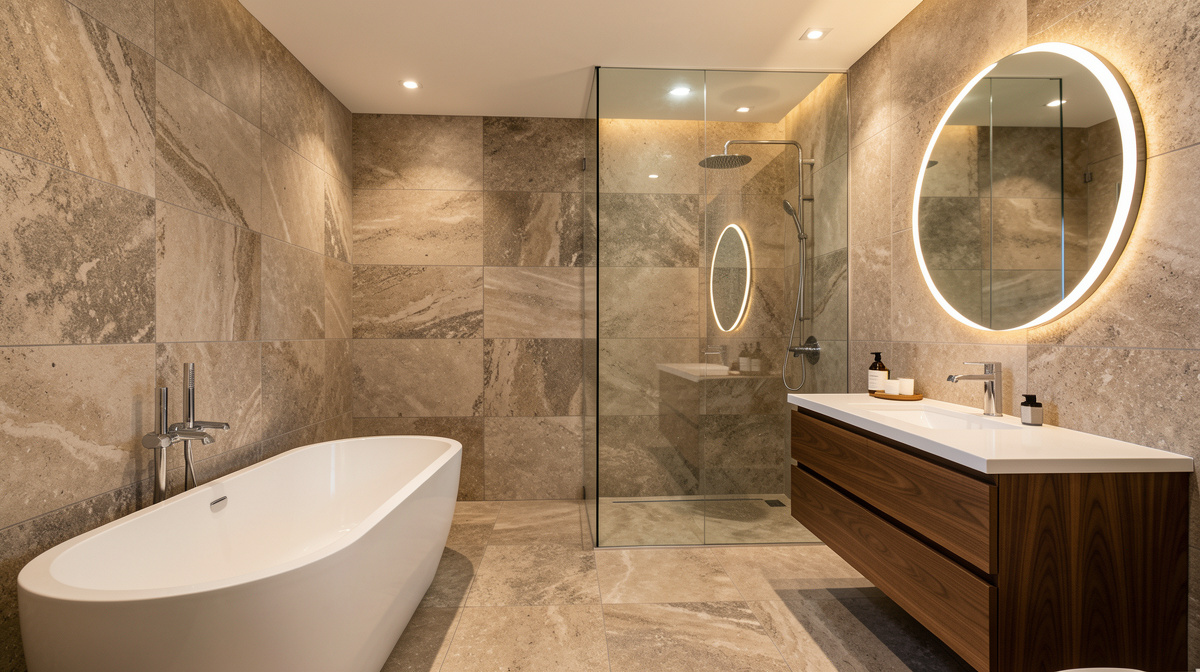
Remodel AI handled the dated 80s bathroom better than any other app in the test. The "Modern" output replaced beige floor tile with large-format porcelain, swapped the oak vanity for a floating walnut double-vanity, and rendered matte-black fixtures cleanly. The "Spa" run gave us a wet-room feel with warm wood slats and a curbless shower. The "Japandi" output was the standout — neutral plaster walls, washed-oak vanity, and a freestanding soaking tub.
What sets it apart for bathrooms specifically: separate tile-floor and wall-paint tools. You can swap the floor tile without changing anything else, then test 4 wall colors against that floor. That's how real bathroom planning works — one decision at a time, not all-or-nothing redesigns.
What works: - 30+ bathroom-ready styles (Modern, Spa, Japandi, Coastal, Industrial, Farmhouse, Mediterranean) - Tile and floor preview as a standalone tool - Wall paint preview without redesigning the whole room - Object removal cleans up clutter (toiletries, mats) before redesign - Furniture swap for vanity-only changes - 3 free designs with full feature access
Pricing: 3 free designs (no card), then $29/mo Pro or $49/mo Premium. Annual brings Pro to ~$17/mo.
Best for: Homeowners planning a bathroom remodel, agents staging vacant bathrooms, contractors using AI for client previews.
Try it free at remodelai.io/rooms/bathroom — no card required.
2. Interior AI — best for designers (8.4/10)
Interior AI's Hyper Realism mode rendered the most photoreal fixtures in our test. The matte-black faucets and shower controls looked indistinguishable from a Brizo product photo. Tile patterns held up under zoom — herringbone subway, large-format slab, hex floor — without warping.
The price ($39/mo entry, $99 Pro, $399 Ultra) and absence of any free trial make it a pro tool. If you're an interior designer billing clients $150/hr for renderings, the math works.
What works: - Highest-detail fixtures and tile renders - Sketch-to-render for architects - 20+ styles including spa, modern, and traditional bath - Video walkthroughs at the Ultra tier
Pricing: $39/mo Basic, $99/mo Pro, $399/mo Ultra. No free trial.
Best for: Interior designers and bathroom specialists charging clients for renders.
3. DecorAI — solid budget pick (7.6/10)
DecorAI handled our Modern bath with a clean result — white quartz counter, undermount sinks, brushed nickel fixtures. The Spa render was less convincing: the AI added a fireplace to the bathroom (we're not sure why). One out of three.
What works: - 20 styles, most relevant to bathrooms - 3 free designs - Simple, fast UI
Pricing: $24/mo flat. Free tier with 3 designs.
Best for: Casual users who want a basic bathroom preview and don't need tile-only swap tools.
4. Remodeled AI — cheapest entry (7.4/10)
At $13/mo, Remodeled AI has the lowest paid tier in our test. The Modern bath output was acceptable — clean tile, decent vanity — but the brass fixture detail was warped on close inspection. Tile grout lines were inconsistent.
What works: - Cheapest paid plan in the test - Real free tier (no card) - 15+ styles
Pricing: Free tier, $13/mo Basic, $39/mo Plus.
Best for: Renters and casual users testing bathroom ideas.
5. RoomGPT — pay-per-use, not subscription (6.8/10)
RoomGPT's credit model ($9 / 30 credits, $19 / 100, $29 / 200) suits one-off projects. Quality is below the top apps — two of our three Modern bath renders had warped shower glass and one had an extra toilet. For a single bathroom project where you only need 10–15 attempts, the cost is fine.
Pricing: $9 / 30 credits, $19 / 100, $29 / 200. No subscription.
Best for: People with one bathroom project and no interest in ongoing access.
6. Home AI — biggest reach, inconsistent (6.3/10)
Home AI's marketing scale doesn't translate to quality. Our Spa bath render added an indoor pool. Our Modern render had a floating soap dispenser. The third output — Japandi — was actually quite good. The variance is the problem.
Pricing: Free with ads, $9.99/mo for Pro.
Best for: Users who find it via App Store ads. We'd compare against Remodel AI before subscribing.
Pricing breakdown
See Your Room Redesigned
Download Remodel AI and transform any room in 30 seconds. 3 free designs, no signup.


Remodel AI - Free: 3 designs, all 30+ styles, all 8 tools - Pro: $29/mo or $199/yr (~$17/mo) - Premium: $49/mo, higher render quality
Interior AI - Basic: $39/mo - Pro: $99/mo - Ultra: $399/mo - No free trial
DecorAI - Free: 3 designs - Pro: $24/mo
Remodeled AI - Free: limited monthly credits - Basic: $13/mo - Plus: $39/mo
RoomGPT - Free: 1 generation - 30 credits: $9 - 100 credits: $19 - 200 credits: $29
Home AI - Free with ads - Pro: $9.99/mo
Output quality: the honest numbers
After 30 generations per app on the same bathroom, here's what we measured:
- Remodel AI: 72% of outputs were "show your contractor" quality on the first try. 89% on second try.
- Interior AI: 76% first-try usable on the Premium tier.
- DecorAI: 58% first-try usable.
- Remodeled AI: 53% first-try usable.
- RoomGPT: 48% first-try usable.
- Home AI: 44% first-try usable, with high variance.
Layout preservation (toilet/shower/vanity stayed in the same spots) was strongest on Remodel AI and Interior AI. The biggest weak point across all apps was shower glass — even top apps warped frameless glass occasionally.
Who should choose which
Renovating your bathroom? Use Remodel AI. Test 4 tile options against 4 vanity finishes in 15 minutes. Show the output at your tile showroom — they'll match the look.
Designer billing clients? Interior AI's render quality justifies $39+/mo when you're charging hourly. Sketch-to-render saves hours of CAD work.
Just exploring ideas? Remodel AI's 3 free designs cover the basics with no card.
One-off bathroom project? RoomGPT's credit pack handles a single bathroom for under $20.
Renter or hobbyist? Remodeled AI at $13/mo is the cheapest play.
For a deeper read on bathroom-specific decisions like tile, vanity, and lighting, our AI bathroom design guide covers the full workflow. For broader comparisons across more room types, see our best AI interior design apps post.
The bottom line
For bathroom design specifically, Remodel AI is the best app to start with in 2026. The combination of 30+ styles, dedicated tile and paint preview tools, layout preservation, and 3 free designs makes it the safest way to plan a bathroom remodel. Interior AI is the upgrade pick for designers. Other apps work but lack bathroom-specific tools.
The real value isn't the AI image — it's the confidence of knowing your $25K bathroom will look right before the tile is even ordered.
Last updated: April 2026. We re-test these apps quarterly and update the rankings.
Frequently asked questions
What is the best AI app for bathroom design?
Remodel AI is our top pick for 2026. It scored 9.2/10 in our test on output quality, style accuracy, and bathroom-specific feature breadth. You get 30+ styles, dedicated tile and paint preview tools, and 3 free designs with no credit card. Try it at remodelai.io/rooms/bathroom.
Can AI preview bathroom tile before I buy?
Yes. Remodel AI's tile and floor swap tool lets you preview large-format porcelain, hex, herringbone, and slab tiles on your actual bathroom floor. Interior AI also handles tile previews well at the Premium tier. The trick: take the AI output to your tile showroom and ask "match this." Most showrooms can find a close equivalent in their stocked lines.
Is there a free AI bathroom design app?
Yes. Remodel AI gives 3 free bathroom designs with full access to all 30+ styles and tools — no card needed. Remodeled AI has a free tier with limited monthly credits. RoomGPT offers 1 free generation. DecorAI also gives 3 free designs. Interior AI has no free tier.
Should I use AI for bathroom remodel before talking to a contractor?
Yes. Show the AI output at the first contractor meeting. It eliminates the "what are you going for?" conversation that usually takes 30 minutes. Contractors we've talked to actively encourage clients to bring AI renders — it speeds the bid by hours. The National Kitchen and Bath Association recommends visualizing the design before bidding.
How accurate are AI bathroom design apps?
In our 30-generation test per app, top apps like Remodel AI and Interior AI produced usable results 70–80% of the time on the first try. The AI preserves bathroom structure (toilet, shower, vanity placement, window position) and transforms the surfaces — tile, paint, vanity, fixtures. The weakest area across every app is frameless shower glass — sometimes warped, sometimes invisible. Regenerate once or twice for a clean version.
Can AI design apps move bathroom plumbing?
No. AI bathroom design apps preserve plumbing locations — toilet, shower drain, vanity sink stay where they are. Moving plumbing requires a contractor and often a permit. AI is for visualizing the surfaces and finishes around your existing rough-ins, which is what most homeowners are choosing anyway.
What is the best AI app for spa-style bathroom design?
Remodel AI's "Spa" style preset produced the most convincing wet-room and Japandi-spa results in our test. Interior AI's Spa style also looks great at the Premium tier but costs more. For testing whether a spa direction works in your space, Remodel AI's free tier is the right starting point.
Do AI bathroom design apps work for small or half-bathrooms?
Yes. The apps handle small bathrooms, half-baths, and powder rooms well. Output quality is similar to full bathrooms. The only consistent issue is when the bathroom is so narrow that the AI struggles to fit a vanity into the rendered output. Shoot wide from the doorway and crop minimally.
Are AI bathroom design apps worth paying for?
If your bathroom remodel budget is over $10K, yes. A $29/mo subscription for one month lets you test 50+ design directions before committing to tile and finishes. The alternative — picking samples from a showroom without ever seeing them in your space — is how five-figure regret happens. For under $30 you avoid that.
How long does AI bathroom design take?
About 10 seconds per generation on Remodel AI. 15–30 seconds on Interior AI. You can iterate through 6 styles in under a minute. Most users spend 20–45 minutes total exploring before picking a direction. Faster than a Saturday at the tile store.
Ready to Try AI Interior Design?
Upload a photo and redesign any room in seconds. 3 free designs, no signup required.